  1. Home
  2. Computing
  3. News

I just fell in love with this adorable pink monitor

Add as a preferred source on Google
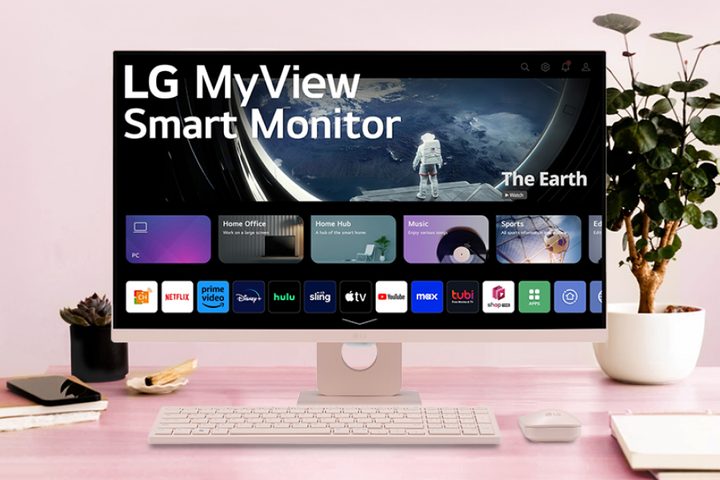
The pink LG MyView smart monitor on a desk.
LG

Pink PC peripherals aren’t easy to come by, which is sad if you’re anything like me. But LG just released a limited edition MyView Smart Monitor bundled with a wireless keyboard and a mouse — and they’re all in pink! It’s a really nice dusty pastel pink too, nothing too garish.

The monitor itself is a 27-inch, Full HD IPS MyView smart monitor with built-in webOS 23. This operating system lets you use streaming apps like Netflix, Disney+, and Prime Video without connecting the monitor to a laptop, desktop, or gaming console. The resolution is 1080p, and the brightness is 250 nits — so it’s pretty basic in terms of specs and quality. It’s nothing as fancy as a 4K OLED LG monitor, but the whole desktop setup costs just $299, so it’s not a bad deal.

There are two USB and two HDMI ports at the back, positioned near the center of the monitor — in other words, in a really easy-to-reach place. I appreciate this, especially since I spent 10 minutes just today trying to slot my chunky PlayStation 5 HDMI cable into an unnecessarily awkwardly placed port on my own monitor. It was hard work, but I needed to make some adjustments to my setup so I can spend all weekend playing the early access of Final Fantasy XIV: Dawntrail.

Recommended Videos

The monitor has two built-in 5W speakers and comes with a remote control so you can watch your shows comfortably from the sofa or anywhere else other than your desk chair. It’s an affordable option for anyone building an “aesthetic” setup like you see on Pinterest or Instagram — and a rare chance to get a monitor, keyboard, and mouse all in exactly the same shade of pink. As for a matching pink desk mat, try this 70cm x 30cm Logitech one. I particularly like how easy it is to keep clean — though I did buy three so I can quickly switch it out if an extreme spill occurs.


Willow Roberts
Willow Roberts has been a Computing Writer at Digital Trends for a year and has been writing for about a decade. She has a…
Shopping for back-to-school? These are the webcam lights I’d actually turn on before a Zoom call
From a budget clip light to a proper desk setup, there's a webcam light here for every price.
Head, Person, Face

Between online classes, group project calls, and the occasional job interview over Zoom, your webcam will be doing a lot more heavy lifting in school than it ever did at home. The problem is that most laptop cameras are bad in low light, and a single overhead bulb or a window behind you turns every call into a game of "wait, can you see me okay?"

A good webcam light fixes that faster than moving your whole desk around. I picked five, starting with the most affordable and working up to the one that's genuinely overkill for a Zoom call but still worth knowing about.

Read more
Google Chrome could soon let you translate pages right inside Reading Mode
However, not everyone's seeing it yet, even on Canary.
Google Chrome

Chrome's Reading Mode just got a new button tucked inside its settings menu. Google is quietly testing a translate option for the feature on Chrome Canary, the browser's experimental testing channel where new ideas show up long before they're ready for everyday use.

What does this new translate button actually do?

Read more
AI dramas need actors, so Chinese platforms are turning human faces into stock assets
People can now earn money by licensing their likenesses to AI creators, although keeping track of where those digital faces end up may prove considerably harder
Adult, Female, Person

People in China can now license their face to AI much like a photographer licenses a stock image. AI creators can then make that likeness speak, move, and appear as different characters in short dramas or ads.

Contributors have earned between $15 and $700 through platforms such as ActID and New Claw, according to Rest of World.

Read more