  1. Home
  2. Computing
  3. Deals

The Dell XPS 16 with Intel Core Ultra 9 is $500 off today

Add as a preferred source on Google
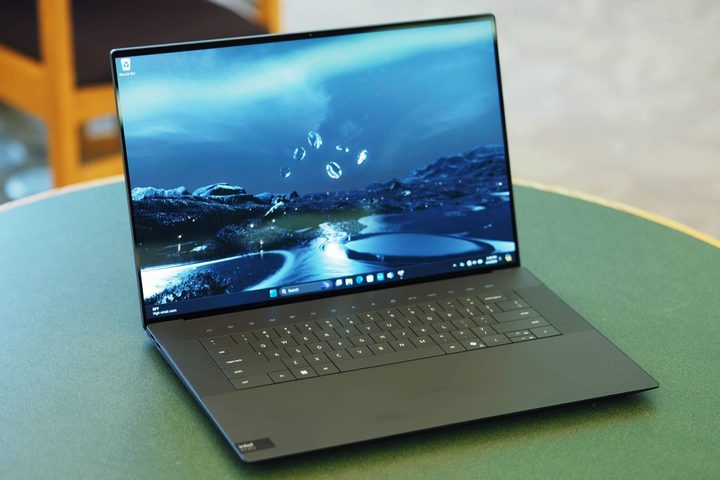
The XPS 16 open on a table.
Mark Coppock / Digital Trends

Dell is no straggler when it comes to producing high-performance laptops and desktop PCs, but did you know that one of the company’s “most beautiful and powerful” laptops is currently on sale? We’re talking about the Dell XPS 16, which is currently marked down to $2,550 when you order through Dell (and that quote was ours). That may not sound like a super-good discount, but this Windows laptop is actually $3,050 at full price!

With that $500 you saved, we recommend investing in a great monitor deal to cap things off. Yes, the XPS 16 has its very own gorgeous-looking screen, but when connected to an external display via USB-C or DisplayPort, you’ll get a serious boost in PC gaming visuals.

Buy Now

Why you should buy the Dell XPS 16

On paper, the Dell XPS 16 can do just about anything. That’s thanks to several key specs, with the two most important of the bunch being its CPU and GPU. As for the main processor, the XPS 16 is equipped with an Intel Core i9-185H that pushes max clock speeds of 5.10GHz. Graphically, the laptop is outfitted with the NVIDIA GeForce RTX 4060; on top of 32GB of RAM and 1TB of storage. These are some of the best internal components you could possibly have built into a Windows computer.

Screen-wise, you’ll be working with a 16.3-inch OLED UHD+ touchscreen, which brings a 3840 x 2400 pixel spread to the table. This is the kind of resolution that 4K movies and video games are made for! While 400 nits for peak brightness isn’t the brightest display we’ve seen, the anti-reflective coating helps to keep glare at bay. You’ll also have your choice of three Thunderbolt 4 Gen 2 ports that double as USB4 and Power Delivery connections. 

We’re also glad to see one of the latest Wi-Fi standards getting full support (check out some of the best router deals we found today). Intel’s Killer Wi-Fi 7 runs the show here, which means you’ll be able to look forward to some of the fastest web performance you’ve ever seen on a laptop. Whether you’ll be using it for advanced workplace tools, photo editing, or PC gaming, the Dell XPS 16 Laptop can climb any mountain. 

Save $500 when you order it directly through Dell, and make sure to check out some of the best Dell laptop deals and gaming laptop deals we found this week!

Buy Now

Michael Bizzaco
Former AV Contributor
Michael Bizzaco has been selling, installing, and talking about TVs, soundbars, streaming devices, and all things smart home…
Asus ExpertBook Ultra review: A dreamy ultra-thin machine that surprised me with raw power
If thin and light is what you value the most, this one will serve you perfectly, without the obvious performance compromises.
Asus ExpertBook Ultra laptop

See at Amazon

Quick Review

Read more
I found a free Mac diagnostic app that tells you what Apple’s tools don’t
It can check your Mac’s storage, memory, battery, and network
Techtool Lite UI screenshot

Macs have a strong reputation for being smooth and reliable, and Apple’s tight control over hardware and software is a big reason for that. Use one long enough, however, and you may still run into slowdowns, freezes, strange behavior, or that familiar feeling that something is simply off.

Apple’s own tools can help, but only to a point. Disk Utility is useful for storage-related checks, but it does not give you a wider picture of your Mac’s overall health. I recently came across Techtool Lite, a free diagnostic and maintenance app from Micromat that looks at more than just your drive.

Read more
Claude redefined my bond with Macs. I am building my own apps and it’s a bliss.
I talk to Claude. It builds me apps. It's as simple as that!
Claude AI on Mac.

A few days ago, one of my colleagues asked me a favor. They wanted a few iOS and macOS screenshots turned into a mockup image where the UI is rendered on an iPhone and a MacBook. The problem? It was 3 am PST, which meant asking one of my design team colleagues was out of the question. 

Now, there are plenty of online tools that will do it, but you either have to pay for a subscription (as in Canva), or sign up to buy usage credits after a few free trials. Moreover, these editors limit you to a handful of design presets. I turned to Anthropic’s Claude, and within half an hour, I had a screenshot-to-mockup editor built for the entire team to use. Take a look:

Read more

