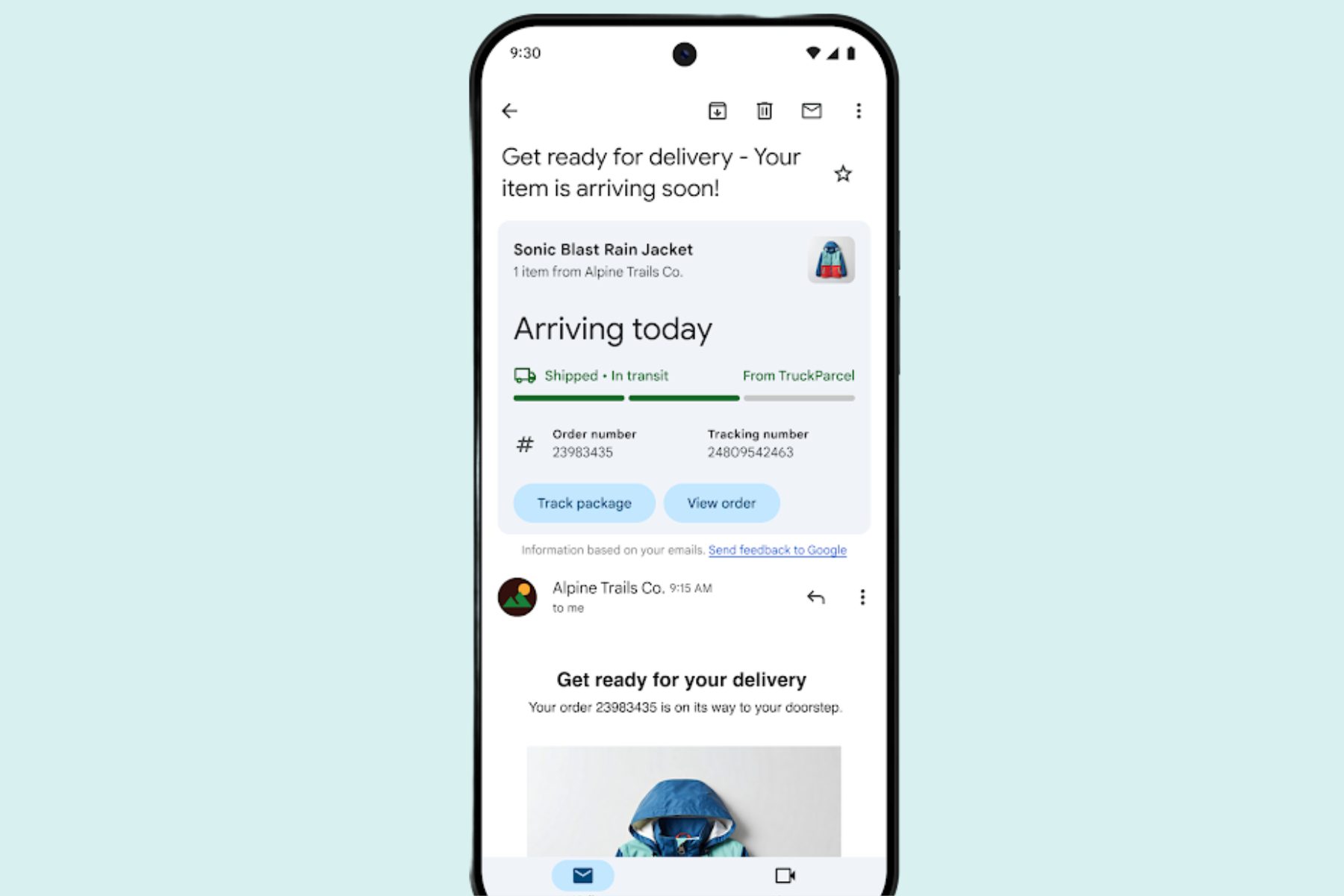
The Gmail experience on mobile devices is about to get better for a lot of users. Remember Summary Cards, a feature that picks up useful information from an email and presents it in the form of a neat card atop an email?
So far, summary cards have provided details related to package tracking or viewing order details picked up from the information present in an email. Now, Google is adding contextual action buttons to these summary cards.
They are also gaining “the ability to organize key information across related emails, and real-time status updates,” says Google in a Workspace update.
So, let’s say you have a package due for arrival at your doorsteps. The summary card for the relevant email will now show buttons for tracking it and viewing the order details. Users will also see a real-time tracker bar that shows them the location and logistics update on their package.
The rollout of updated Summary Cards has already begun, and it will be available for Gmail app users on Android and iOS. In case you’re not seeing them, follow this path to enable the feature: Gmail > Menu > Settings > General > Smart features > personalization.
Summary Cards will soon broadly support purchases, events, travels, and bills. Simultaneously, they will also get quick action buttons such as “Remind me,” “Invite others,” and “Get directions,” among others. A “Happening soon” section will also appear at the top of the inbox to inform users about upcoming events related to a Summary Card.
Next in line is an AI-centric update for Google’s email app on iPhones. Late in August, Google put Gemini in the Gmail app for mobile, offering users a new way to interact with their inbox. Google refers to this feature as Gmail Q&A.
Instead of manual search, users could simply use natural language queries such as “Catch me up on the emails about quarterly planning” or “show me unread messages from XYZ.”

Gemini is also able to look for specific information from within the emails, pull up conversations about a particular topic, and more. So far, the perk has been limited to Android devices, but it has now started to appear on iOS as well.
It can also summarize emails, and if you’re already reading a message, simply tap the Gemini icon in the top row and the AI will also suggest next steps based on the email’s content and suggest a reply.
At the moment, Gemini can only do its job based on the contents of an email, but in the near future, it will also be able to look into your Drive files. At the moment, support is limited to the English language, while access is restricted to paid Workspace accounts and Google One AI Premium subscribers.
Gemini in Gmail has proven to be a real game changer, and in my time using the Pixel 9, it’s been my favorite trick owing to the sheer convenience. On a related note, Gemini Extensions are also a massive convenience if you are burdened with a lot of papers and files, but only want a summarized version or a few key findings hidden between pages.