

Detailed on the official Bing Search Blog earlier this week, Bing social team senior program manager Ian Lin announced the launch of a new Bing feature that allows users to browse through friend’s Facebook photo albums as well as use keyword search for specific photos. Called the Friends’ Photo feature, any Facebook user can visit www.bing.com/friendsphotos and log into Facebook in order to enable access to photo albums. The most recent photos posted by your friends will appear in a large thumbnail format on the screen similar to the layout of Pinterest. Each photo can be clicked to open up a version at a larger resolution. In addition, comments about the photo are loaded on the right side of the page. The user has the ability to add a comment, like or share the photo as well as open up the photo on Facebook.
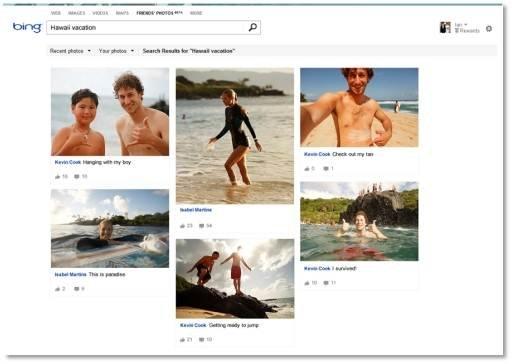 Using filters at the top of the page, users can switch between friend or fan page photos as well as browse through personal photos. Arguably, the real advantage to using this format on Bing is the search bar. The user has the ability to type keywords in order to find a specific photo.
Rather than having to search through albums to locate a photo, the search function scans through album names, photo descriptions and locations in order to pull all pictures matching a specific keyword. However, this feature will fail if a user has a large amount of friends that don’t bother tagging photos or adding descriptions.
If a user would prefer to search by album, they can simply type their friend’s name in the search bar and the field should auto-populate with the name. After clicking on the name, all albums uploaded by the friend will appear on the page in thumbnail format. While this method of browsing photos isn’t necessarily faster than perusing through the albums on Facebook, users will be able to see larger thumbnails of the photos in addition to social interaction before actually clicking on a photo.
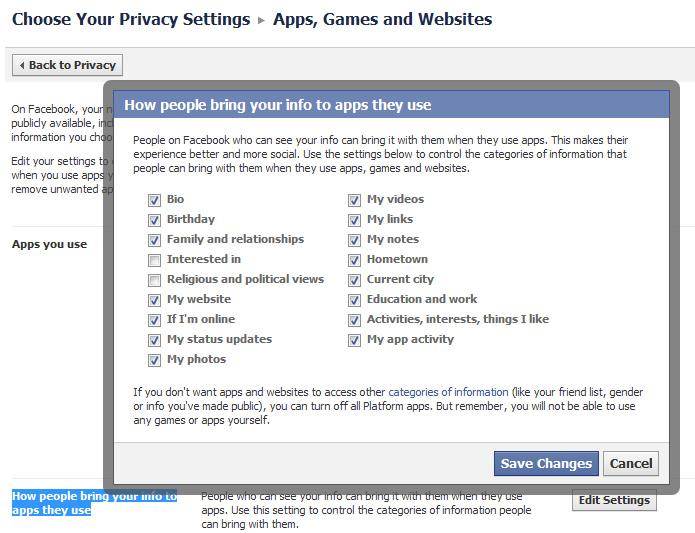 According to Bing, the Friends’ Photo feature doesn’t work with Facebook users that have blocked photos from being accessed by third-party applications. Facebook users can edit this setting by visiting the Privacy Settings page and clicking on “Edit Settings” in the “Ads, Apps and Websites” row.
From here, the user clicks on the “Edit Settings” button in the “How people bring your info to apps they use” row. That launches a pop-up that allows the user to limit specific aspects of their Facebook profile from being pulled into third-party applications. Beyond photos, users can also limit demographic data, status updates, video, location and online status from being used within a third-party Facebook application.
According to the Bing development team, they indicated that Microsoft will never publish Facebook photos to the public. Prior to the launch of the new Facebook photo feature, Bing rolled out support for a Social Search sidebar that imports status updates and allows users to search through their social space using specific keywords.


