  1. Home
  2. Computing
  3. News

Nvidia to expand RTX 50-series with more GPUs for budget gamers

Add as a preferred source on Google
Side view of the RTX 4060
Jacob Roach / Digital Trends

Recent filings with the Eurasian Economic Commission (EEC) by popular GPU manufacturer Zotac (spotted by @harukaze5719 on X), have unveiled potential new additions to Nvidia’s RTX 50-series lineup – the RTX 5050, RTX 5060, and RTX 5060 Ti. These registrations suggest that Nvidia is preparing to introduce budget-friendly options within its latest GPU series.

The RTX 5050 is particularly noteworthy, as it would mark Nvidia’s potential return to the sub-$250 GPU market—a segment it hasn’t actively targeted since the RTX 3050. The absence of a 50-class card in the RTX 40-series left a gap that was filled by older RTX 30-series GPUs and offerings from competitors. The introduction of the RTX 5050 could provide an affordable entry point for gamers seeking to leverage Nvidia’s latest technologies without a significant financial outlay.
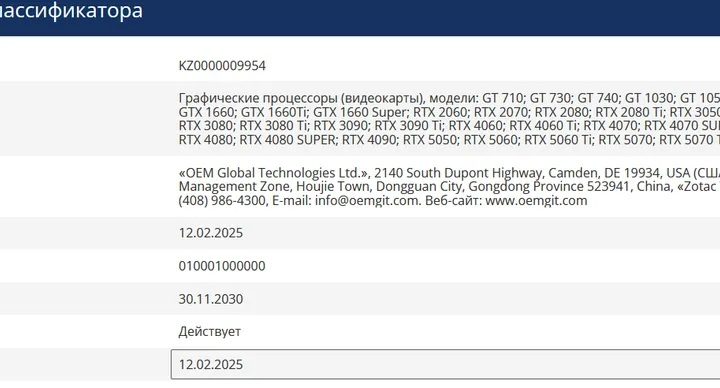
The RTX 5050, the RTX 5060 and RTX 5060 Ti GPUs listed on EEC
EEC

While the EEC filings indicate Zotac’s intent to produce these models, it’s important to approach this information with caution. Registrations with regulatory bodies like the EEC often include placeholder names, and not all listed products make it to market. However, the inclusion of the RTX 5050, RTX 5060, and RTX 5060 Ti aligns with industry expectations for a more diverse RTX 50-series lineup catering to various budget levels.

Recommended Videos

The RTX 5060 and RTX 5060 Ti are expected to offer mid-range performance, with rumors suggesting multiple VRAM configurations. Specifically, the RTX 5060 Ti may come in both 8GB and 16GB variants, providing consumers with options based on their performance needs and budget. The standard RTX 5060 is expected to launch with 8GB of memory, similar to its predecessor, the RTX 4060.

As of now, Nvidia has not officially announced these models, and details regarding their specifications, pricing, and release dates remain speculative. Reports suggest that more concrete information may emerge around Computex in late May, a period often used by tech companies to unveil new products.


Kunal Khullar
Kunal Khullar is a computing writer at Digital Trends who contributes to various topics, including CPUs, GPUs, monitors, and…
These are the compact printers I’d actually recommend for back-to-school
From dorm room paperwork to instant selfie prints, there's a tiny printer for every need.
Computer Hardware, Electronics, Hardware

Everything is digital until the one professor who still wants a printed essay, or the lease you need to sign in ink, or the photo you want to stick on your dorm room’s wall. That's usually the exact moment you remember you don't own a printer anymore, and the nearest one is a library machine with a line out the door.

I looked at four compact printers that solve that problem without taking over your desk and breaking the bank. Two are built for documents, one is a proper all-in-one for actual home office work, and one has nothing to do with homework and everything to do with turning your camera roll into something you can hold.

Read more
Shopping for back-to-school? These are the webcam lights I’d actually turn on before a Zoom call
From a budget clip light to a proper desk setup, there's a webcam light here for every price.
Head, Person, Face

Between online classes, group project calls, and the occasional job interview over Zoom, your webcam will be doing a lot more heavy lifting in school than it ever did at home. The problem is that most laptop cameras are bad in low light, and a single overhead bulb or a window behind you turns every call into a game of "wait, can you see me okay?"

A good webcam light fixes that faster than moving your whole desk around. I picked five, starting with the most affordable and working up to the one that's genuinely overkill for a Zoom call but still worth knowing about.

Read more
Google Chrome could soon let you translate pages right inside Reading Mode
However, not everyone's seeing it yet, even on Canary.
Google Chrome

Chrome's Reading Mode just got a new button tucked inside its settings menu. Google is quietly testing a translate option for the feature on Chrome Canary, the browser's experimental testing channel where new ideas show up long before they're ready for everyday use.

What does this new translate button actually do?

Read more
