1. Home
  2. Computing
  3. News

Gemini’s new feature might make it your new favorite group project partner

Add as a preferred source on Google
EMBARGO: 18 March 2025 9am PT - new Gemini features.
Google

Google has released new content for its Gemini assistant called Canvas — a split-screen feature that lets you chat to Gemini on the left and see your changes appear in real-time on the right.

The idea is to make editing and iteration a smoother experience — instead of scrolling up and down the chat to copy sections of output you’re not happy with, you can just highlight the text in question on the right and tell Gemini what to change. The assistant will then edit the specified section and update the document, rather than generating a whole new version or spitting out additional paragraphs you need to splice together yourself.
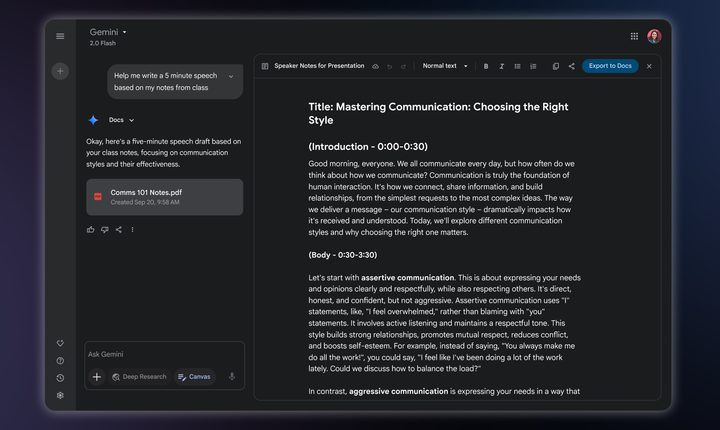
EMBARGO: 18 March 2025 9am PT - Gemini Canvas document editing.
Google

Asking an LLM like Gemini to make revisions to its responses can be a bit of a chore, so this will hopefully make the process less painful.

Recommended Videos

Canvas also works with programming projects, allowing you to view code on the right and chat with Gemini to explain, revise, and debug it on the left. It can also display your HTML or React code as a visual representation of your software, allowing you to preview what your email subscription form might look like, for example. When you request changes, the preview will update, allowing you to try out different ideas quickly and efficiently.
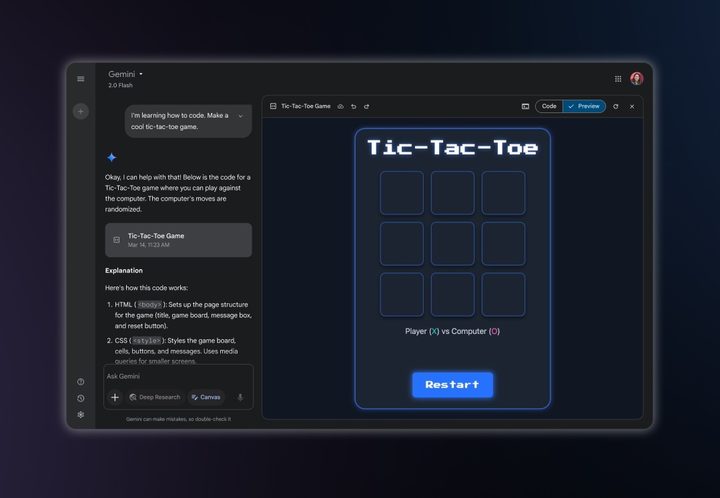
EMBARGO: 18 March 2025 9am PT - Gemini Canvas coding feature.
Google

To try out these new features, you’ll need to be a Gemini or Gemini Advanced subscriber and click the Canvas button in the prompt bar. Google is marketing these updates as features for “collaboration” but just to be clear — it doesn’t mean collaboration with other people. The features are designed for you to collaborate with Gemini and, according to Google, “if you want to collaborate with others on the content you just made, you can export it to Google Docs with a click.”

The update also includes Audio Overview, a feature from NotebookLM that essentially transforms documents into podcasts. It’s similar to any summary and analysis generation tool in its purpose, but it presents the information in an audio format with two AI hosts holding a podcast-style discussion.

The feature has been popular with NotebookLM users who want to multitask while consuming information. To use it, upload your documents to Gemini and click the suggestion chip that appears.


Willow Roberts
Willow Roberts has been a Computing Writer at Digital Trends for a year and has been writing for about a decade. She has a…
What happens when AI detectors fail? Researchers say we must be trained to spot fake AI faces
Researchers say spotting AI faces may soon depend more on people than software
Zuckerberg Deepfake

Artificial intelligence has become remarkably good at creating fake human faces. So good, in fact, that the old tricks people relied on - counting fingers, spotting warped earrings, or looking for distorted backgrounds - are quickly becoming obsolete. According to a new study highlighted by the BBC, the next line of defence may not be a better AI detector at all. It might simply be a better-trained human.

Researchers from the University of Aberdeen, working alongside Australia's National University, found that people can dramatically improve their ability to distinguish AI-generated faces from real ones after a relatively short period of structured training. Instead of hunting for obvious visual glitches, participants were taught to recognise subtle patterns that modern image generators still struggle to replicate consistently.

Read more
Google’s new Magic Pointer Play Store listing reveals a Gemini shortcut built for Googlebooks
The unannounced app turns the cursor into a contextual AI tool for search, image creation, and shopping
Plant, Text, Business Card

Google has quietly published a new Play Store listing for Magic Pointer, an unannounced app built for Googlebooks. Updated on July 10, the app turns the cursor into a Gemini shortcut that can act on whatever a user selects on screen.

Magic Pointer can send an image to Lens, generate a related image, or surface a shopping action without forcing users to open a separate chatbot. Regular Android devices currently show as incompatible, so the listing offers an early preview rather than a broad release.

Read more
You can stop using AI, but this new report says you probably can’t escape it
A UK survey found that most people feel AI exposure is unavoidable, raising harder questions about consent, privacy, and whether opting out is still realistic
AI Chatbots

More people are trying to use less AI, but avoiding it altogether may already be impossible.

A survey of 2,055 UK adults found that 42% deliberately limit how much AI they use. Another 70% said avoiding AI exposure would be difficult or impossible, even when they actively wanted less of it.

Read more