  1. Home
  2. Phones
  3. Mobile
  4. News

Google is working on a cleaner backup interface for Android users

Add as a preferred source on Google
google is working on a cleaner backup interface for android users pixel home screenf
Bryan M. Wolfe / Digital Trends

Google is redesigning the backup page on Android to give it a cleaner and more organized appearance. This update is part of the Google Play Services version 25.11.32 beta, as reported by Android Authority.

The Android backup page can be found in the Settings app under System > Backup. It allows users to manage and control the data backed up from their phones or tablets to their Google Accounts. You can initiate backups for various data types, including apps and app data, contacts, SMS, and MMS messages.

Recommended Videos

The updated design for the backup page is still a work in progress and lacks some features, including the option to backup using a limited data connection. Additionally, crashes have been reported in the beta version, which is not unexpected since it is still in testing.
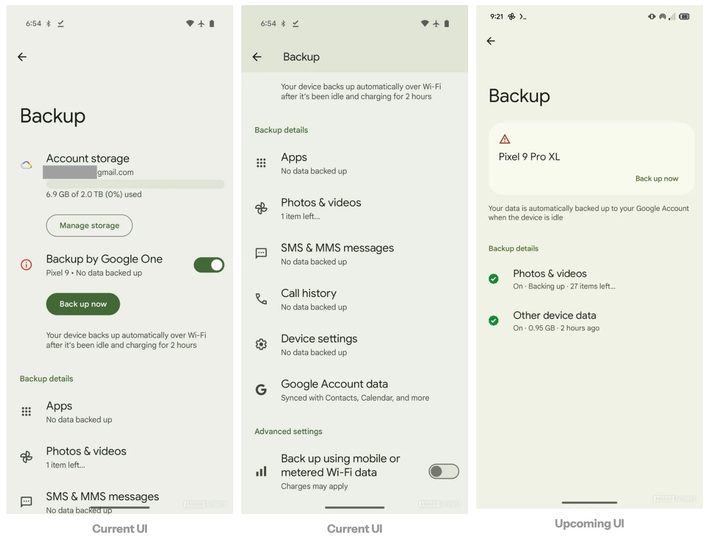
New Google backup up page in beta.
Android Authority

This isn’t the only change Google is prepping for Android. Last week, we noted it was also working on new features for Android Desktop Mode. With this mode, some Android smartphones and tablets can utilize a desktop-like interface when connected to an external display, keyboard, and mouse.

In Android 16 Beta 3, Android Desktop Mode picks up a developer option called “Enable desktop experience features.” This feature allows users to adjust the desktop mode settings on a secondary display or simultaneously on both the phone and the external screen.

We are uncertain about the arrival of the updated backup screen in Android, and we do not know when Android 16 will be publicly launched, although we anticipate it will happen before the end of the year.

Bryan M. Wolfe
Former Mobile and A/V Freelancer
Bryan M. Wolfe has over a decade of experience as a technology writer. He writes about mobile.
T-Mobile’s new financing plan sounds great until you realize what it’s preparing you for
T-Mobile's new financing plan smooths upfront costs while longer payments become the norm.
T-Mobile logo on iPhone

Every time a carrier says "no upfront cost," I brace myself for the asterisk buried in the fine print. T-Mobile's newest 36-month financing plan has one too, though it's dressed up quite nicely. 

T-Mobile, the second largest wireless carrier in the United States, just rolled out a financing option called EIP Flex 36. As the name suggests, it stretches device payments across three full years instead of the usual two. The real hook, however, is what it lets you skip at checkout. 

Read more
The OnePlus 16 could crank things up with a 200MP camera and a massive battery
The purported flagship could bring substantial upgrades across the board.
Person holding OnePlus 15.

Two fresh OnePlus 16 leaks just landed within days of each other. Together, they point to a flagship that could outlast its competition with its massive battery, and one that ships with genuinely better camera hardware than the OnePlus 15. 

So what's happening with the cameras?

Read more
RISION’s new pocket-sized cameras turns your phone into a nitfty thermal imaging tool
This tiny $119 camera gives your phone Predator vision
RISION Magic Pro in action

If you've ever had to look for any sort of heat leaks or hot wires, chances are that you've probably used a dedicated handheld camera. But RISION has just launched a tiny new camera tool to make the job easier (and more pocketable). It reminds me of the InfiRay we checked out a while back.

RISION has introduced the Magic and Magic Pro, two compact thermal cameras that plug directly into supported USB-C phones, tablets, and Windows computers. Each module weighs 24 grams, draws power from the connected device, and requires no separate battery. Support covers compatible iPhones, Android devices, and Windows PCs.

Read more