1. Home
  2. Phones
  3. Cars
  4. Mobile
  5. News

CarPlay in iOS 18.4: four key feature upgrades explained

Add as a preferred source on Google
CarPlay shown in March 2025.
Bryan M. Wolfe / Digital Trends

Apple rarely updates CarPlay, but several changes are expected in the upcoming iOS 18.4 update. There’s truly something for everyone in the update.

Let’s begin with the fun news. In iOS 18.4, CarPlay will be integrating sports app functionality. This enhancement will enable drivers to view live sports scores and information on the road. Since this feature is available through an API, any sports app developer can implement it. Apple’s official Sports app will likely be the first, although that hasn’t been confirmed.

Recommended Videos

In the E.U., Apple will allow users to choose navigation apps other than Apple Maps. This change enables Siri voice commands to seamlessly switch to third-party apps like Google Maps. Apple is undoubtedly making this change to comply with the Digital Markets Act (DMA).

With the iOS 18.4 update, CarPlay now includes a third row of app icons for vehicles with larger infotainment displays. This enhancement allows quicker access to favorite apps and minimizes the need to swipe between pages.
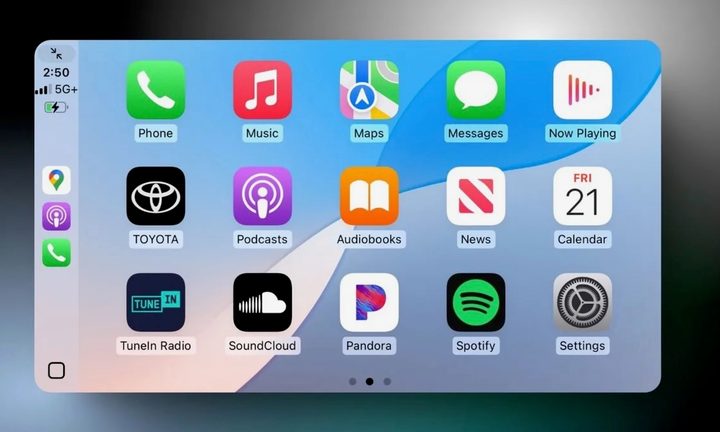
CarPlay on iOS 18.4.
MacRumors

Finally, in iOS 18.4, Apple Maps now includes electric vehicle routing in CarPlay with support for the North American Charging System (NACS) charging connector standard. This feature allows users to plan routes that incorporate stops at Tesla Superchargers.

Apple released iOS 18.4 RC this week, which means a public version could be released as early as next week. The update brings a range of enhancements to iPhones, although not the Siri AI updates Apple promised initially.

Key highlights of the update include significant enhancements to AirPods Max, which now feature USB-C support for wired headphone connectivity and improved audio capabilities. Additionally, iOS 18.4 introduces new functionalities related to Apple Intelligence, allowing users to access Visual Intelligence directly from the Control Center, a feature particularly beneficial for iPhone 16e users.

Improvements in notification management, such as introducing “Priority Notifications,” designed to emphasize important alerts, are also included. Furthermore, the Apple News app receives new features and changes to the Apple Maps application.

Bryan M. Wolfe
Former Mobile and A/V Freelancer
Bryan M. Wolfe has over a decade of experience as a technology writer. He writes about mobile.
Vivo X300 FE review: The compact flagship I didn’t expect to like this much
The Vivo X300 FE is the Hawkeye of flagships. It doesn't have superpowers, but somehow gets the job done better than everyone else.
Vivo X300 FE

Why Hawkeye?

Hawkeye was never the strongest Avenger, nor did he have the flashiest suit or superpowers. Yet he consistently proved his worth through precision, reliability, and doing the fundamentals exceptionally well. The Vivo X300 FE follows the same philosophy. It doesn't chase outrageous specifications or marketing gimmicks. Instead, it quietly nails the essentials with a superb display, dependable performance, excellent cameras, and outstanding battery life. It may not grab all the headlines, but when it matters, it's the flagship that gets the job done.

Read more
7 Apple Notes tips to elevate your note-taking experience
A few small tweaks buried in the menus that make Apple Notes feel like a completely different app.
Apple notes on iPhone

Over the years, Apple has turned Apple Notes into one of the best note-taking apps for the iPhone. The problem is that most people use the app just as a place to dump info and do not use it to its full potential. Today, I will share seven of my favorite Apple Notes tips that will elevate your note-taking experience. 

Switch between recently opened notes

Read more
This Android lock screen bug lets anyone text using Gemini without knowing your PIN
Google confirms a fix is coming for this risky Gemini lock screen bug
google-gemini

Your Android lock screen is supposed to keep your messages safe, even if someone gets hold of your phone. But a newly discovered Gemini bug could do the opposite. Since May, The Register has received multiple reports of people bypassing device authentication on Android 16 devices that allow Gemini access straight from the lock screen.

The flaw lets anyone use Gemini to send SMS and even WhatsApp messages without ever entering your PIN. It only works under specific conditions, but it is serious enough that Google has confirmed a fix is already rolling out.

Read more