
  1. Home
  2. Computing
  3. Legacy Archives

Microsoft urges Windows 7 users to install Service Pack 1 before April 9

Add as a preferred source on Google

windows-7-logo-pcsAs Microsoft winds down free support for Windows 7, it’s pushing out one of its only service packs (SP1)  to users who have yet to install it. Unless you have SP1 on your computer by April 9, Microsoft will stop supporting your computer with future security and performance fixes, so it’s imperative that you take the time to get this service pack.

Windows users should be familiar with service packs – a feature that basically consists of a number of fixes that are all delivered in one big software update. Microsoft actually rolled out Service Pack 1 for Windows 7 back in February, 2011, but because support for it ends within 24 months, the update will expire on April 9, 2013.

Recommended Videos

There’s a good chance  you already have SP1 installed, especially if your computer is set to automatically receive updates from Microsoft. You can check to see if you already have the service pack installed by following these instructions. According to Microsoft, starting today, “the installation will be fully automatic with no user action required for those who already have Automatic Update enabled.” 

If you don’t have it, it’s not difficult to get this very important Windows 7 update. Depending on whether you’re running the 32-bit or 64-bit Windows 7, you will need to free up between 750MB and just over 1GB of space on your hard drive to install SP1. Otherwise, you will need to head over to Download Center to grab the service pack yourself, which takes about 30 minutes to download.
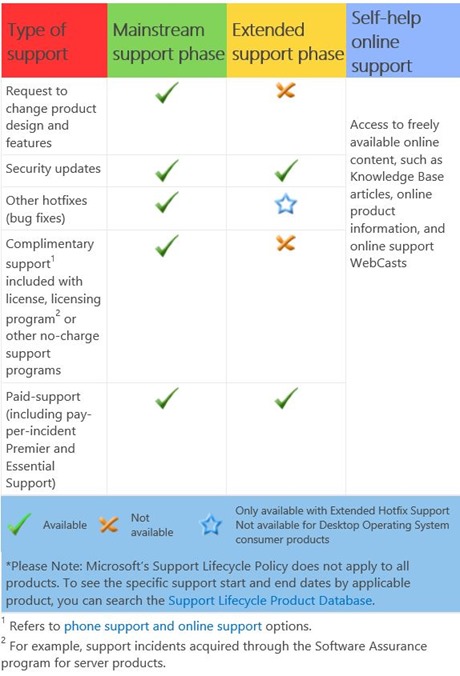
windows 7 support chart
Image used with permission by copyright holder

Once your copy of Windows 7 is up to date, Microsoft promises to keep providing updates and free “mainstream support” until January 13, 2015. That said, if you require help with Windows 7 beyond 2015 (and until January 14, 2020), as you can see in the chart above, you’ll have to pay Microsoft for “extended support.”

Gloria Sin
Former Contributor
Gloria’s tech journey really began when she was studying user centered design in university, and developed a love for…
YouTube’s AI-powered search is rolling out in the US to find videos based on situations you describe
Ask YouTube can find videos based on the situation or idea you describe
youtube ai search feature

YouTube users in the U.S. are getting a new way to search for videos on the web. The company has started rolling out Ask YouTube, its conversational AI search experience, beyond the Premium-only test announced at Google I/O 2026.

Instead of entering a few keywords and scrolling through a standard list of results, users can ask YouTube a complete question. The feature is designed for broader searches where the exact video, channel, or topic may not already be clear.

Read more
Meta’s detection tool fails to identify photos generated by its own Muse Image AI
Meta has created an invisible watermarking tool called Content Seal that is embedded in all images generated by the Muse Image AI.
Meta AI identification tool.

Earlier this week, Meta announced two new AI products, namely, Muse Image and Muse Video. As the name suggests, these are generative AI tools for making photos and video clips using natural language text prompts. Soon after their rollout commenced, these tools sparked controversy because Meta had automatically opted in Instagram users, allowing others to use their publicly posted media and convert them into remixed AI content. But it appears that Meta courted another loss on its side of the court.

What's the problem?

Read more
Your Google AI Studio apps can finally have polished, presentable web links
AI Studio web apps can now use personalized subdomains
google ai studio logos

Google AI Studio has made building a web app surprisingly easy. You can describe what you want, refine the design through prompts, and publish the result without setting up a traditional development environment. An awkward point of friction comes after deployment, when the finished app still has to live behind a long, forgettable Cloud Run link.

Google is now cleaning up that final step. AI Studio lets you assign a deployed web app a personalized address under the “ai.studio” domain, such as “your-app-name.ai.studio.” A recognizable URL should make the project look more presentable in a portfolio, client demo, social post, or internal project page.

Read more