  1. Home
  2. Mobile
  3. Android
  4. Legacy Archives

Smartisan OS launches in China, attempts to make Android simpler and easier to use

Add as a preferred source on Google
D5MkXuTp4k
Image used with permission by copyright holder

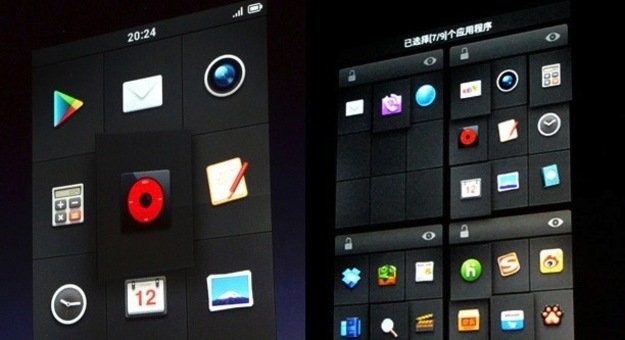
This week, a new Android-based operating system called Smartisan OS was revealed. At a lengthy event — three-plus hours long — led by CEO of Smartisan, Luo Yonghao. Yonghao spoke about, what he referred to as an unhealthy obsession, the Chinese have with iOS-esque grid-style design. He also spoke against the vast majority of icons that he insists are deformed and not recognizable; as a result — and also because he believes in a closed, controlled system — his team worked on redesigning icons to fit the look he preferred (think: futuristic). Hundreds have already been completed, with many more to come. But with a team of just 24, this will take some time.

Each icon was also stripped of any text by default, which he insists cleans up the look, though the user can enable text if they decide. In addition, he implemented larger icons on a 4 x 3 grid, as opposed to the normal 5 x 4. With a charcoal background for the icons and no visible wallpaper, we have to agree, Yonghao succeeded.

Recommended Videos

One cool feature is in the moving of icons; instead of having to drag them across multiple screens. You can zoom out and easily select which of the home screens you want to drop the icon off at. When zoomed out, you can even choose multiple icons to move all at the same time.

Beyond that, users will even be given the ability to lock certain home screens. (Embarrassing apps that you don’t want to chance people seeing? This is perfect for you!)

Some other notable features:

  • Contacts can be sorted by the date you added them, where they live, and how frequently you interact with them.
  • For those of you that act before you think, SMS messages are delayed by three seconds after hitting send.
  • When adjusting the volume of your phone, the brightness toggle appears just below so you can easily adjust at the same time.
  • Kids get ahold of your phone and now — surprise!! — your phone is in Portuguese? Flags of each country are displayed instead of text so you can easily get back to the correct language setting.
  • Voice command works just by holding the phone up to your ear and speak; using a gyroscope and proximity sensor, the phone knows to activate.
  • Quickly read and reply to SMS texts just via the pop-up notification.
  • Have more contacts than you can keep track of? You can add a brief note to their contact information, and it will appear above their photo when they call, just in case you need a reminder.

These are all simple, but smart changes to Android, which may really help the OS take off. The first public beta testing will begin in China on June 15, but there’s no word yet when, or even if, it will ever make its way to the United States.


Joshua Pramis
Spending a childhood engrossed in such technologically inspiring television shows like Voltron, Small Wonder, and Power…
The best note-taking apps for iOS and Android
I tested these apps for months so your notes never have to switch homes again.
iPhone showing note-taking apps

Choosing a note-taking app is not easy. What note-taking app you choose depends on your needs, the platform you use, and of course, the cost. The process becomes even more complicated as it seems that there’s a new shiny app released every other week. 

That’s why I always suggest choosing a note-taking app that has all the features you need and can last you for a long time. Also, don’t chase new apps. The real power of a note-taking app comes when all your notes live in one place, making it easy to spot connections between them.

Read more
The best phones in 2026: our 14 favorite smartphones right now
We tested phones across all price brackets so that you can make the best pick based on your needs and budget.
Google Pixel 10 Pro Fold vs Galaxy Z Fold 7 cameras

Choosing the right smartphone in 2026 is no easy task. Apple and Android manufacturers now have strong options at almost every price, while better cameras, longer battery life, improved software support, new AI features, and more refined foldable designs have made the market more competitive than ever. But picking one is not easy, especially if your budget is tight, or you are just legitimately concerned about getting the best value for your money and need a reliable daily driver for long-term usage.

We have tested and compared the leading smartphones available today, looking beyond the spec sheet to see how they actually perform in daily use. Camera quality, battery life, performance, display quality, software, design, and long-term value all play a part in our recommendations. Whether you are looking for a powerful flagship, a dependable budget phone, a compact device, or a foldable, this guide should help narrow down your choices.

Read more
Snapchat Planets Meaning: Order, Rankings, and How Friend Solar System Works
Snapchat Planets turns your best friends list into a solar system, and yes, your orbit says a lot
Snapchat Planets being shown on the Snapchat app on iPhone.

Snapchat+ includes several exclusive features, but few have generated as much curiosity as Snapchat Planets. Part of the app's Friend Solar System, it transforms your Best Friends list into a planetary ranking, assigning each of your top eight friends a planet based on how often you interact.

From Mercury, which represents your closest friend, to Neptune, which represents your eighth closest, the system offers a quick visual snapshot of your interactions. But what do the different planets actually mean, and how does Snapchat decide who gets which one?

Read more