I’ve been a part of every Windows launch since Windows 95. That launch still remains the historic high point of Microsoft and Windows, even though Windows 95 wasn’t exactly a perfect product. Apple, which was struggling through a series of rather clueless CEOs at the time, was less hurt by Windows 95 than its own inability to focus and execute. It’s an error that wouldn’t be corrected until Steve Jobs got back and fixed things.
But that was then, and this is now. And Windows 7, for its time, is vastly better than Windows 95 was in 1995. The operating system benefits not only from the nasty pounding that Windows Vista got, which helped to better focus the development team. It also enjoys a boost from one of the strongest marketing teams Microsoft has ever fielded. In addition, this is the first time that Microsoft has fully taken responsibility for its virus problems with its free Security Essentials product, something the company likely should have done decades ago, and overall, the manufacturer appears readier for war than it has ever been. It is somewhat ironic, though, that at this exact point in time the market also appears ready to move on to another model, and it isn’t the Mac, adding that little bit of extra drama the technology segment loves.
Let’s talk about my Windows 7 experiences, make some recommendations, and chat a bit about where the market is going. Oh, and yes, for the record, Windows 7 will kick MacOS butt – the difference being that Mac fans simply aren’t likely to care.
Windows 7 Experiences
Remember that Windows 7 isn’t shipping yet. Having said that, I’ve installed final code of Windows 7 on five custom current generation desktops including an HP Netbook, a Panasonic Toughbook, and an IBM ThinkPad with no major problems. There have been minor issues, however. For instance, the fully-featured HP drivers are not released yet, so you have to use the native Microsoft HP printer drivers which prevents the use of certain high-level options. Then again, I don’t actually ever recall using these features, so it’s no big loss.
I’ve both installed Windows 7 cleanly and upgraded from Windows Vista. (I don’t recommend even trying to upgrade from Windows XP, and therefore didn’t test that.) The clean install takes about 15 minutes to add the operating system, and then about 3 hours to install current versions of the key applications and do a file and settings transfer. The upgrade takes about an hour and a half to complete (unattended), but cleaning up the results generally takes several days of discovering and removing things from your PC that are outdated like disk defragmentation products, old utilities, remaining anti-Malware products that you didn’t take out during the installation, and settings that once made sense under Vista, but don’t under Windows 7.
Having done it both ways, I’d only do an upgrade on a system where I needed some of the utilities like I did with the Panasonic (and likely would with any laptop) – not with a desktop system. In this latter case, there were a couple of times where I needed to go onto the Web and download a particular driver to get everything back up and running. However, such instances were rare and the overall process proved vastly better than it did with any prior pre-launch testing of any other version of Windows. This is because, historically, new drivers tend to show up around the time the new product launches. But this time, there has been a lot of effort to test them before the launch so that these drivers were available early. I’m expecting a lot less launch breakage as a result.
Hands-On Use
For once, Windows 7 scores a small coup from my perspective right out of the gate: The sleep function actually works on desktops. For whatever reason, while I’ve been able to sleep laptops reliably since Windows XP, I’ve never been able to reliably sleep a desktop system. This feature now performs as advertised, which means I can sit down in front of a Windows 7 system that is totally dark and appears powered down, hit the escape key, and within 2 seconds, I have a login prompt. And, of course, once logged in, my last session is fully restored.
You have no idea how big this is for me, because I live in a solar-powered house, and leaving high-performance PCs running at night was killing me. Otherwise, the experience has truly, for a longtime Windows user, been wonderful. Stuff just works. My games load, my applications perform as expected, and I can even click on and burn .ISO files without searching for obscure Web applications.
The new free Security Essentials product runs in the background, doesn’t annoy me to death, and seems to quietly look for and eliminate viruses as well. It’s actually getting some rather good reviews for what is clearly a basic product to boot.
I loaded Windows 7 Starter Edition on the netbook, which had been running Windows Vista, and the machine transformed from a poor performer to something I could actually work on. It’s still no gaming machine by any stretch of the imagination, but it made the product usable where it really wasn’t with Vista. I used a Windows XP netbook earlier this week just to get a feel for the difference, and performance was similar – however, the XP product just felt ancient.
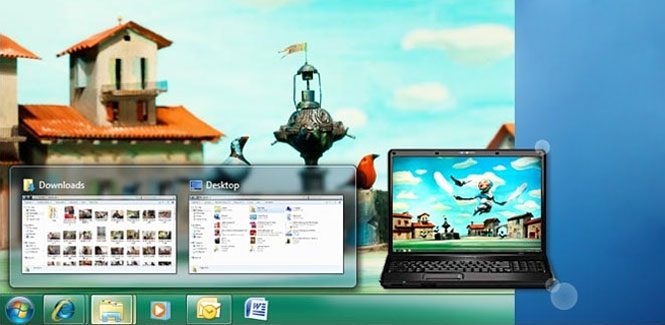
Also important to note is that while the taskbar and some of the menu changes take a little getting used to, once you do, going back to Windows XP is a painful experience.
Media Center Capabilities
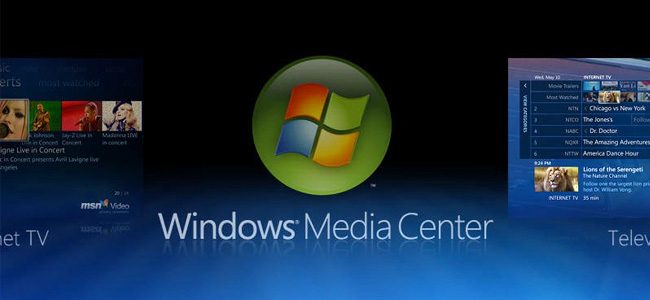
I have to take a moment to talk about Media Center. The big improvement is the addition of Web channels so that you can tune into a wide variety of online programming. I’m actually using a Media Center hooked to the TV again, and the quality, while still not great on my 52-inch HD screen, is actually not that bad either, and suddenly Media Center makes a bit more sense. I’ll likely not be tossing out my TiVo any time soon, but this is a huge improvement this year.
Wrapping Up: Does Snow Leopard Stand a Chance?
If you go from Leopard to Snow Leopard, you don’t see much change or much in the way of compelling improvements. As usual, since Apple doesn’t do beta testing, Snow Leopard has had a few significant teething problems as well. On the flip side, thanks to ample pre-launch testing out of the gate, Windows 7 performs nicely, and its full suite of noticeable enhancements makes a considerable first impression.
Granted, I don’t see anything in Windows 7 that would compel a happy Mac user switch back to Windows. Still, should they wish to take the plunge, Windows 7 is a vastly better alternative for unhappy Mac users than either Windows Vista or Windows XP was. Suffice it to say that Windows has come a long way since the ‘90s, and after going hands-on with Microsoft’s new operating system, I strongly suspect that you’ll be impressed.
Editor’s Note: 10/4/09 – I mentioned in my article that Apple does not beta test their products. I meant this figuratively. As one reader pointed out, Apple does have a beta testing program. Apple’s beta testing program historically is not as robust as Microsoft’s, and the barrier to entry is pretty strong with reports saying it costs some developers $500 to even participate in the program. With Apple products gaining in popularity, it might be time to open the gates and put a stronger beta testing program into place.