Thanks to advances in computer software, it has never been easier to record your own music from home or on the go. When it comes to the search for a free and reliable Digital Audio Workstation (DAW) to record music, the internet has a lot to offer.
GarageBand is our top pick because it’s free, easy to use, and comes with an extensive variety of effects and virtual amps to choose from; but it isn’t the only offering on the market. Check out our other picks for the best free recording software below.
Further reading
GarageBand

Although MacOS isn’t always the only platform for great software, when it comes to free recording applications, it has the best of the bunch. GarageBand is an Apple-exclusive program that gives you a full audio-creation suite with features for audio recording, virtual instruments, and even music lessons built right in.
Part of the appeal of GarageBand is how simple it is to get going. Its interface is intuitive and easy to learn, and if you want to record something, you just plug in your instrument or device and get started. There is a wide variety of virtual amps and effects you can use, as well as drum tracks that sound like they were performed by real musicians.
The sound and loop library that’s available for editing into your own tracks is growing all the time, and you can even bring in your iOS devices for wireless control of your setup. GarageBand is the most fully featured free application on this list. While you will need to have an Apple device to run it, you’d be hard-pressed to find a better application that doesn’t force you to get out your credit card first.
Avid Pro Tools First
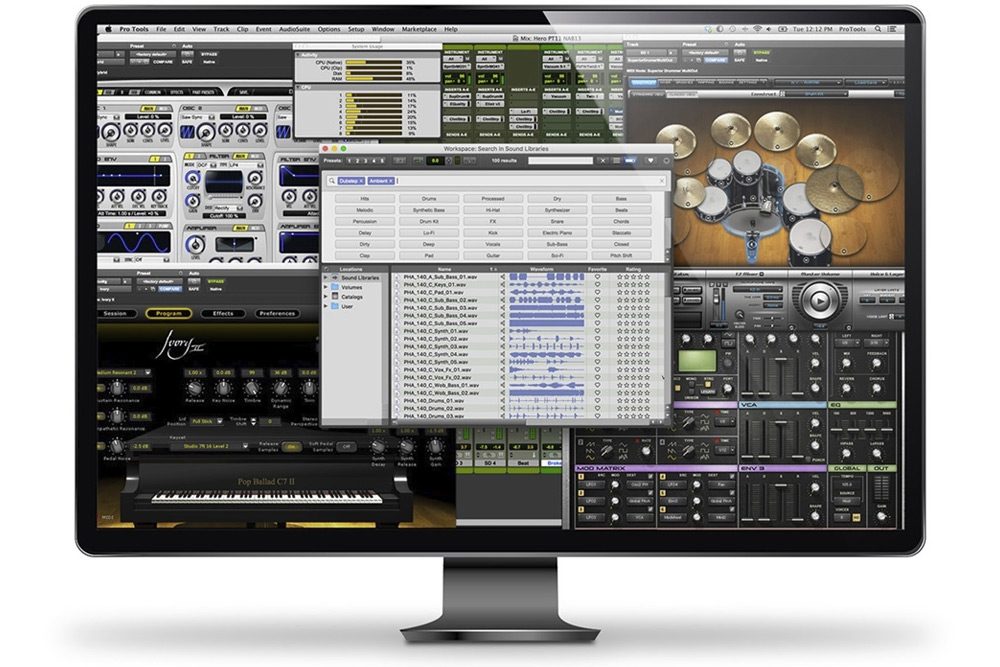
Pro Tools First is a limited version of the main Pro Tools and Pro Tools Ultimate applications, but it’s still pretty capable in its own right. Aimed at “students, musicians, and podcasters” who are just getting started with audio recording or want to try out the software before buying, its main limitation is that you can only store three projects in the cloud. You’re also limited to 16 simultaneous audio tracks, four inputs, and 16 instrument tracks.
Beyond that, though, you’ll still have access to a great number of the same features and capabilities as in the other paid versions of Pro Tools, giving you a good idea of what the software can do. For example, you’ll still have access to non-destructive editing, a MIDI editor, and support for AAX Native and AAX AudioSuite.
If you do choose to upgrade to the standard or Ultimate paid versions further down the line, they’ll set you back $30 and $80 a month, respectively.
Audacity

First released in 2000, Audacity has gone on to become one of the most popular pieces of free software around — and for good reason. The open-source program gives users a wide range of options for recording and editing audio, all tied together with a simple interface. Plus, everything Audacity has to offer is free of charge. Compared to other notable DAWs such as ProTools and Sound Forge, Audacity’s layout is very minimalist. There are toolbars for navigating tracks, editing them, and mixing. When tracks are loaded, they will appear as waveforms, and users can edit specific sections of a track by highlighting the appropriate section of the waveform.
Of course, no piece of free software is without its shortcomings, and despite Audacity’s many virtues, it has some issues. The most notable problem is that Audacity uses “destructive editing,” which means that when users add effects to a track, they are actually altering the waveform; these changes happen to the original file, so undoing unwanted effects can be tough. This isn’t necessarily a problem if you’re carrying out simple tasks — such as editing pauses out of a podcast — but more complex actions like mixing might be difficult.
Ardour

Ardour is an open-source DAW available for Linux, MacOS, and Windows. Its developer, Paul Davis, also invented the Jack sound server for Linux and worked previously as one of the original programmers at Amazon.
Ardour has highly versatile multi-track recording features that include the ability to import video for film scoring, to record and edit nondestructively, and to prepare any combination of individual tracks for recording. Its use of Jack makes it compatible with a number of outside applications as well. However, unlike other DAWs, Ardour does not come with any built-in effects or instruments and relies instead on the installation of third-party software.
Zynewave Podium Free

In 2005, programmer Frits Nielsen left his position as a user interface designer with TC Electronic. He wanted to focus his efforts on a recording application he began developing back in the early 1990s. Nielsen started a company called Zynewave and released a program called Podium. Podium was a fully functional DAW with a 64-bit sound engine, MIDI capabilities, VST, and third-party plug-in compatibility. Ahead of its time, Podium also had several other advanced functions. Plus, its price was a mere $50.
Zynewave now offers a free version of its software called Podium Free. Granted, it comes with some limitations — Zynewave has disabled Podium’s multiprocessing capabilities. The block hinders the program’s performance under pressure, which is one significant drawback. Zynewave also disabled the surround-sound playback capability. Other freezes on the 64-bit mixer engine and ReWire also limit the scope of the program. Further, the MIDI interface setup only allows one input and one output. Otherwise, though, Podium Free is identical to Podium. The learning curve might be steep here, due to the program’s quirks.
Once users learn how to use it, they will find that Podium Free offers an interface that excels in customization. It provides a suite of effects and other features on par with premium DAWs.
PreSonus Studio One 5 Prime

Studio One 5 Prime is PreSonus’ free version of its Studio One software. And though it doesn’t cost anything to use it, it still comes with a long list of recording and editing features including: a drag-and-drop interface, unlimited instrument and audio tracks, over 2GB of bundled loops and content, unlimited virtual instruments and FX channels, and advanced audio editing and grouping. You can also expect other notable features such as Presence XT and MixVerb. Presence XT is the software’s polyphonic sample player for synth and keyboard sounds. MixVerb is Studio One’s reverb feature that allows you to adjust its pre-delay, size, and dampening.
Studio One 5 Prime is only available for devices that run the 64-bit versions of Windows 10 and MacOS (10.13 or higher). You’ll also need at least 10GB of hard drive space.