
  1. Home
  2. Computing
  3. Legacy Archives

Microsoft pulls Windows 8.1 updates, which can cause blue screens of death, restart loops

Add as a preferred source on Google

Many people who downloaded last week’s Windows 8.1 patch have experienced blue screens of death, and looping system restarts. In fact, the problem has been so significant, that Microsoft has pulled the patches from Windows Update. They also recommend that you uninstall them.

Related: Microsoft patches Internet Explorer slowdown bug, download now

Recommended Videos

In all, the problems have been associated with four patches, which aimed to address a number of issues. Aside from the symptoms associated with system instability, these could cause problems with any of your computer’s fonts in the event that any of them aren’t installed in the typical fonts directory in Windows.

Related: Common Windows 8 and Windows 8.1 problems, and how to fix them

According to Microsoft, fonts that are installed anywhere other than “%windir%\fonts\” can’t be changed when loaded into an active session, and could spit out a “File in use” error message if you attempt to alter, replace, or delete them. These fonts can also render incorrectly.

Here are the four problem patches that Microsoft has identified:

  • “2982791 MS14-045: Description of the security update for kernel-mode drivers: August 12, 2014″
  • “2970228 Update to support the new currency symbol for the Russian ruble in Windows”
  • “2975719 August 2014 update rollup for Windows RT 8.1, Windows 8.1, and Windows Server 2012 R2 “
  • “2975331 August 2014 update rollup for Windows RT, Windows 8, and Windows Server 2012″

If you want to check and see if you have any of these patches installed on your Windows 8.1 PC, head over the the Metro UI and type “Programs.” Then, click “Programs and Features.” From there, click “View installed updates” in the upper left hand corner of “Programs and Features.” This screen will allow you to identify whether you’ve installed any of the updates that have been causing problems for Windows 8.1 users by matching them up with the identification numbers in the list above.
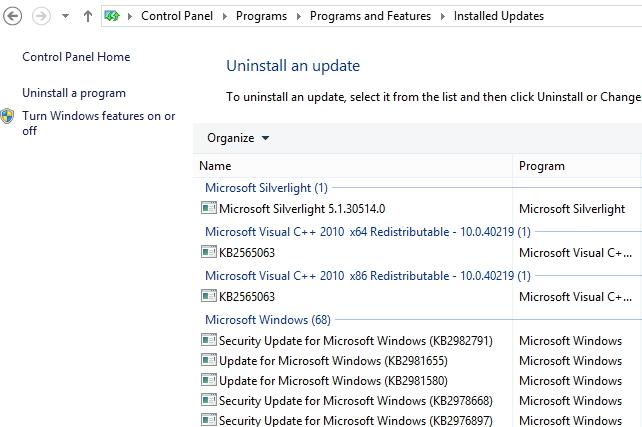
We will be uninstalling this now.
We will be uninstalling Update 2982791 now. Image used with permission by copyright holder

To uninstall any of these updates, just click on them, and click “Uninstall” towards the top of the window.

This isn’t the only issue that Microsoft has had with its big-name software products. Microsoft acknowledged issues with Internet Explorer users experiencing extreme performance slowdowns, and has issued patches to combat the problem.

Konrad Krawczyk
Former Computing Editor
Konrad covers desktops, laptops, tablets, sports tech and subjects in between for Digital Trends. Prior to joining DT, he…
If you miss the feel of paper in the digital age, this app gives your Mac’s screen a textured look
A paper-like screen overlay could make long work sessions feel less harsh.
Advertisement, Poster, Electronics

Most screen-comfort tools work by changing color temperature. Apple’s Night Shift makes the screen warmer, often giving everything an orange tint. Paperman is an interesting alternative because it adds a subtle paper-like texture over the display instead.

The app is available for Mac and Windows, and it is designed to make a screen look closer to paper, matte glass, or an e-ink display. It softens the harsh contrast and reduces the glossy look of modern screens during long reading or writing sessions.

Read more
I dug these last-hour Prime Day smart home, laptop, and accessory deals that are irresistible
Deals up to 60% off, a few hours left, and no reason to wait any longer.
Electronics, Phone, Speaker

Amazon's Prime Day 2026 sale is in its final hours, giving you your last chance to get your hands on the best smart home, security, tablet, laptop, and accessory deals. I've pulled together the picks that are still live, still deeply discounted, and still worth buying before the sale ends tonight or until the stock lasts.

Best Amazon Prime Day deals on smart home devices

Read more
Apple’s biggest MacBook Pro redesign in years may skip the chip everyone expected
The next MacBook Pro may bring OLED and touch support without M6 Pro silicon
MacBook Pro on Table

Apple is expected to launch a refreshed MacBook Pro later this year, but according to Bloomberg, it won't come equipped with a next-gen processor. Instead, Apple is going to equip the highly anticipated device with Pro and Max variants of the current-gen M5 silicon.

It was widely speculated that when the redesigned MacBook with an OLED display and touch-screen capability debuts, it will also mark the arrival of the M6 series processors. Well, it appears that Apple has changed its silicon strategy pretty significantly.

Read more