
Covered in depth by Digital Trends’ Geoff Duncan, Adobe’s Creative Suite CS6 announcement introduced an entirely new way to license the company’s products: Creative Cloud, which provides access to a vast library of Adobe’s software for a monthly or annual fee. Below, find out if Creative Cloud makes sense for you, no matter who you are.
What is Creative Cloud
Creative Cloud makes Adobe’s most powerful applications available via a subscription model for the very first time. Creative Cloud users can access all software contained in Adobe’s formidable (and, at $2,599, costly) Master Collection CS6 bundle at a much more tenable price point: $49.99 per month for the service’s annual plan or $74.99 per month when paying on a monthly basis. Adobe offers discounts for students and teachers ($29.99 per month in an annual-only plan) and owners of any Creative Suite version 3.0 or later (also $29.99 and requiring a year-long commitment).
The Math
If I need access to Adobe’s entire software library, I have two options: Creative Cloud or Master Collection CS6. A Master Collection license is forever. Creative Cloud requires money on a constant basis. If you know that you will need access to Adobe’s entire application library forever, Master Collection seems to be the better option — if you have the means.
However, it’s not that easy when you consider software updates. Upgrading to Master Suite CS6 from a previous version will cost a minimum of $525. Creative Cloud provides up-to-date software without additional cost. Theoretically, Master Suite CS7 would cost a CS6 owner a total of $3,124: $2,599 for their original CS6 license and the $525 upgrade fee. That same $3,124 purchases more than 5 years of Creative Cloud access to the same applications.
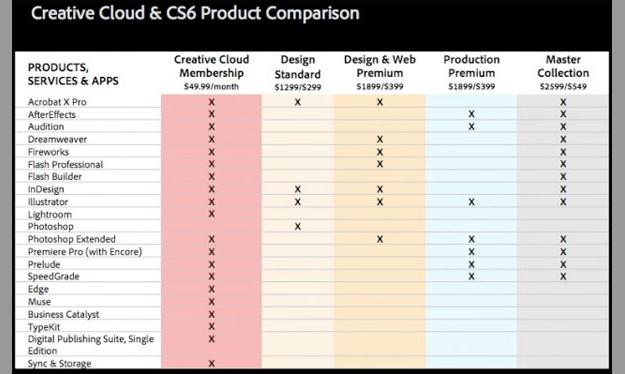 Factoring in upgrade fees (and assuming that Creative Cloud always provides access to the most up-to-date software), Creative Cloud will provide access to Adobe’s latest, greatest applications at a lower cost than Master Suite — as long as Adobe updates Master Suite to CS7 sometime in the next five years.
Creative Cloud becomes a worse option the fewer applications you use. If you only need Photoshop, Creative Cloud will become more expensive than that single application license after just 14 months. Purchasing a Photoshop license outright would probably be a better option in this case.
Good News, (Almost) Everyone!
Creative Cloud will make Adobe’s applications available in a way they never were before. Many customers will benefit from this offering. So will Adobe. Here are the parties that will benefit most from Creative Cloud:
Power Users – If you need the power afforded by Adobe’s entire Master Collection, this is the plan you have been waiting for. Creative Cloud offers all applications included in Adobe’s largest bundle plus access to new, online-only apps like Muse and Edge (though at an additional monthly cost). Over the same span of time, the total cost for Creative Cloud is likely to be less than that for Master Collection.
New Users – Creative Cloud is also a great option for users new to Adobe’s family of applications. If you need more experience than Adobe’s month-long trials afford, $74.99 is a lot easier to pay than several hundred or even thousands of dollars.
Temporary Users – If your client project requires the Master Collection and ends in three months, it’s a lot easier to pay $225 for three months of Creative Cloud access than to pay $2,599 to own Master Collection for the same period of time.
Adobe – Creative Cloud makes Adobe’s software an option for many who can otherwise not afford it. Further, even existing users may gain access to software previously unavailable to them. In this way, Creative Cloud serves as a showcase for Adobe’s product line, hooking users on new apps which require them to remain Creative Cloud subscribers.
Other Perspectives
Creative Cloud will be less attractive to other user groups. They are:
Master Collection Owners – Though Adobe is offering Creative Cloud at a 40% discount to Master Collection license holders, “upgrading” to Creative Cloud may not offer much beyond convenience features like cloud storage and syncing. Any designer worth his or her salt probably already has a data management solution. Existing Master Collection users may want to hold off from subscribing to Creative Cloud.
Hobbyists – If you’re using Adobe’s products “just for fun,” it may by psychologically easier to splurge on their expensive software once as opposed to spending money every month. We may have no problem justifying an unnecessary purchase if we are temporarily-rich from our last tax refund, but when we’re spending hundreds of dollars each month just to keep our tech services running we may start to be more conscious of where that money is going.
Old-School Users – If Photoshop CS4 was the perfect Photoshop for you then there isn’t really any reason to upgrade until Creative Cloud offers features that you can’t live without. Before those features become available, Creative Cloud won’t be worth the switching cost or the monthly fee.
License Abusers and Pirates – The millions of people stealing Adobe’s applications should heed Creative Cloud as a “shot across the bow.” Though pirates always seem to be one step ahead, subscription software models will probably make software theft much more difficult.
Conclusion
Though software-as-a-service isn’t a new concept, Creative Cloud is the most prominent professional-grade example so far. If it is successful, the business strategy could lead to similar plans from other publishers. Those purchase decisions should be considered in the same way as they are for Creative Cloud. Balance the one-time purchase price against the monthly fee. Consider the other benefits and drawbacks of that service, and then make your decision accordingly.


