Professional photo-editing applications aren’t cheap, nor are they easy to master without formal training. That’s why we’re taking a look at the best free photo-editing software on the market.
Our top pick is GIMP, an open-source photo editing software available for the big three operating systems. As a strong alternative to using Adobe Photoshop, It offers a huge workspace and a wide variety of professional editing tools.
We provide thousands of how-to articles, news articles, and best-of lists to help you build your photography skills, choose the best gear for your photography needs, and make the most out of your photo equipment. And if our top pick isn’t for you, check out the other options on this list. There are great choices for conventional desktop software, mobile apps, and even web-based solutions that don’t require installing software.
GIMP

Often heralded as the best free alternative to Photoshop, GIMP (GNU Image Manipulation Program) is an open-source application that relies on a community of volunteer developers who maintain and improve the product. It’s available for macOS, Windows, and Linux. It provides many professional-level editing and retouching tools — perfect for designers who can’t or won’t shell out hundreds of dollars for Adobe Photoshop.
Once you launch the program, you’ll find a dedicated window that displays the image. You’ll also see two floating docks: One with the toolbox and another for managing layers, paths, brushes, and more.
You’ll have an expansive workspace to edit your images when using a large display or two monitors. Icons in the toolbox represent specific tools, like Scale, Pencil, Paintbrush, Airbrush, and more. You can apply numerous filters, too, such as dropping a shadow, adding a neon effect, adding a glass tile, removing devilish red eyes, and so on.
Overall, GIMP may feel like a free version of Photoshop, but it sports a unique look and experience. Making the jump from one to the other will take a little time, but you’ll save yourself a monthly subscription fee if you do.
Paint.NET
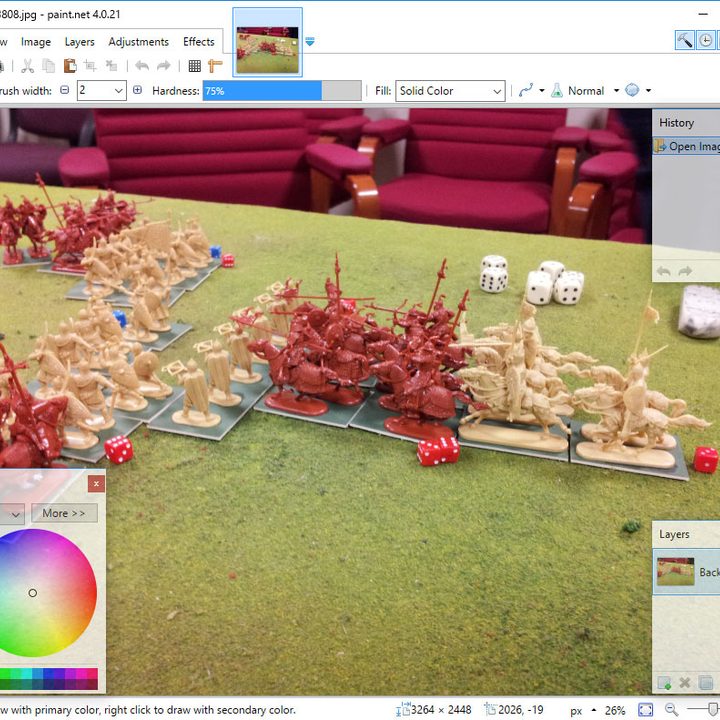
Paint.NET is a case where the apprentice becomes the master. It was created as a college undergraduate senior’s “design project mentored by Microsoft,” Paint.NET. The software was initially developed as a no-cost substitute for Microsoft Paint, which comes standard with Microsoft’s Windows operating system. Paint.NET has surpassed Microsoft Paint in functionality and also provides more advanced features.
Paint.NET features an easy-to-understand user interface that supports layers, an unlimited undo tool to back out of any mistake no matter how disastrous, various special effects, and other utilities. While Microsoft Paint could do little more than resizing images, Paint.NET can handle advanced photo editing you’d expect only Photoshop and other paid programs could perform.
Paint.NET is available as a free, traditional desktop program for Windows and a $10 app in the Microsoft Store.
Photoshop Express

If the above options seem too derivative or you want more of the Adobe experience without the associated price, Photoshop Express is another option worth considering. Although pared down compared to the premium Photoshop model, the Express variant does have several excellent options for editing photos with a much more gradual learning curve.
With an interface that betrays its mobile roots, Photoshop Express offers quick-and-easy access to slide bar adjustments and one-touch fixes for photos of all types. Details gives you control over sharpening and noise. You can also crop, rotate, flip images, blur, remove red-eye, remove blemishes with the Spot Heal tool, and adjust the exposure.
Its file type support is limited to raw camera files, JPG and PNG files, but Photoshop Express is a freely available app that you can use on your Windows, iOS, or Android device without hassle.
Pixlr
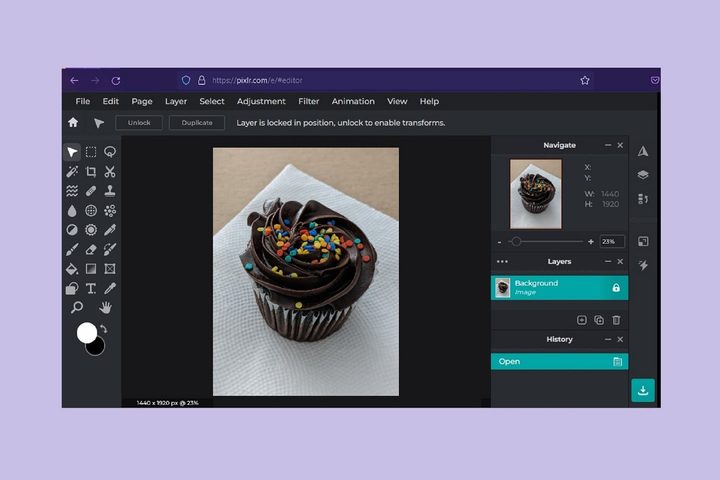
Pixlr provides two tools you can access for free: Pixlr X (express) and Pixlr E (advanced). Both provide essential editing tools and limited layers. These tools are ad-supported, though you can upgrade to Plus ($2/month when paying monthly) or Premium ($8/month when paying monthly) to remove ads and unlock additional features.
In a Pixlr E vs. Pixlr X showdown, Pixlr X offers quicker editing and a simpler, user-friendly design. This software is accompanied by 12 essential tools, from drawing to applying filters to cropping pictures.
Then there’s Pixlr E, a bare-bones photo editing software that gives you access to 24 useful tools. Users can easily draw shapes, blur, sharpen, or clone a photo, and much more.
Overall, the easiest way to access Pixlr is via its Pixlr X and Pixlr E web apps described above. Pixlr’s website says you can also download desktop (for Windows) and Android apps.
Adobe Lightroom mobile app
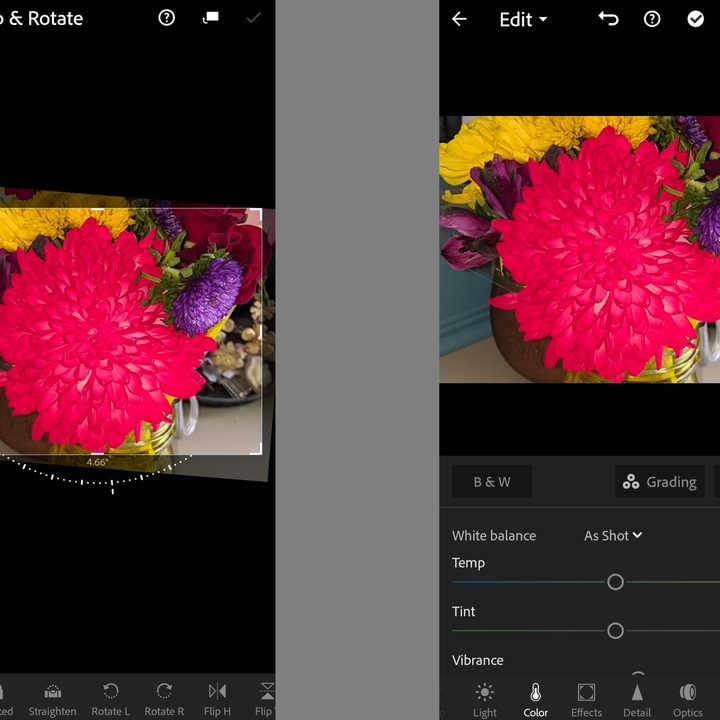
Adobe might be better known for its more expensive Photoshop editing software, but you don’t have to break the bank to take advantage of Adobe-quality photo editing — especially if you know you’ll be doing most of your edits on a mobile device. With Adobe Lightroom on mobile, you can expect to make many of the adjustments you’d normally do with other editing apps: cropping, adjusting the lighting, customizing the color, or adding filters. The app is easy to navigate as it has a minimal interface with clearly labeled icons and simple-to-use sliders and toggles to help you quickly adjust certain aspects of your photos.
But Lightroom doesn’t just help you with the quality of your edits, it also has its own camera controls to help enhance the quality of the photos you take with your mobile device. You can choose from camera modes such as raw, HDR, and professional depending on your devices.
Some features are locked behind a paid subscription paywall, but you don’t need a subscription to use many of the editing tools.
Photo Pos Pro

Photo Pos Pro is a decent free photo editing option for Windows users. And the first thing you need to know is that the software really emphasizes ease of use and a customized user experience. In fact, when you first open the software, you’ll be greeted with a series of questions about how you want to use the software. The most important question it will ask is when it prompts you to choose between two main interfaces (based on your own level of photo editing experience): An interface for experts (PRO) or one for newbies (Novice). And the interface you choose will determine how you’ll edit using the software going forward. (Don’t worry: Photo Pos Pro allows you to easily toggle between the two interfaces as needed.)
The PRO interface looks a bit like Photoshop and as expected comes with an abundance of advanced editing features. You can expect to see layers, curves, cropping, paint brushes, effects, rulers and grids, and color and lighting adjustment options. This interface is packed with tools for more intensive editing and as such, the interface can be a bit overwhelming with its many small icons and various kinds of menus.
The Novice interface is best for beginners or those who need to make a few quick edits to their photos. The interface is similar to what you would encounter with a simple desktop or mobile photo app: Just a bare-bones selection of features. In Photo Pos Pro, these features would include cropping, flipping and rotation, resizing, auto fix, color and light adjustments, deformation effects, and adding frames.
FAQ:
What is the easiest free photo editing software to use?
The easiest free photo-editing software to use is Paint.NET, especially if you also need Photoshop-level editing capabilities. It perfectly combines a minimalist interface, a familiar simplistic layout, and many of the complex tools and features you can expect from higher-end photo editing software. The only software on our list that’s a close second for ease of use is the Adobe Lightroom mobile app, which doesn’t offer very many advanced editing tools.
Beyond that, if your photo editing software doesn’t offer the tools you need, it’s time to starting thinking about paying for it. That’s when you need our list of the best photo editing software.