

“The Samsung Chromebox Series is a great computer for what it is. Google should be commended for developing an OS that can cater to most users’ everyday needs quickly and gracefully – provided they’re willing to truly invest in Google’s ecosystem.”
- Extremely fast
- Plenty of ports
- Chrome OS is starting to mature
- Derivative design
- Limited ecosystem
- Expensive compared to the competition
“Why you can trust Digital Trends – We have a 20-year history of testing, reviewing, and rating products, services and apps to help you make a sound buying decision. Find out more about how we test and score products.“
Google’s svelte series of Chromebooks the last few years have served as both testing grounds for the still-nascent, cloud-based Chrome OS platform and as attractive secondary Web devices for consumers with money to burn. They may lack the versatility of a traditional operating system, but Google has always promised that this approach is what computing will look like in years to come.
So what happens when you take mobility out of the equation? You’re left with a Chromebox – more specifically, the Samsung Chromebox Series 3, running the latest version of Chrome OS and offered at an entry-level price of $329. With this computer, it becomes all the clearer that Google is committed to this new paradigm. But who is this mini computer for exactly? Read on to find out.
Well this is familiar…
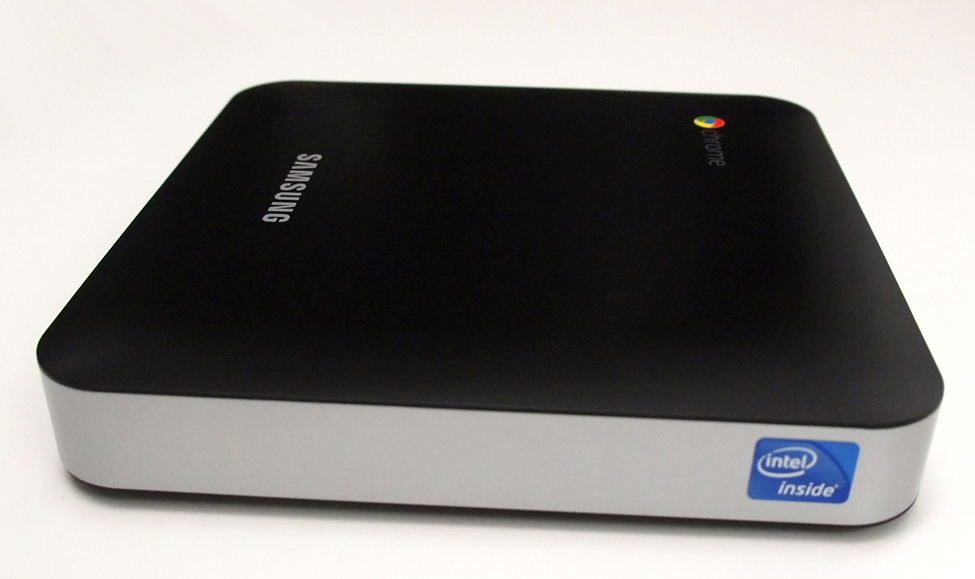
The first thing you’ll notice when you lay eyes on the Chromebox is how similar it looks to the Apple Mac Mini. Indeed, much of the same was said about Samsung’s Series 3 Chromebook as compared to the Macbook Air (you really have to hand it to Samsung). However, as always, there are some distinct differences.
The Mac Mini positively trounces the Chromebox in the design department. While the Mini is made out of aluminum and touts Apple’s traditionally minimalist aesthetic, the Chromebox’s plastic chassis is emblazoned with both the Samsung and Chrome logos, looking and feeling a little cheap as a result.

Samsung makes up for that in terms of sheer connectivity. We’re talking six USB ports, two DisplayPorts, Ethernet, and DVI – that’s a lot of ports. However, we do find it odd that it lacks the standard VGA and HDMI ports found on most other modern PCs. Any number of adapters can take care of that problem in short order, but it’s still just one more thing to buy.
Under the hood
Behind the plastic facade, the Chromebox boasts a 1.9GHz dual-core Intel Celeron B840 processor, 4GB of upgradeable RAM, and 16GB of solid-state storage. Along with the respectable, if not muscular, specs, the Chromebox comes with the requisite complement of radios, including Bluetooth 3.0 and WiFi a/b/g/n, as well as an unsurprisingly quiet internal speaker. Feel free to hook up whatever set of speakers you prefer. All these essentially guarantee that the user can connect to whatever monitor, mouse, and keyboard they want, and jump online in a matter of moments.
In the Chrome bubble
When you land on the desktop in Chrome OS, you truly see how much the operating system has matured since Google first unveiled it in 2009. Google has worked hard to grant the user a familiar, intuitive experience without sacrificing the ideal of a completely cloud-centric operating system. However, that ideal can be both a blessing and a curse.
Previously, the OS was confined completely to a browser window, altogether alien to those who wanted a fully realized desktop. With the latest software, Chrome OS resembles a cross between Windows 7 and OS X, replete with its own wallpaper, icons, and a task manager that handles the usual suspects in WiFi, volume, and Bluetooth connectivity. Overall, it doesn’t ask the user to break too many of their habits.
Google’s principle apps – Mail, YouTube, Drive, etc., – rest along the bottom of the screen. You can also expand this selection with Google’s ever-growing Chrome Web Store, which rounds things out nicely enough with apps like Evernote and Angry Birds. Everything is meant to run within the confines of the Chrome browser, which deserves all the credit it has earned over the years for being both fluid and thoroughly robust.
 Things can, however, get a bit hairy when running more than one tab in a single window. Chrome OS does a good job of differentiating between features like Google Play Music and Google Play Movies, allowing you to manage them independently of the main browser window. But having more than a dozen tabs open all doing markedly different things is unwieldy, especially after a long session.
Unfortunately, you start to feel a little boxed in, and therein lies the main problem. Running everything within Chrome inherently limits the user in ways that Google may one day adequately address – but hasn’t yet. The fact remains that much of present-day computing is done with applications independent of the browser. Customers accustomed to programs like Office, Skype, and Photoshop won’t be able to install them due to Google’s locked-in ecosystem. While Google Drive, Google Hangouts, and apps like photo editor Aviary readily attempt to pick up the slack in terms of missing core features, depending on the context and needs of the user, many of the apps in the Web Store aren’t’ on par with those outside of Google’s auspices.
Performance
Apart from it’s running atop Sandy Bridge architecture, the Chromebox derives much of its performance from Chrome’s lightweight OS – it’s basically a browser, after all. Using the device for most tasks is a very smooth, quiet ride. Even though it can’t really be benchmarked in any traditional way since most benchmarks are designed for Windows, Chrome OS acquitted itself nicely in our browser-based Peacekeeper test, benching an impressive 2,946. That’s well ahead of its Chromebook cousin, which came in at 1,226.
Boot time is insanely quick, taking about 4 seconds in our tests, and waking up from sleep is similarly speedy. The Chromebox even handled YouTube and Netflix videos, as well as some graphics-heavy games, with nary a hiccup. And thanks to the 4GB of memory, Chrome can handle at least 25 tabs open before exhibiting refresh/reload behavior. For what it’s worth, this machine is a miniature workhorse.
Conclusion
All in all, the Samsung Chromebox Series is a great computer for what it is. Google should be commended for developing an OS that can cater to most users’ everyday needs quickly and gracefully – provided they’re willing to truly invest in Google’s ecosystem.
That said, it simply isn’t as versatile as the average entry-level PC or Mac Mini, and its $329 price point is expensive for how limited it is. The average user in 2013 uses more than Web apps to carry out their habituated tasks. That may change with time, but Google’s pushing for a shift many of us may not be ready for just yet.
Educators and small business owners might look at this device and see an ideal workstation for students or customers in their brick-and-mortar shops, but in a world where the same work can already be done with tablet devices like the iPad and similarly priced desktop computers, most consumers may want more than what the Chromebox has to offer.
Highs
- Extremely fast
- Plenty of ports
- Chrome OS is starting to mature
Lows
- Derivative design
- Limited ecosystem
- Expensive compared to the competition


