  1. Home
  2. Computing
  3. Web
  4. News

"We are sorry!" TeslaCrypt ransomware authors release decryption key

Add as a preferred source on Google

The developers of the notorious TeslaCrypt ransomware have called it a day and released a master decryption key for all of their victims to retrieve their encrypted files.

Security researchers at ESET had been tracking the number of infections at the hands of TeslaCrypt, which is a piece of ransomware that encrypts the users’ files and holds them up for a bitcoin ransom. But the researchers noticed a considerable dip in TeslaCrypt cases, with other forms of ransomware becoming more prevalent like CryptXXX.

Recommended Videos

According to a report from BleepingComputer, the makers of TeslaCrypt operated a support chat service, a peculiar service that a number of cybercriminals have actually been using. The researcher contacted TeslaCrypt’s authors through this feature and much to his surprise, they happily handed over the decryption key for free.

The decryption details have now been posted on the webpage that previously hosted the payment details for victims with the message, “we are sorry!”
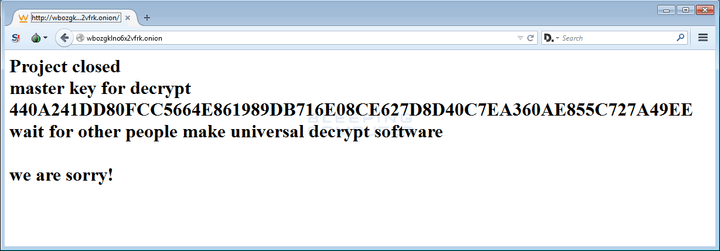
teslacrypt-decryption
Image used with permission by copyright holder

Using the details that they retrieved from the decryption key, ESET has now released a decryption tool for TeslaCrypt victims to guide them through the decryption process and get their data back.

ESET is keen to point out that decryption software like this isn’t a silver bullet to ransomware.

“We must stress that ransomware remains one of the most dangerous computer threats at this moment, and prevention is essential to keep users safe,” said ESET in its announcement. “Therefore, they should keep operating systems and software updated, use reliable security solutions with multiple layers of protection, and regularly back up all important and valuable data at an offline location (such as external storage).”

Users are also advised to stay wary of suspicious looking links in their browsers or emails from unknown sources, which may be vehicles used to distribute the ransomware.

Cases of ransomware have become more and more notorious in recent months with a number of high profile cases and several new variants of the viruses making the rounds, so users should stay vigilant.

Jonathan Keane
Jonathan is a freelance technology journalist living in Dublin, Ireland. He's previously written for publications and sites…
This website is a goldmine if you love Mac menu bar apps
Discover hundreds of menu bar apps, from tiny utilities to powerful productivity tools, all in one place.
MacMenuBar website open on Mac

The menu bar is the most underrated part of macOS. It sits quietly at the top of your screen, and most people never do anything with it other than checking the time and battery percentage. But if you find the right apps, that thin strip becomes the fastest way to get things done on your Mac.

The problem is finding those apps. The Mac App Store is not great at surfacing them, and hunting through random blog lists is a chore. And while I have shared my favorite Mac utilities that include menu bar apps like Supercharge and CleanShot X, there’s an even better place to find the best apps for your Mac’s menu bar.

Read more
How to install macOS 27 Golden Gate public beta on your Mac?
From a smarter Siri to a more reliable Spotlight, here's your full walkthrough for installing macOS 27 Golden Gate's public beta today.
macOS 27 Golden Gate

Along with iOS 27’s public beta, Apple has also released macOS 27 Golden Gate’s public beta build, so that early adopters can get their hands on the new features, including Siri AI, and provide timely feedback to help ensure a stable iOS launch in September. 

If you’re sold on all the new features but don’t want to put your faithful MacBook through developer beta duty, a public beta offers a much more refined experience. To install macOS 27’s public beta, follow the steps given below. 

Read more
Microsoft is finally fixing the worst thing about Windows Search, but you can’t try it just yet
Windows Insiders in the Experimental channel are getting a Search experience that finally feels less of a billboard and more of what users actually need.
Page, Text, Person

Windows Search has been a mess for years, and I do not use that word lightly. Open it to find a file, and you get trending Bing topics, Microsoft Store promotions, and an AI tools tile that just opens a browser. 

That is changing, but not immediately for all users. Microsoft is rolling out a batch of Windows Search improvements to Insiders in the Experimental channel, and for once, this isn't just a fresh coat of paint.

Read more
