

According to a recent blog post by an official at Microsoft, the next version of Windows sports a cold boot time of eight seconds. Since the release of Windows 7, Microsoft has studied the natural process flow of typical computer uses. They found that 57 percent of desktop PC owners completely shut down the computer each day while only 42 percent simply use the sleep function and a small one percent use the hibernate function. Within laptop owners, shutting down the laptop or putting it into sleep mode were tied at about 45 percent each. Laptop users are nearly ten times more likely to use the hibernate function over consumers utilizing PCs at work or at home.
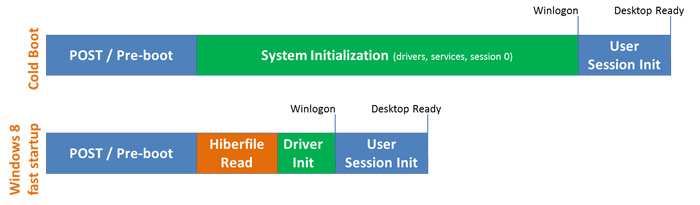 The majority of the people in the study also believed that shutting down the PC was the only way to eliminate power usage, although the hibernate function does the same. People that shut down their laptop also preferred getting a fresh restart of all applications over seeing applications being used from the previous day. The new boot process is a response to these concerns as booting in Windows 8 is a hybrid combination of a cool boot and the hibernate function. While the preboot process and post-login times have remained the same in Windows 8, Microsoft has found a way to scale back the load times on driver initialization and load the services as well as session information from a “hiberfile”.
Microsoft says that any system will benefit from the difference in load times, but computers utilizing a solid-state hard drive are particularly fast to boot to the initial login screen. Microsoft estimates that the time saved after upgrading to Windows 8 will reduce boot time between 30 to 70 percent on all computers. Microsoft faces competition with boot times from companies like Google. The company claims that the Google Chrome operating system on Google’s Chromebook has a boot-up time of about 8 seconds.


