1. Home
  2. Phones
  3. Mobile
  4. Deal Evergreens

Amazon Kindle Unlimited Free Trial: How to sign up without paying a dime

Add as a preferred source on Google

Searching for an Amazon Kindle Unlimited free trial? Stick with us and in no time you’ll be enjoying a two-month subscription without handing over a dime. You’ll even receive a notification when it’s about to come to an end so you can nip it in the bud before it switches over to a paid membership.

Think of Amazon Kindle Unlimited as the Amazon Prime Video (or Netflix) of the book world. The service offers unrestricted access to more than a million must-read titles, as well as a selection of popular magazines and audiobooks that come bundled with the subscription for free — no hidden charges.

Signing up for the Kindle Unlimited free trial couldn’t be easier. Just head over the website — or click the button above — and follow the on-screen instructions to create an Amazon account. Already have one? Simply click ‘”Join Kindle Unlimited”. You’re now enrolled for two months — for free.


Of course, there are some caveats. First, the two-month trial offer is only valid for customers who subscribe before midnight on June 30. Second, former Kindle Unlimited subscribers are not eligible for the taster: They’ll need to hand over the usual $10 per month if they want to use it again.

How To Sign Up For The Amazon Kindle Unlimited Trial

Confused? We’ll walk you through how to sign up for the Kindle Unlimited free trial.

Existing Amazon Customer

Step 1: Head over to the Amazon Kindle Unlimited website.
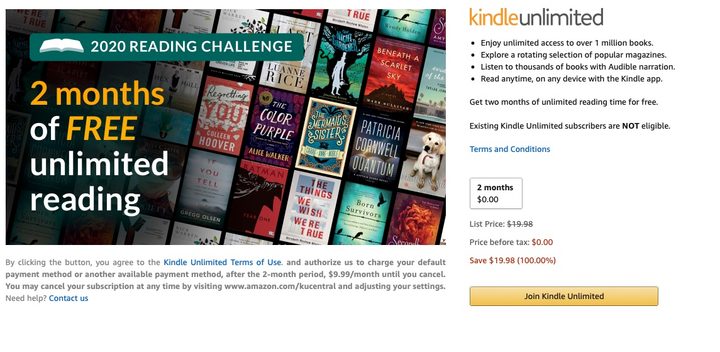
Head over to the Kindle Unlimited website and select ‘Join Kindle Unlimited’. Image used with permission by copyright holder

Step 2: Click the button labeled “Join Kindle Unlimited” — or hit the one below.

Step 3: Enter payment information for when the trial comes to an end.
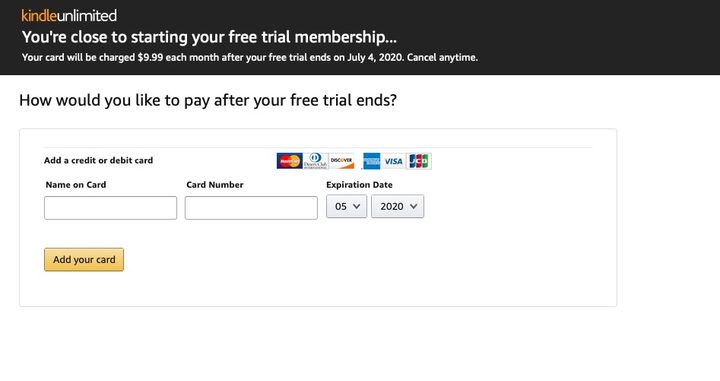
Enter some payment information for after the trial ends. Image used with permission by copyright holder

Step 4: Time to start reading!

New Amazon Customer

Step 1: Head over to the Amazon Kindle Unlimited website.
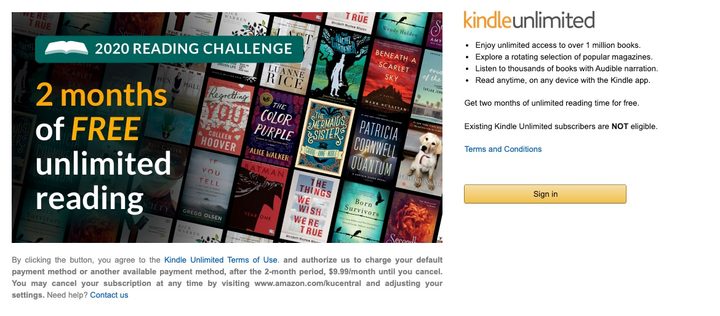
Head over to the Kindle Unlimited website and select “Sign In.” Image used with permission by copyright holder

Step 2: Click the button entitled ‘Sign In’ — or click the button below.

Step 3: Press “Create Your Amazon Account.”
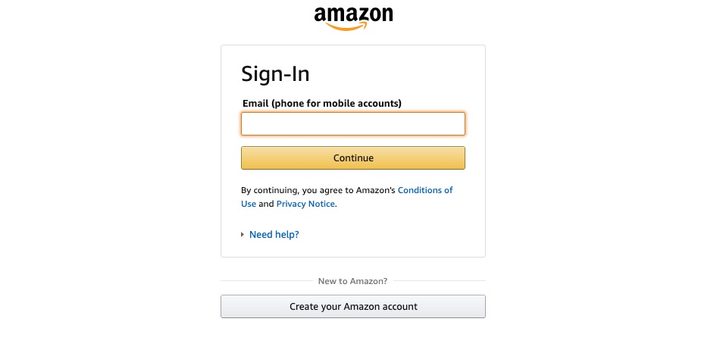
Select “Create Your Amazon Account” and follow the instructions. Image used with permission by copyright holder

Step 4: Follow the on-screen instructions to create an account.

Step 5: Add a credit card to be used once the taster is over.

Enter some payment information for after the trial ends. Image used with permission by copyright holder

Step 6: Choose a book and start reading!

Not sure where to start? Your best bet is to head over to the Amazon Kindle Unlimited Store, which isn’t a store at all because everything is free. What it is, however, is a catalog of everything that can be accessed through the subscription at no charge, organized by genre and what’s trending.

Here’s a look at what’s hot at the moment:

  1. When We Believed In Mermaids by Barbara O’Neal
  2. If You Tell by Gregg Olsen
  3. In An Instant by Suzanne Redfearn
  4. Last Day by Luanne Rice
  5. The Last Sister by Kendra Elliot
  6. The Dressmaker’s Gift by Fiona Valpy
  7. The Missing Sister by Elle Marr
  8. A Killer’s Wife by Victor Methos
  9. The Dare by Lauren Landish
  10. Wall of Silence by Tracy Buchanan
Commerce Contributor
Former Digital Trends Contributor
Digital Trends' Commerce team has a simple mission: to help our readers make the purchasing decision that is right for them…
Galaxy Z Flip 8 official renders reveal Samsung’s familiar foldable in three fresh colors
WhatsApp texting on the cover screen of Samsung Galaxy Z Flip 7.

Samsung's next foldable just lost another one of its secrets. Android Headlines has shared what appear to be the official renders of the Galaxy Z Flip 8, giving us our best preview yet of Samsung's upcoming clamshell. If you were expecting a dramatic redesign, though, you may want to temper those expectations.

If it ain't broke, Samsung isn't fixing it

Read more
Apple starts testing cheaper Chinese RAM inside iPhones, but your pocket won’t feel the ease
Fourth-largest DRAM producer in the world, on the Pentagon's watchlist, and now quietly inside Apple's test labs.
The M4 Mac mini on a desk.

Apple has quietly been testing a new memory supplier for some of its devices sold in China, and the name behind those chips is one that Washington has been keeping a close eye on.

It’s the one that I talked about a few days ago in another story, when rumors about Apple considering a Chinese memory supplier started surfacing after the company announced an ugly price hike for most of its devices (except iPhone and Apple Watch). 

Read more
Android 17’s new video standard fixes one of HDR’s biggest problems
Your HDR videos are about to look right, no matter what screen you use.
Electronics, Mobile Phone, Phone

Android 17 is packed with new features, but one small addition might end up mattering more than the flashy ones. It's called Eclipsa Video, and its whole purpose boils down to this: your HDR videos should finally look the way they're supposed to, regardless of which screen you're staring at.

Why does HDR look different on every screen?

Read more