“Blue’s Satellite headphones may look good and sound ok, but they’re not as easy to use or as comfortable as they need to be.”
- Wide stereo image
- Excellent passive noise isolation
- Noisy Bluetooth connection
- Hard clamping force
- Difficult controls
“Why you can trust Digital Trends – We have a 20-year history of testing, reviewing, and rating products, services and apps to help you make a sound buying decision. Find out more about how we test and score products.“
As the future of the 3.5-mm audio jack remains in question among smart phone makers, audio companies have gotten serious about developing new wireless options for listeners on the go.
That’s where Blue’s Satellite headphones come in. An over-ear set of cans with Bluetooth and active noise cancelling, the Satellite are aimed at the same crowd who might be entertaining other premium options like Sony’s MDR-1000x or Bose’s QC-35.
Though Blue’s latest headphones look great and have solid sound, we don’t think the higher-end pedigree paid off in terms of build quality. For all of the compelling bells and whistles the Satellite offer, problems with fit and finish preclude our recommendation.
Out of the box
Catching your first glimpse of Blue’s new over-ear headphones requires peeling back a few layers of black cardboard, at which point you’ll see a full-sized hard case with a gold Blue logo in the center.


Once you swing open the case, you’ll find a pair of black headphones gilded in gold and silver sitting snugly inside a perfectly molded interior, with a small zippered case securely storing an included 3.5 mm audio cable and black micro-USB charging cable.
Features and design
Save an adjustable microphone, the Satellite headphones look like the sort of headset a helicopter pilot might hand you before takeoff.
They look like the sort of headset a helicopter pilot might hand you before takeoff.
The Satellite’s steampunk exterior is a toned-down take on the company’s more aggressively designed Ella and Mo-Fi headphones, but it’s still a head turner.
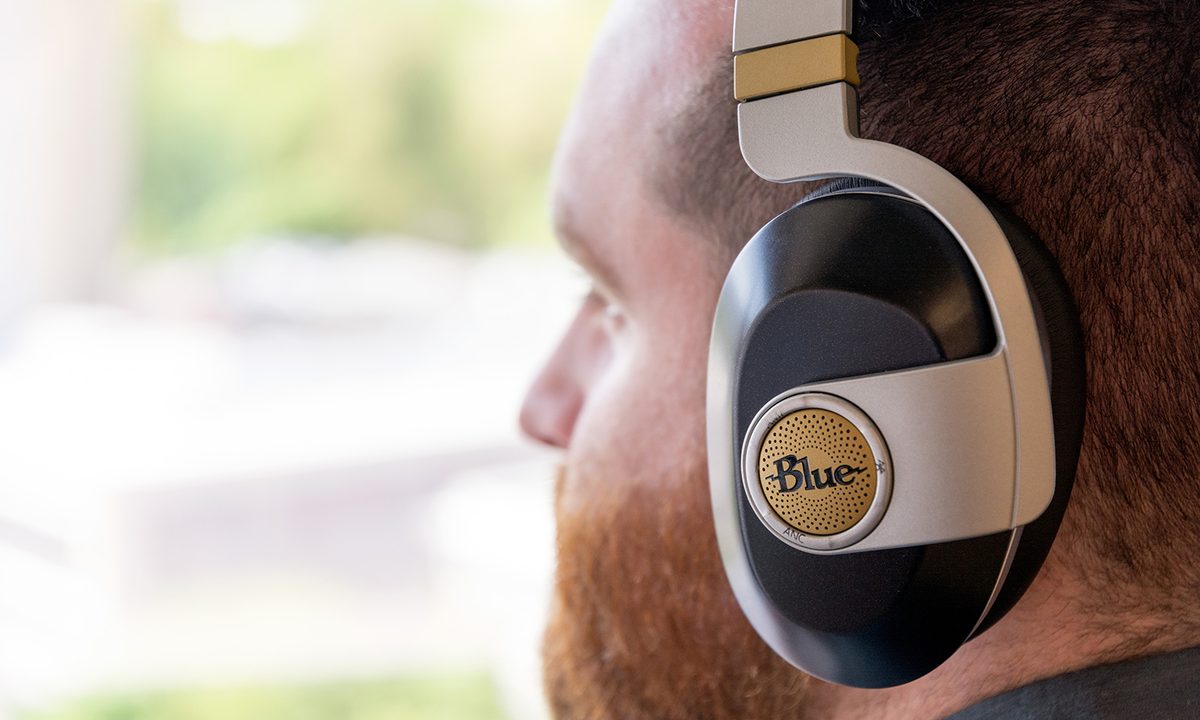
The headband — perhaps the most iconic part of the previous models — still attaches to the rear of the headphones, but manifests as a simple band of grey plastic with gold accents and dark fabric padding beneath, rather than the insane metal and leather contraption we’ve seen in the past.
The earphones are also similar to their older brother and sister in terms of overall design, still clearly modeled after classic studio headphones from the 1970’s, but with more subtly-designed black plastic exterior prominently featuring the Blue logo on each earcup.
Even though the looks are softer than their more expensive predecessors, the Satellite sport a more vast array of features. Although Blue’s other models also feature built-in headphone amps to power their custom drivers, the Satellite are the only ones to feature active noise canceling and Bluetooth.

The amplifier, active noise cancellation, and Bluetooth pairing are controlled via a trio of raised-plastic buttons that surround the Blue logo on the left earcup, with a similar set of buttons on the right side to control volume, playback, and phone calls. The LED-lit power button and micro-USB charging port can be located on the bottom of the left earphone.
Given that there are so many physical buttons on the outside of each ear, it was tough to remember which button served what purpose — so much so that we frequently found ourselves removing the headphones to turn the noise cancelling amplifier on or off.
Ease-of-use issues aside, we found a few other problems with finish quality: We were disconcerted to find that the painted “AMP” button label was already wearing off after just a few weeks of light testing, numerous testers commented on how difficult the power button was to press, and the headphones were uncomfortable to wear for everyone in our office who tried them.
Everyone in our office who spent time with them had a tough time wearing the headphones for extended periods.
We’re used to Blue’s traditionally firm fit, but this time the clamping force was just too much. After an hour or so, everyone we loaned them to reported some form of annoying pressure on the side or top of their skull, despite the well-padded headband and earcups. With all of that said, Blue says that the headband will loosen with time, and that the most recently made units are being shipped with a slightly loosened fit.
Along with the clamping woes, we also noticed some degree of Bluetooth signal noise was constantly audible in the background when paired with both an iPhone 6 and Moto X Pure Edition. When music was playing it became unnoticeable, but this isn’t something we like to experience in Bluetooth devices at this price point.
The Satellite’s battery performance varies widely depending on how you’re using them. The company advertises 24 hours with the noise-cancelling and built-in headphone amp off, and 8 hours with both on, which is in keeping with what we experienced in testing. Fortunately, the headphones don’t need power to play back music when using the included 3.5 mm cable.
Setup
Pairing with the Satellite headphones is quick and painless. Simply turn them on, press the Bluetooth button on the left earcup, locate the headphones in your device’s Bluetooth menu, and pair.
Audio/Active noise-cancelling performance
The Satellite headphones feature an interesting 4-driver setup, with two dedicated 30mm dynamic drivers fitted just for the noise-cancelling functionality, and a pair of 44 mm dynamic drivers for music playback. This separation of duties is aimed at a clearer overall sound profile and better overall noise-cancelling performance, but we didn’t notice a significant improvement over the more conventional design used by Sony or Bose.
Much of the Satellite’s noise abatement comes from the passive sound isolation offered by a very firm fit and thick earcups. At times, we weren’t certain the active noise-cancelling feature was engaged. Still, even though normal sounds like voices and keyboard clicks were mostly muted by the earcups themselves, we did notice a cleaner overall soundstage with active noise cancelling engaged, particularly when it came to weeding out tough-to-sort low-mid frequency rumbles from AC units and heaters. In the end, the combined sound-stopping abilities of the Satellite headphones was more than enough knock out the din of a noisy office or subway train.

While we often found ourselves listening to the headphones without active noise cancelling, one thing we recommend leaving on is the built-in headphone amp. When engaged, everything about the sound was fuller and more dynamic, with the extra power giving every aspect of the music more room to breathe, further expanding the soundstage.
In fact, the thing we most loved about the overall sound of the Satellite headphones was how wide the stereo image was. Especially when listening to hard-panned music like The Beatles’ Abbey Road, we found something extremely fun and vivid in the sound in its far edges, with background voices and percussion peeking happily out from the corners. We did notice that general clarity of the sound got less vivid the closer to the middle you listened. When listening to the same Beatles material in its re-mastered mono form, we felt there was something a bit opaque about the center of the soundstage, a quality that one listener described as sounding as though it was covered in a thin plastic film.
Still, the overall listening experience was solid, with the vibrant stereo imaging met with firm and punchy bass, particularly suiting the kick drums and dull bass lines on classic recordings like Neil Young’s On The Beach. The clean low end also served the warm upright bass tones heard on jazz recordings such as Freddie Hubbard’s Dedicated To You extremely well, with each pluck of the strings coming through clearly in the musical image.
Our Take
While Blue’s Satellite have solid overall sound, there are too many issues with fit, finish, and usability at this price point.
Is there a better alternative?
There are a good amount of great quality wireless noise-cancelling headphones in this price range, but the king of the castle is Sony’s excellent MDR-1000x, which offers longer battery life, better sound isolation, and an even cleaner soundstage.
How long will it last?
Given the hard case and solid overall feel to the Satellite headphones, they should last through years of steady use, even if we have some gripes with the overall fit and finish.
Should you buy it?
No. Even with all these bells and whistles, there are simply too many excellent headphones with noise cancelling at or around this price point to make a compelling argument for Blue’s Satellite.