1. Home
  2. Audio / Video
  3. Mobile
  4. News

Samsung Galaxy Buds+: Everything we know following Unpacked 2020

Add as a preferred source on Google
 

The February 11 Samsung Galaxy Unpacked event is now part of the history books and, as suspected, the company included the debut of its Galaxy Buds+, the true wireless follow-up to its popular Galaxy Buds.

Here are all of the details you need to know:

Recommended Videos

Price, availability, and colors

Samsung Galaxy Buds+ hands-on in case
John Velasco / Digital Trends

The Galaxy Buds+ are $150 and they’ll be available on Samsung.com starting February 14, 2020, and then at retailers and mobile phone operators starting March 6, 2020.

If you pre-order a Galaxy S20+ or Galaxy S20 Ultra, which were also unveiled at the event, you will get Samsung credits of up to $200 that can be used toward the purchase of the Galaxy Buds+, which could make them effectively free.

You’ll be able to buy them in one of these Samsung colors: Cosmic Black, White, Red, and Cloud Blue.

Battery life

Samsung Galaxy Buds+ hands-on earbuds on table
John Velasco / Digital Trends

Battery life will be a very generous 11 hours per charge. As with the Galaxy Buds, the case will only carry about one full recharge, for 22 hours of total playtime. Three minutes of fast charging will get you an extra 60 minutes.

Audio performance

Samsung Galaxy Buds+ hands-on case
John Velasco / Digital Trends

With a new dual-driver design and audio tuning by AKG, sound quality is expected to be even better than the Galaxy Buds. Samsung has described it as “studio-quality that is balanced, detailed and natural.” The company says that Ambient mode — which allows the passthrough of outside sounds via the onboard mics — has also been beefed up.

Water-resistance
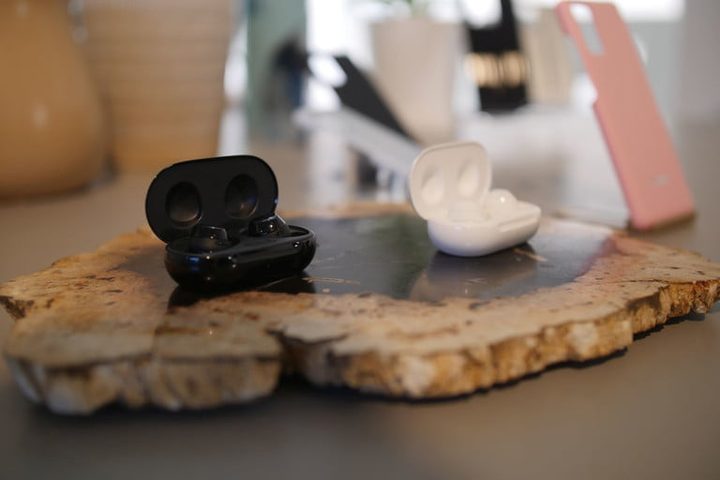
Samsung Galaxy Buds+ hands-on cases
John Velasco / Digital Trends

Somewhat disappointingly, Samsung has elected to leave water-resistance on the Galaxy Buds+ the same as the Galaxy Buds, which is to say, it’s IPX2. That’s going to be fine for the occasional sweaty workout, but not much more. Virtually all new true wireless earbuds are shipping with a minimum of IPX4 these days.

Noise cancellation

This is something of a surprise: The Galaxy Buds+ will not have active noise cancellation. Given that since the debut of the Galaxy Buds, we’ve seen the appearance of the Sony WF-1000XM3, the Echo Buds, the AirPods Pro, and the Master and Dynamic MW07 Plus — all of which have this feature — you’d think Samsung would want to compete here too. However, the Echo Buds are the only earbuds to offer this feature for less than $150, and perhaps Samsung reasons that few people will expect a $150 set of earbuds to have it.

Given that the Jabra Elite 75t and Elite Active 75t don’t have ANC either and cost even more than the Galaxy Buds+, perhaps Samsung’s decision is the right one.

Extras

Beyond these top-line features, the Galaxy Buds+ will also have a few other cool aspects:

  • Multiple Bluetooth connections will be supported
  • One-touch access to Spotify via the earbuds
  • An iOS app at launch, something the Galaxy Buds never had, and which will give iPhone users full customization control

For the price, Samsung has definitely provided a lot of value. Should they be your next true wireless earbuds? Check back with us soon — we’ll have our first impressions and a full review shortly.


Simon Cohen
Former Contributing Editor, A/V
Simon Cohen obsesses over the latest wireless headphones, earbuds, soundbars, and all manner of related devices and…
Proton reveals how smart TVs track you and the escape situation is pretty grim 
Modern smart TVs fingerprint your screen content at the chipset level.
Google TV applications on the Sony A95K TV.

Your smart TV may know far more about your viewing habits than you realize, even if you rarely use its smart features. In a new privacy explainer, Proton warns that many modern TVs quietly collect data about everything displayed on the screen and share it with manufacturers, advertisers, and analytics companies.

The worrying part is that escaping this tracking is becoming increasingly difficult because many privacy controls are buried deep in settings or enabled by default. Proton argues that buying a smart TV today often means accepting a level of surveillance that most people never knowingly signed up for.

Read more
LG is cracking down on smart TV apps that quietly turn your TV into a secret proxy
LG OLED Settings

If you own an LG smart TV, there's a chance one of your harmless-looking apps has been moonlighting as an internet relay for someone else's traffic. According to a report from KrebsOnSecurity, LG says it's finally stepping in to stop this menace. This week, the company confirmed it plans to suspend any webOS app that turns a TV into what's called a residential proxy node.

The move follows a report from security firm Spur, which found that more than 42 percent of apps on LG's webOS store include SDKs that quietly reroute internet traffic through your TV, indefinitely. Samsung isn't spared either, with over a quarter of Tizen apps carrying similar code.

Read more
The LG C6 OLED is great out of the box. These settings make it even better.
From Filmmaker Mode to shadow detail and AI Sound Pro, these are the settings that made the biggest difference after a month of testing the LG C6 OLED.
LG OLED Settings

The LG C6 OLED is one of the best mid-range OLED TVs you can buy right now. After spending the past month testing and using it every day, one thing became clear: straight out of the box, you're leaving picture quality on the table.

The good news is that getting more out of the TV doesn't require professional calibration or hours spent digging through menus. A handful of small adjustments can make movies look more cinematic, improve shadow detail, smooth out motion and even make the built-in speakers sound noticeably better. Here are the exact settings I've been using after living with the LG C6.

Read more