

Everybody loves a good deal. That’s why we like to hunt Craigslist for every sector of life that can use a discount: used cars, apartment rentals, cameras, airplane tickets, the list goes on. I’ve probably used Craigslist for all of the aforementioned, and the quickest way to complete a transaction on Craigslist is knowing how to write the perfect post. With hundreds of listings added to the site on a daily basis, here’s everything you need to know to make your ad stand out from the crowd and convey your message — fast.
Clear, concise headline
Attention grabbing headlines do not mean write everything in all caps. That just makes people glance over the post, envisioning some annoying salesman trying to beat a product over their heads. More than two exclamation points and asterisks in one headline? Do not want.

Instead, opt for keywords that describe your item in as few words as possible. Trust me, if people are looking to buy, they will click. You don’t need fancy adjectives like “elegant and charming 3-bedroom apartment” or “wonderful cheap Audi, great for family” to sell the audience on your ad. You can mention the size and qualities inside the post, but naming the adjectives off the bat isn’t going to convince anyone who is just glancing and sorting through listings.
Yes, while being unique and witty helps, when most people flock to Craigslist, they are willing to sort through anything that’s available to keep them as options. Therefore, if you must show off your sense of humor and awesome writing abilities, keep it concise and preferably inside the actual post. If you’re selling a car, just name the car make, year, model, transmission type. If you really want to put the color there, that’s fine, but it’s not the most important factor. The same goes for cellphones or cameras: name the manufacturer, condition (new, used, open box, selling just parts), and model. Keep it simple!
Photos
Since Craigslist has a feature that will filter for only posts with images, it’s a good idea to at least include one photo in your listing. Make sure to use original photos that you’ve taken yourself. If that photo can be found anywhere else on the Internet, my first thought generally assumes that this photo is not genuinely yours and that you just stole someone else’s to illustrate your product. Stock photos are even worse. If I’m searching particularly for a Samsung Galaxy S3, I already know what it looks like according to Samsung.

Even if you are a novice at HTML, you can link photos that have been uploaded via a third party directly onto your listing. Still, unless these photos are resized correctly, they may display oddly on different computers and mobile phones. Use Craigslist’s uploading tool to ensure your photo come out in the exact scale the site intended, even if that means you sacrifice a bit of quality. You can always externally link your viewers to an online album like Flickr or Picasa where they can see more detailed images.
That said, keep photos inside the post to a minimum. No one wants to scroll for ten minutes waiting for everything to load. If you are selling a car, get a photo of the front, side, interior. Getting rid of shoes? Show the overall pair along with the underside. If you mention any flaws with your product, be sure to highlight that photo as well. Interested parties will e-mail you for more photos, or offer to come see it in person, if need be. Just make sure to have additional pictures on hand in case they are requested.
Readability
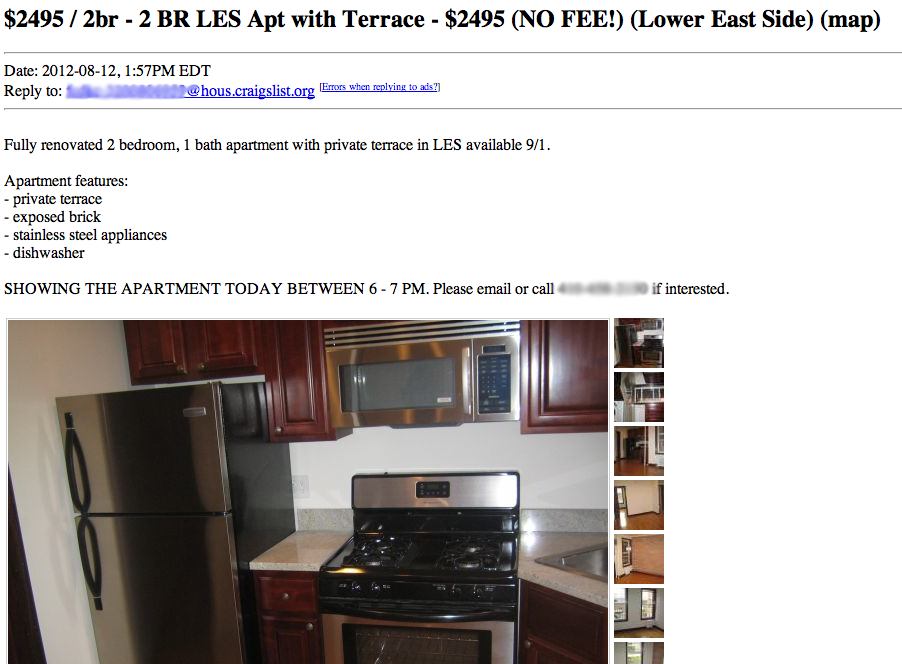 Congratulations, someone clicked on your listing! Now you have to maintain their attention. The easiest way to help viewers get a good grasp of your listing is to make the post more readable. This means using bullet points, or paragraph breaks to help the eyes follow the flow of information with ease. If you’re looking for a roommate, give your quick introduction as to who you are and what you do. Then, bullet point the size of the available room, rent, utilities, neighborhood, furnishings, and then a separate bullet checklist of what you are looking for in your roommate. The entire page should not take more than a few scrolls to get through the whole listing, photos included.
The same rationale goes for job postings. Introduce the company and what the job entails, then list the qualifications desired. Oftentimes, people will skip right down to the qualifications to see if they should actually apply in the first place, so this is a quick way to funnel your applicants. If you want to take it a step further and bold the important points, such as starting date or contact information, this will also be helpful. However, do not use various font sizes and stick with one uniformed look.
How to contact you
You’d be surprised how hard it can be to track down a Craigslist poster, especially for a hot-ticket item like a cheap apartment in cool neighborhood of New York City. That thing goes in a few hours.
 Make it clear for viewers how to best contact you. E-mail is the best option if you want to establish a casual form of communication before handing your number out to a stranger over the Internet. If you are selling urgently, make your phone number clear in the listing and whether the person should call or text you. To prevent creepers from calling you again after the transaction is over, sign up for a Google Voice number that you can toss out after the deal is done.
If your deal is finished before your post is set to expire, remember to take it offline so you can stop the e-mails from pouring in. Remember that while these components are effective writing methods, the transaction success rate will depend on your pricing and the customer’s eagerness to buy. Good luck, happy selling, and please, don’t scam anyone.


