“Lenovo’s adds a stunning HDR display to its fast, feature-packed X1 Yoga 2-in-1.”
- Rugged design
- Great keyboard
- Beautiful HDR display
- High-performance hardware
- Doesn’t lose weight from prior year
- Extremely expensive
“Why you can trust Digital Trends – We have a 20-year history of testing, reviewing, and rating products, services and apps to help you make a sound buying decision. Find out more about how we test and score products.“
There are a lot of 2-in-1s available today, but if you’re looking for something durable and fast, the Lenovo X1 Yoga stands out. Lenovo is launching the third generation at CES. Though not a major change from past models, the X1 Yoga 3rd-gen adds a few intriguing features.
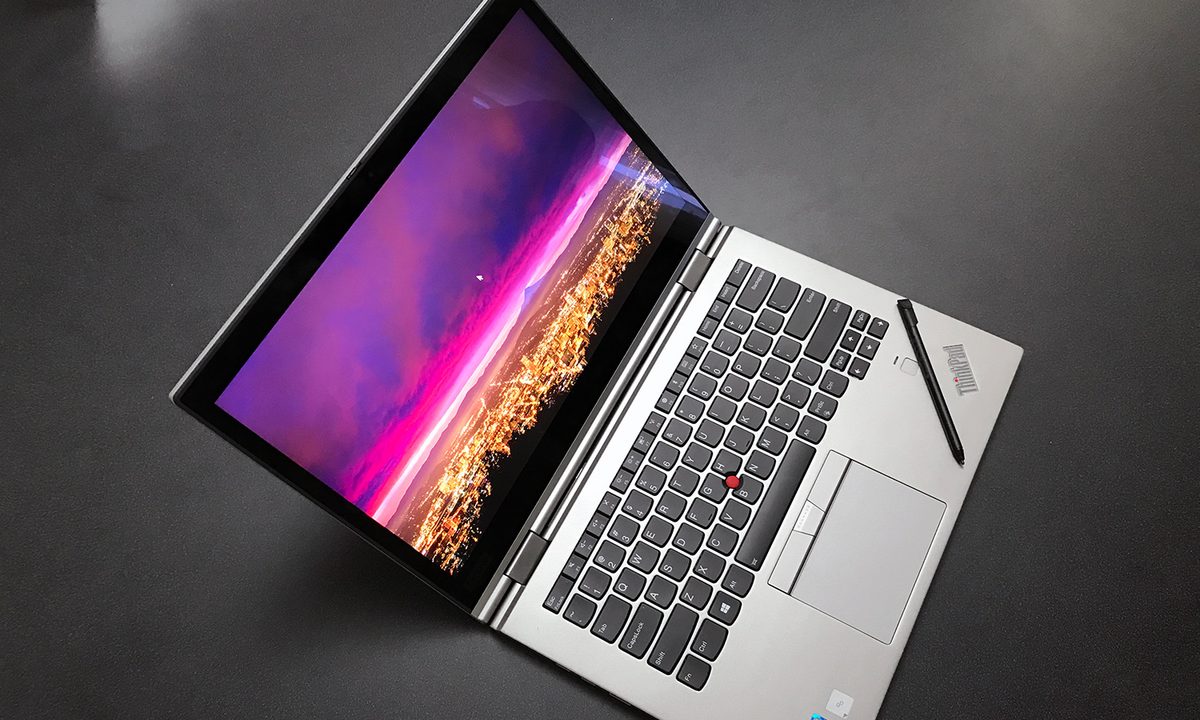
The headliner is undoubtedly the 14-inch Dolby Vision HDR touchscreen. With a maximum brightness of 500 nits and 2,560 x 1,440 resolution, it’s a looker, particularly when fed high-quality HDR content. This is the first HDR display to appear on a ThinkPad, and is meant as a replacement for the OLED screen, which is being discontinued.
With a brightness of 500 nits and 2,560 x 1,440 resolution, the Dolby Vision HDR screen is a looker.
We’ll be sad to see the OLED go. It was gorgeous and, to be honest, the HDR screen doesn’t quite measure up – though it does look excellent in its own way. The OLED’s demise is due to its power drain, which sucked down the battery quick. Lenovo thinks the HDR screen is a better balance between visual punch and endurance.
Lenovo has also added a physical privacy shutter to its camera, a handy security feature that the company seems to be adding to many of its device – and not necessarily just laptops.
Like past X1 Yoga models, the 3rd-gen includes a built-in stylus that tucks into the 2-in-1 when it’s not in use. It’s small, which might make it uncomfortable for long stretches, but at least you won’t lose it. This remains an uncommon feature, though Samsung’s Notebook 9 Pen will give it competition.
3rd-gen updates to 8th-gen
As you’d expect, the Lenovo ThinkPad X1 Yoga 3rd-gen includes Intel’s 8th-generation Core processors, up to the Core i7. That’s paired with up to 16GB of memory, up to 1TB of PCI Express solid-state storage, and Intel UHD 620 graphics. Battery life is quoted at 15 hours. This is all top-tier hardware, but we’d expect no less from a premium 2-in-1.


What hasn’t changed – much – are the laptop’s overall dimensions. Lenovo says the chassis isn’t identical to the second generation, but its specifications are very similar. It weighs 3.09 pounds, which is a slight gain from the 2nd-gen’s 2.8 pounds. The new X1 has slimmed down a bit, though, from .66 to .6 inches. Differences this small will be hard to notice even if you use a 2nd-gen and 3rd-gen model side by side.
Luckily, the X1 Yoga’s best traits remain intact. The keyboard is still one of the best you’ll find on any 2-in-1, the touchpad is responsive, and the iconic TrackPoint is still nestled in the middle of the keys.
We’re also a fan of the X1 Yoga’s sturdy build quality. While it’s light, it also feels stiff and rugged. It’s the kind of device you can literally throw in a backpack without (much) worry it’ll break. Despite the lack of diet, the Lenovo X1 Yoga still feels light in your hand. Three pounds isn’t extremely light for a 2-in-1, but remember – the X1 Yoga has a 14-inch screen, which is larger than most of its competitors.
Lenovo asks at least $1,889 for the X1 Yoga. That’s a lot of money. The ThinkPad X1 Yoga targets users that demand a lot from their hardware, and our willing to spend a lot, too. Most people will be better off with a mainstream 2-in-1, like the HP Spectre x360, Lenovo Yoga 920, or perhaps even the new Samsung Notebook 9 Pen – depending on its price, which is still unknown. If you want a road warrior, however, the Yoga X1 is hard to beat.