
 So, is the new BlackBerry Torch, officially the BlackBerry 9800, an iPhone killer?
Uh, no. That’s something the lamestream media would ask. A more informed question is, will the Torch staunch BlackBerry’s bleeding?
While still the smartphone leader, BlackBerry has dropped 12 percent in market share, first to iPhone and most recently to Android, according to Nielsen. Worse, Nielsen reports a whopping 58 percent of survey respondents say they plan on switching from BlackBerry to some – any other – smartphone OS.
First Impressions of BlackBerry OS 6
Thanks mainly to the new BlackBerry 6 OS, the Torch, available Aug. 12 for $200 from AT&T, should help blunt that switching desire. BB OS 6 looks and acts more like iPhone or Android, but adds two compelling improvements: universal search, and fully customizable app home screens that make Torch far easier to use for BlackBerry neophytes.
Universal search is truly universal. Just slide down the vertical QWERTY and start typing; search results appear immediately and possibilities narrow as you continue to type. You can then further narrow your search by tapping an application icon. For instance, if you’re searching for “Poker Face” by Lady Gaga, as you type in “Poker…” you can then tap the music player or Slacker or YouTube to narrow your search to that app, or if you’re looking for poker games, tap the BlackBerry Marketplace app.
It’s also easier to find an app buried in multiple home screens filled with icons. First, each screen has an Android-like slide-up vertical window of apps, so you can hide or show all the apps on that screen. Second, apps are grouped into logical categories (favorites, media, social, downloads, etc.), that you swipe through horizontally. Like Android, BB OS 6 offers top-line notification updates, but the drop down notification menu gives you more of a preview of each individual incoming item.
Other functionality niceties include multi-tasking, an RSS aggregating app, photo geotagging (file names are the city in which the photo is taken and a number), wireless Wi-Fi syncing, and best of all, an app that aggregates social networks, e-mail, updates and messages. When you tap an incoming message, you’re taken instantly to the page on the source application; in other words, if you tap on an incoming Facebook update, you’re taken directly to that Facebook page without having to open a separate Facebook app.
 Missed Opportunities
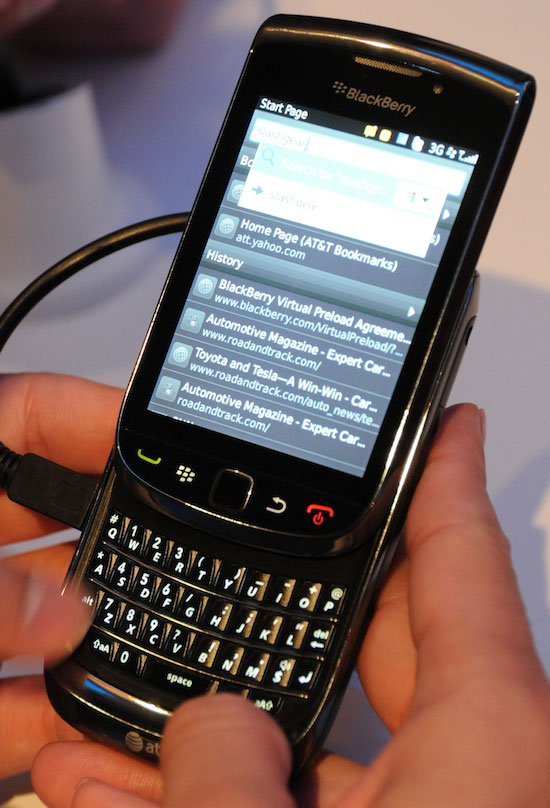
That’s the good news for current and potential BlackBerry users. The bad news is the Torch itself. Given the recent flood of superphones, the Torch is hardly a dying ember.
The Torch has a slide out vertical keyboard under a full multitouch capacitive touchscreen, which seems like two missed opportunities. First, even though the Torch’s whole front is a touch screen, it’s just a 3.2-inch display with just 360 x 480 pixels – that’s around half the pixels arrayed on iPhone 4’s Retina screen.
Second, BlackBerry’s QWERTY keyboards necessarily have been compressed affairs. A slideout keyboard affords the opportunity to spread out horizontally – but RIM opted for yet another compressed QWERTY.
BlackBerry’s Band-Aid
The Torch falls short compared to iPhone 4, Samsung Galaxy S, Motorola Droid X, Sprint’s Evo 4G, and all their contemporaries in nearly all other hardware capabilities. It’s powered by a 624MHz processor, rather than the suddenly de rigueur 1GHz engine on all other recent superphones. There’s a 5-megapixel camera with a flash, but only a VGA rather than HD video recorder, not to mention just 4GB of built in memory rather than 8GB or even 16GB, and Bluetooth 2.1 instead of 3.0.
Considering all its competitors offer a lot more for the same price or less, Torch is hardly the breakthrough AT&T and RIM hope it will be.


