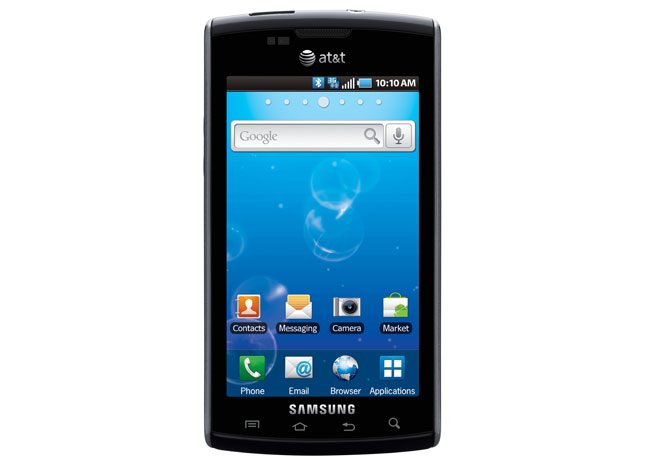

“Samsung’s iPhone-challenging Galaxy S Captivate offers a larger screen and blissful freedom from antenna issues, but has its own headaches, too.”
- Bright, colorful, glossy 4-inch AMOLED screen
- Google Android OS v2.1
- 5-megapixel camera, 720p HD video recorder
- 16GB built-in memory
- Light, sleek, uncluttered exterior
- Touch controls backlighting out-of-sync with screen
- No camera flash
- No front-facing camera
- Confusing lock switch in camera mode
- Slower Web surfing than iPhone
“Why you can trust Digital Trends – We have a 20-year history of testing, reviewing, and rating products, services and apps to help you make a sound buying decision. Find out more about how we test and score products.“
 Introduction
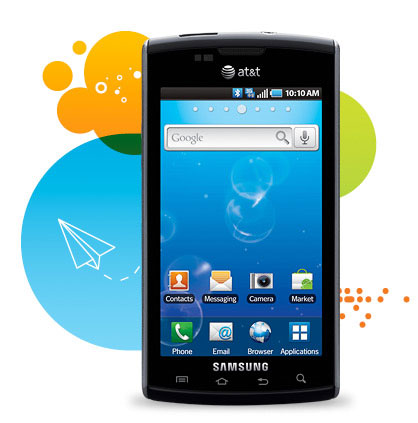
Guy walks into an AT&T store and says, “I want a touch-screen smartphone, but I’m concerned about the iPhone 4 antenna issues.” Until the Samsung Galaxy S Captivate, AT&T sales staffers could only perform stuttering a Ralph Kramden prevarication. But will iPhone purchasers or returners be captivated by the Captivate’s capabilities? It’s a more social-network-centric device than iPhone, with a large 4-inch, crisp “super” AMOLED screen. While it suffers in a basic features comparison with iPhone, that’s also like arguing that U2 sucks because they haven’t sold as many records as The Beatles.
Features and Design
A slimming black slab superphone, Samsung’s Captivate contains nearly all the modern cell Android 2.1 amenities: 7.2 Mbps 3G connectivity, WiFi, a speedy 1GHz Hummingbird processor, 5-megapuxel camera and HD (720p resolution, 30 fps) video recorder, Bluetooth 3.0, six-axis sensor for enhanced gaming, 16GB internal memory, and SWYPE text input. Captivate also includes something Samsung calls “Social Hub,” which aggregate updates from your Facebook, Twitter and MySpace accounts.
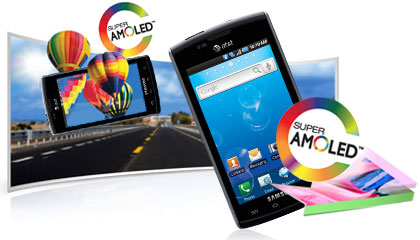 The Captivate’s main physical advantage over the iPhone is its screen. It’s a 4-inch super AMOLED display, compared to the iPhone’s 3.5-inch LCD display. The Captivate displays brighter, more accurate colors than the iPhone; For instance, the red band on ESPN’s home page is actually red, as opposed to the nearly maroon rendering on the iPhone. However, the Captivate’s whites tend toward the blue, and the iPhone’s screen is generally brighter, especially out in the sun. With its 960 x 640 pixel Retina resolution, reading text on the iPhone 4 is also easier on the eyes. But you’d only notice the brightness and readability differences in a side-by-side comparison, and neither is a deal breaker.
The curvier Captivate is around a quarter-inch taller and wider than the iPhone, and barely perceptively thicker. None of this makes much real-world difference, especially considering the extra half-inch of screen real estate. Its rear resembles the old Sidekick. Even though it’s slightly bigger, the Captivate’s all-plastic housing makes it a surprisingly noticeable 0.3 ounces lighter than the iPhone 4.
To the left of the earpiece are two small windows: These are light sensors, not a front-facing camera array, which the Captivate surprisingly lacks.
One other annoying drawback is the backlighting on the front touch control, such as menu, home, back, and search. The touch control backlighting goes off while the display is still on, rendering them nearly invisible in artificial light. We often had to touch the area twice, once just to activate the backlight so we could see where the controls were. This became increasingly frustrating the longer we played with the Captivate, and almost became a deal breaker.
There are only two physical controls: the volume rocker on the left side, and the power switch on the right, which doubles as a lock and hold key in certain apps.
The microUSB jack is at the top, next to the headphone jack, which makes it less awkward to use the phone when it’s plugged into a PC for charging and syncing.
Multimedia
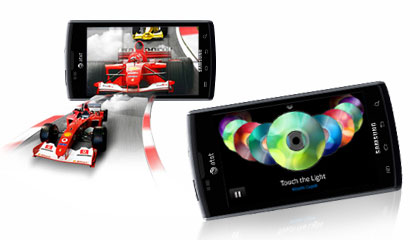
AT&T has crammed Captivate with video options, including the oddly not-yet-renamed Cingular Video (it’s called “Mobile Video,” but connects to a Cingular Video URL), the subscription-based MobiTV (you get a free trial period), and the yet-to-be-implemented Samsung Media Hub, from which you’ll be able to rent or buy movies and TV shows. Unfortunately, most the low-res offerings from these services don’t exactly challenge the AMOLED screen.
Like most 3G phones, YouTube videos default play in standard resolution, requiring you to drill through the menu to get the high-quality version that helps show off the AMOLED technology.
Samsung also has included a media app called AllShare, which lets you play a file from your phone on another media player, play a file from a server on the phone, or play a file from a server onto another player, using the phone as a remote – all requiring Wi-Fi and DLNA.
The bulk of the audio emanates from a rear speaker, which produces plenty of volume. But be careful where you put your hand, or you’ll muffle the sound.
Sound Quality
Call quality is above average, similar to the iPhone, so you’ll neither gain nor lose anything in conversation quality between the two.
Phone Functionality
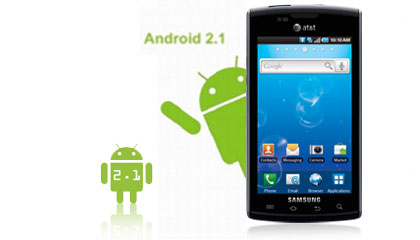
Samsung has changed the app menu from the usual vertical slide-up to an iPhone-like, four-by-four grid of icons arrayed across a series of swipable horizontal screens. On the Captivate, apps can’t be re-arranged from their automatic alphabetical ordering.
The Captivate’s white-on-black Contacts app is a throwback to monochrome screens, but actually makes info easier to read, especially in a dark environment. The haptic touch dial pad has large, white-on-gray, easy-to-read alphanumeric keys.
Similarly, the well-spaced Captivate white-on-black haptic-touch keyboard is possibly the best of the Android phones thus far.
Web

In New York, AT&T’s 3G network has vastly improved, but the Captivate lags behind the iPhone in loading Web pages. The iPhone loaded Mobile-optimized pages nearly twice as fast as the Captivate – around three to four seconds on iPhone versus four to six seconds on the Captivate. Apple’s phone holds a three-to-five second advantage for non-optimized pages – the New York Daily News page, for instance, took 17 seconds on the iPhone, and 21 seconds on the Captivate.
Camera
Here’s where the iPhone shines and Captivate, well, doesn’t. Both phones have 5-megapixel imagers, but Captivate images look slightly bleached compared to the iPhone’s crisp, colorful snaps. The iPhone’s biggest photographic advantage is a flash, which the Captivate shockingly lacks.
 Not surprisingly, the iPhone also captures slightly superior video with less grain on indoor footage. But the Captivate’s 30-fps video capture is still far above average, compared to other recent superphones with lower frame rate video capture, such as the Sprint EVO and the Droid X.
Then there’s the side multifunction button. In almost all other apps, you hit this key and the phone shuts off. But in camera and video record mode, it locks the screen and all the buttons, a status indicated by a tiny, barely perceptible on-screen padlock icon. We’re not sure why this camera lock is necessary. With no immediate and obvious status indication, it frequently delayed snapping candid shots. Its location on the Captivate’s spine also suggests it is a shutter release key, further confusing matters.
Battery Life
Technically, the Captivate is rated at nearly six hours of talk time and 300 hours of standby. In real-world use, there wasn’t a day of normal calling, Web surfing and picture-taking usage in which our test model dipped below 50-percent capacity. That gives it capacity similar to the iPhone 4, which is rated at seven hours of talk.
Conclusion
If you’re an active social networker and video watcher, the Captivate probably makes a better choice than the iPhone 4, especially if you’re concerned with iPhone’s antenna issues. If you’re more concerned with speedy Web surfing, image and video capture, and video chatting, the iPhone 4 is the only choice. All other things being as equal as they can be (including the $199 price tag), the iPhone 4 is still the AT&T superphone champion, with performance superior in head-to-head comparisons with similar functions on the Captivate. But the margins are narrow enough not to make Captivate an uncomfortable non-Apple choice.
Highs:
- Bright, colorful, glossy 4-inch AMOLED screen
- Google Android OS v2.1
- 5-megapixel camera, 720p HD video recorder
- 16GB built-in memory
- Light, sleek, uncluttered exterior
Lows:
- Touch controls backlighting out-of-sync with screen
- No camera flash
- No front-facing camera
- Confusing lock switch in camera mode
- Slower Web surfing than iPhone