Wondering how to repair a broken iPhone screen? Should you live with it, get it fixed, or try to fix it yourself? If you’ve just had the misfortune of dropping your iPhone or had some accident where your iPhone’s screen was cracked or shattered, then welcome to one of the biggest clubs in the world. This problem is very common, so Apple has options for you to get your iPhone screen fixed, but it isn’t always cheap or convenient. So, what should you do if you have a broken iPhone screen? Let’s take a look at your options.
Option 1: Live with it

Many people with a broken iPhone screen decide to live with it. Maybe their iPhone is out of warranty and they just don’t want to pay for repairs, or maybe they’re thinking about upgrading their phone soon, so they don’t see the point in fixing it. Obviously, if your iPhone screen shattered completely and pieces are missing or if it’s not working at all, then you have no other option than to get it fixed. However, many users just have a crack or two and the damage may not interfere with normal use of the iPhone.
Bear in mind that once cracked, the iPhone screen is weak and very prone to further damage. It’s smart to invest in a screen protector to help hold it together and keep it safe from further harm. Check out our picks for the best iPhone 7 screen protectors, best iPhone 7 Plus screen protectors, or the best iPhone 6S screen protectors to get you pointed in the right direction towards choosing a good screen protector. Even if the screen is cracked, this will prevent it from getting worse, and it’s a cheap alternative to a full repair.
Option 2: Get an official repair from Apple

Opting for an official Apple repair is perhaps the best choice if your iPhone’s screen becomes damaged. Apple has options for you, even if you’re out of warranty. Currently, the Apple pricing to get your iPhone screen repaired is as follows:
| Model | With AppleCare+ | Out of Warranty |
|---|---|---|
| iPhone 7 Plus | $30 | $150 |
| iPhone 7 | $30 | $130 |
| iPhone 6s Plus | $30 | $150 |
| iPhone 6s | $30 | $130 |
| iPhone SE | $30 | $130 |
Things to keep in mind
When it comes to warranties, you always want to pay attention to the fine print. Every new iPhone comes with a one year warranty for repairs, but the vast majority of broken iPhone screens are considered to be accidental damage and not a manufacturing issue. Apple will determine whether the damage can be attributed to a manufacturing issue, or if it was accidental.
AppleCare+ for the iPhone 7 or 7 Plus, and the iPhone 6S or 6S Plus will cost you $130. AppleCare+ will cover up to two incidents of accidental damage. That means any cracked or smashed iPhone screen can be repaired for just $30, regardless of how it happened. To learn more about AppleCare+ click here. The terms of the warranty and AppleCare+ work the same way for the iPhone SE, however, the cost is lower at $100. To learn more about AppleCare+ for iPhone SE click here.
You’ll be able to get your broken iPhone screen fixed by contacting Apple. The company will either send you a box, so that you can send in your iPhone by mail, or you can make an appointment at your nearest Apple Store for an on-site repair — provided that there aren’t any other issues with the smartphone, and the only thing that needs to be done is a simple screen replacement.
Always keep your cool and be very nice and polite to the employees at the Apple Store. They’ll replace a screen for free if they determine that it wasn’t an accident. If your iPhone shows no other damage at all, and the only thing is a simple hairline crack, it’s possible you may get lucky and get them to fix it for you for nothing.
Also, whenever you send your smartphone for any sort of repairs, backup your iPhone just in case. Follow these simple steps if you need help backing up your iPhone. If you can’t use iCloud, won’t use iCloud, or you don’t use iTunes, then you can check out our guide on how to back up your iPhone to your computer with these 6 iTunes alternatives.
Option 3: Try to fix it yourself

There are many tutorials on the internet explaining how to replace an iPhone screen. It may be tempting for some to try to do this repair for themselves. From YouTube channels like JerryRigEverything to iFixit, the information is out there. Watching someone who has done this many times may seem easy, but if you have no experience repairing smartphones it could lead to total disaster.
There are many delicate components, especially the ribbons that attach the screen to the smartphone. You could easily tear these in the process of trying to pry the screen off. An iPhone 6 screen can be bought online for $40, but an iPhone 7 screen runs anywhere from $215-$250. This is in addition to the cost of all of the tools required to do this repair.
The iPhone 7 and 7 Plus are also water resistant. One of the ways the iPhone 7 achieves an IP67 water resistance is by using an adhesive when the screen is attached to the body of the smartphone. If you swap the screen, then your smartphone will no longer be water resistant.
Trying a repair yourself always comes with a warning that you are attempting it at your own risk, and it could end up costing you more than an official repair through Apple.
Option 4: Get it fixed by a third-party unauthorized shop
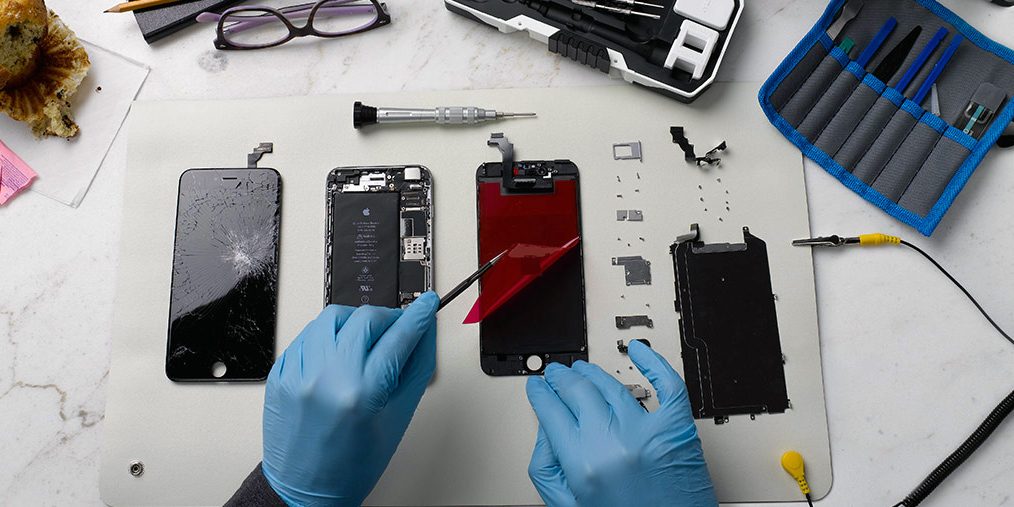
So, you want to take your broken iPhone screen to an unauthorized third-party for a repair? You may want to read this first: Apple apologizes for Error 53 bricked iPhones and offers a fix. You may not save that much money by taking your iPhone to a third-party repair shop. Actually, it could become a nightmare, as they may break or damage something else in your iPhone when replacing the screen.
Consider that Apple may refuse to repair your iPhone altogether in the future, as you have voided the warranty by taking your iPhone to an unauthorized repair shop. If you have AppleCare+ it will definitely be safer and cheaper to let Apple fix your iPhone.
There are some good third-party repair shops and services out there and some tempting prices, but it’s smart to be cautious and do your homework. Look for reviews on any shop or service you’re thinking about using, and check what guarantees they offer with the work. Understand that if you go to a third-party, then your only option, if anything goes wrong, is to deal with that third-party.