There’s a whole host of things I’d like to see Apple borrow from Android, but that’s an argument for a different day. Right now, after weeks of using the Samsung Galaxy Note 20 Ultra, there are features I’ve been loving on this phone in particular that I’ll be missing when I have to swap over to the new iPhone 12 Pro.
It’s obviously way too late for Apple to integrate anything new into the iPhone 12 series, but it’s always fun to look forward to the next thing, right? When I hop over to the new iPhone 12 Pro for review, I’ll certainly be missing these features — and hoping they come on the iPhone 13.
1. 120Hz refresh rate display
When early rumors pointed to the iPhone 12 Pro models having a 120Hz refresh rate display, I was ecstatic. I’ve been using Android phones with high-refresh-rate displays for a while now, and it’s one of the biggest changes to the smartphone experience in years. But now, it looks like that isn’t going to happen — iPhones are going to be stuck on 60Hz for another year.
I understand this isn’t a huge deal if you’ve been using an iPhone or Android phone with a 60Hz display, but if you’ve experienced a phone with a 90Hz or 120Hz display, you’ll absolutely know what I’m talking about. Every bit of motion throughout the interface is smooth and seamless. Games feel faster and look better. The whole phone feels like it’s responding to your touch on a new level.
And Apple knows how great 120Hz is, because it offers it on the iPad Pro — that’s what its “ProMotion” technology is. It apparently was unable to get the high-refresh-rate displays in the quantities it needed in time to meet the huge shipment demands of the iPhone 12. You’ll probably still be happy with how the iPhone 12 Pro’s display looks — just keep your eyes away from a Galaxy Note 20 in the meantime.
2. A simple camera cutout rather than a notch
I know that the giant notch at the top of the iPhone’s display is “worth it” because Face ID is so great. But my goodness, it’s painful to go back to looking at the top of the iPhone after you’ve seen something as sleek and simple as the top of a modern Samsung phone. The trend in the Android world is to simply have a small “hole punch” cutout for a front-facing camera, and that’s it.
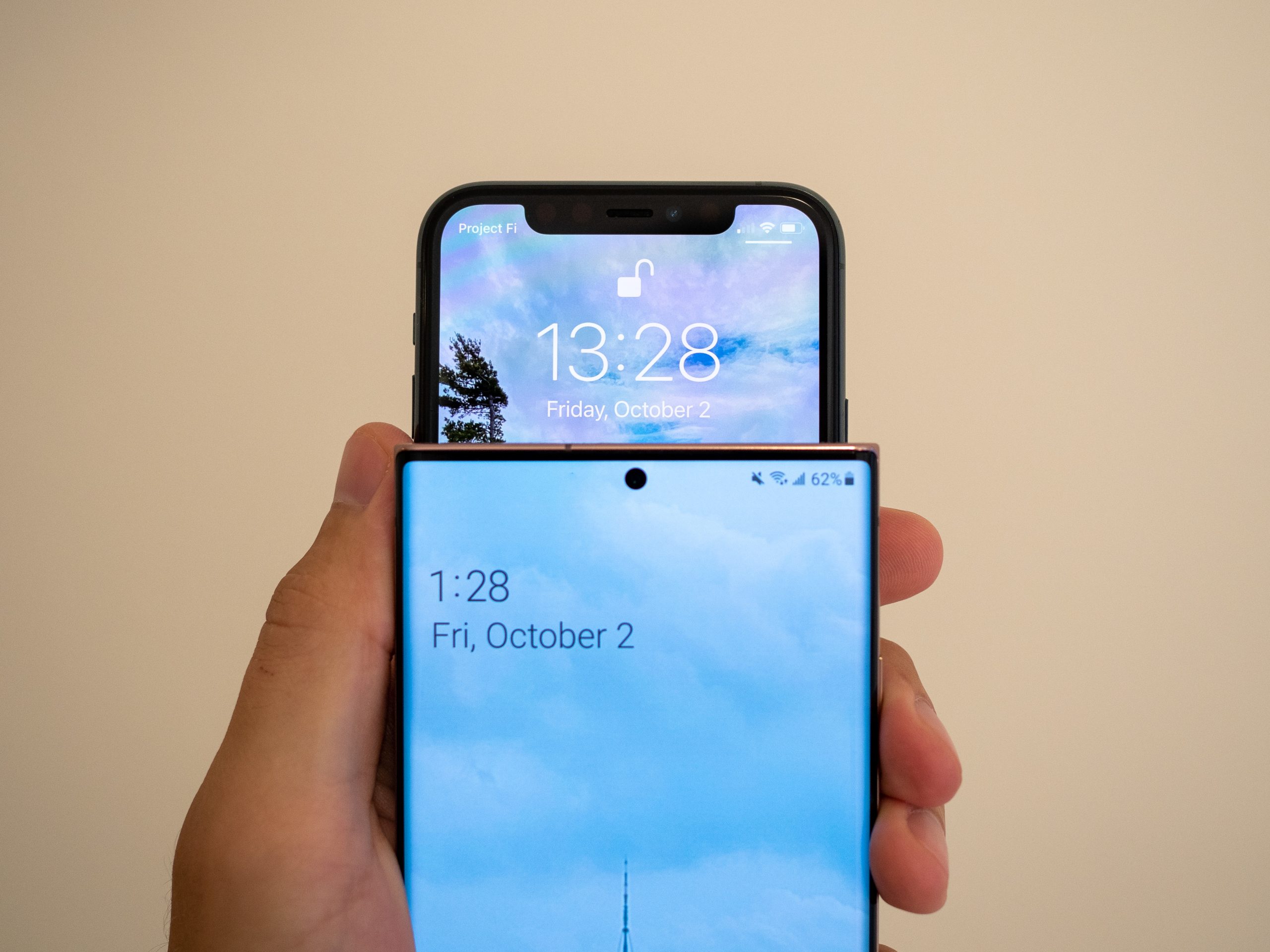
Apple is thankfully reportedly shrinking down the bezels around the entire screen of the iPhone 12 series, falling in line with the design aesthetic the rest of the smartphone industry has been following for years. And that’s good — because Apple’s large bezels up to this point continually felt old school. But the smaller bezels all around the display will only emphasize just how big that Face ID-laden notch is by comparison.
3. Longer zoom camera
Samsung’s full 50x zoom on the Galaxy Note 20 Ultra is a gimmick, full stop. The quality is simply too low to be useful, so it mostly stands as a party trick and a way Samsung can market its phone. But that shouldn’t take away from how great that zoom is at lower levels, under 20x, where it blow away the iPhone 11 Pro’s zoom.
The iPhone 11 Pro’s “telephoto” camera is only a 2x zoom, and the iPhone 12 series is expected to follow suit. That just isn’t enough to make a difference. The Note 20 Ultra’s telephoto camera is a 5x optical zoom from the standard camera, which means that you start at huge advantage, shooting full-resolution photos at 5xand digital zooming from that point on.
By reducing the amount you digitally zoom, you dramatically increase the quality for 10x to 20x photos. The iPhone 11 Pro only lets you zoom to 10X, and the quality is rough — the Note 20 Ultra is still pretty sharp, and goes well beyond that. Starting with 5x also gives you that true telephoto, narrow field-of-view look, which you only get a glimmer of at 2x.
If you’ve been using a phone with a zoom camera that’s only 2x, you don’t realize what you’re missing. But once you have that telephoto camera at your disposal, actually taking good-looking zoomed photos, you will definitely work it into your photography rotation.
4. Reverse wireless charging
When reverse wireless charging started hitting phones a couple years back, I didn’t think it was all that useful. Now that I’ve had it in Samsung phones, I don’t understand why every phone with wireless charging doesn’t also incorporate it.
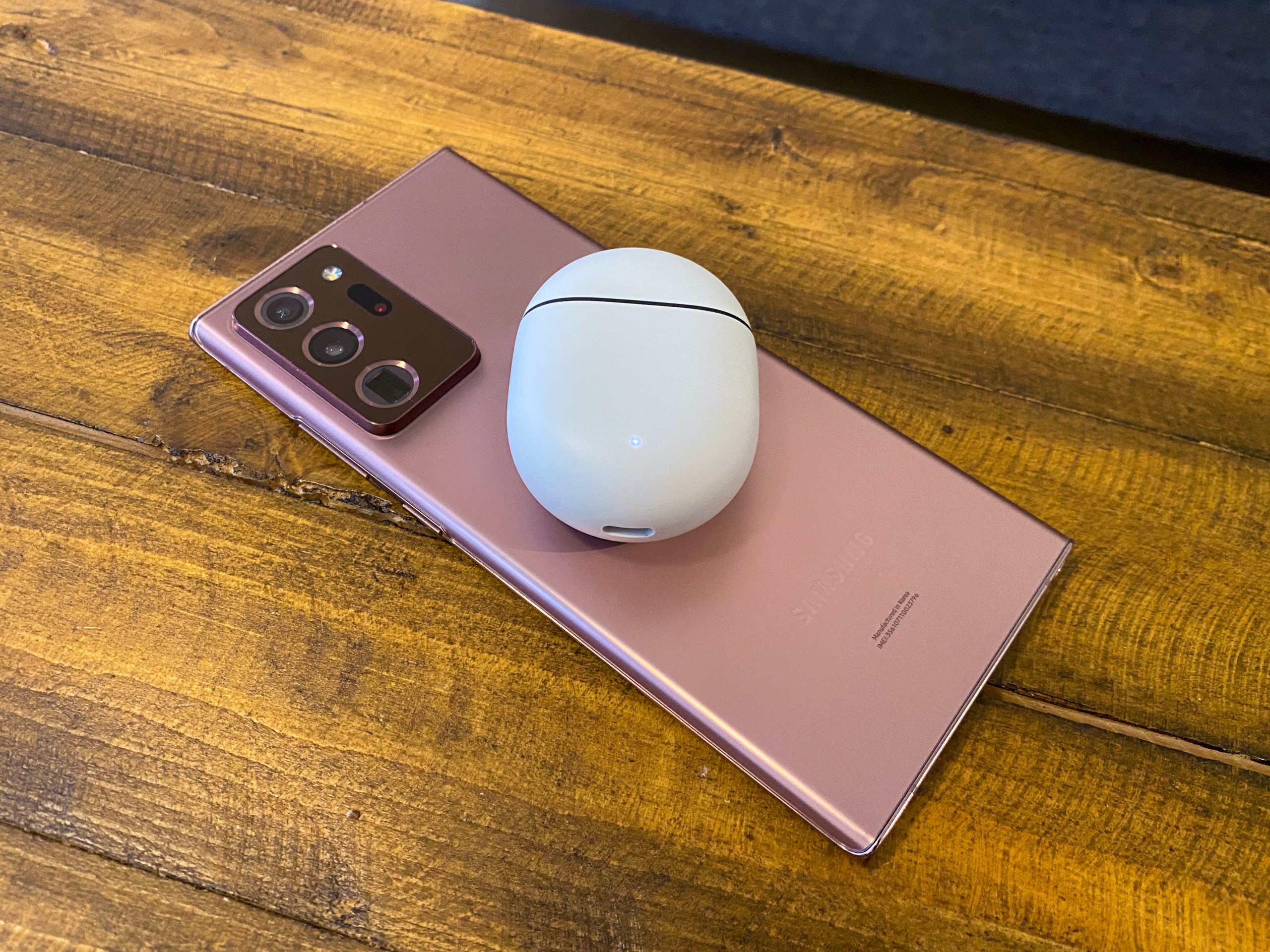
Reverse wireless charging isn’t useful for phone-to-phone top-ups, considering its slow speeds. It’s all about charging up little things, like true wireless earbuds and smartwatches. Considering the staggering number of AirPods and AirPods Pro that Apple has sold with wireless charging cases, I can’t believe it hasn’t managed to integrate reverse wireless charging as yet another ecosystem play.
These wireless earbud cases already offer great battery life, but when you bring phone wireless charging into the mix, it means you never have to think about their battery level. If it gets low, just flip over your phone, set the earbuds case on there, and in a few minutes you’ll get enough charge to last you a while. Little top-ups here and there can keep you running for weeks without much thought.
5. S Pen stylus
I know, Apple is never going to make a phone with a stylus in it. But it’s still fun to think of the possibilities — all you have to do is use a Galaxy Note, and the benefits are clear.
You don’t have to be an artist to love using the S Pen. It’s great for quickly writing down notes, but it’s also an excellent tool for just navigating around the phone and interacting with apps. It has a fine point to touch small buttons precisely, can perform hover gestures for things like scrolling, and offers great tools for quickly screenshotting, marking up, and sharing content.
Apple knows the benefits of a stylus — it really pushes the Apple Pencil for iPads — and with iPadOS 14 has even moved beyond drawing to handwriting recognition for general interface use. But that’s where it’s going to stay, on the iPad.