1. Home
  2. Phones
  3. Mobile
  4. Deal Evergreens

Amazon Kindle Unlimited Free Trial: How to sign up without paying a dime

Add as a preferred source on Google

Searching for an Amazon Kindle Unlimited free trial? Stick with us and in no time you’ll be enjoying a two-month subscription without handing over a dime. You’ll even receive a notification when it’s about to come to an end so you can nip it in the bud before it switches over to a paid membership.

Think of Amazon Kindle Unlimited as the Amazon Prime Video (or Netflix) of the book world. The service offers unrestricted access to more than a million must-read titles, as well as a selection of popular magazines and audiobooks that come bundled with the subscription for free — no hidden charges.

Signing up for the Kindle Unlimited free trial couldn’t be easier. Just head over the website — or click the button above — and follow the on-screen instructions to create an Amazon account. Already have one? Simply click ‘”Join Kindle Unlimited”. You’re now enrolled for two months — for free.


Of course, there are some caveats. First, the two-month trial offer is only valid for customers who subscribe before midnight on June 30. Second, former Kindle Unlimited subscribers are not eligible for the taster: They’ll need to hand over the usual $10 per month if they want to use it again.

How To Sign Up For The Amazon Kindle Unlimited Trial

Confused? We’ll walk you through how to sign up for the Kindle Unlimited free trial.

Existing Amazon Customer

Step 1: Head over to the Amazon Kindle Unlimited website.
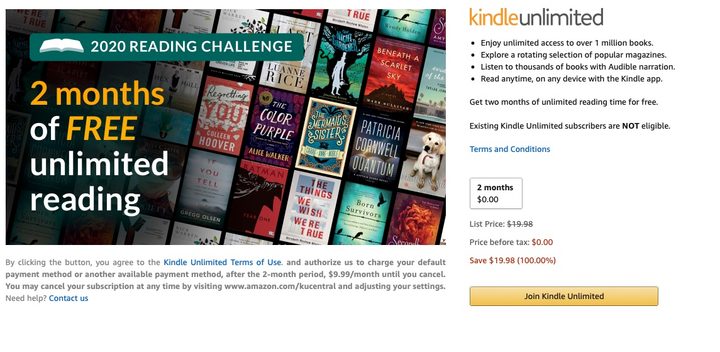
Head over to the Kindle Unlimited website and select ‘Join Kindle Unlimited’. Image used with permission by copyright holder

Step 2: Click the button labeled “Join Kindle Unlimited” — or hit the one below.

Step 3: Enter payment information for when the trial comes to an end.
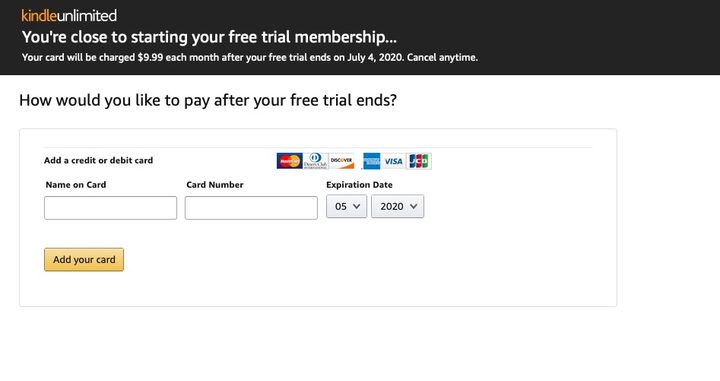
Enter some payment information for after the trial ends. Image used with permission by copyright holder

Step 4: Time to start reading!

New Amazon Customer

Step 1: Head over to the Amazon Kindle Unlimited website.
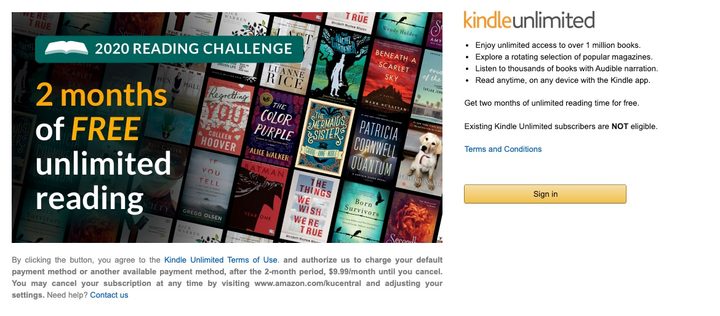
Head over to the Kindle Unlimited website and select “Sign In.” Image used with permission by copyright holder

Step 2: Click the button entitled ‘Sign In’ — or click the button below.

Step 3: Press “Create Your Amazon Account.”
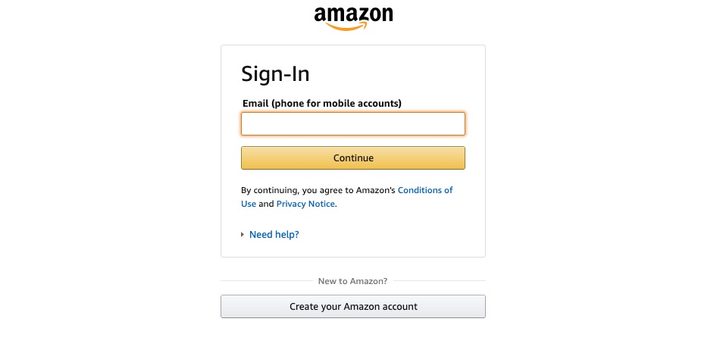
Select “Create Your Amazon Account” and follow the instructions. Image used with permission by copyright holder

Step 4: Follow the on-screen instructions to create an account.

Step 5: Add a credit card to be used once the taster is over.

Enter some payment information for after the trial ends. Image used with permission by copyright holder

Step 6: Choose a book and start reading!

Not sure where to start? Your best bet is to head over to the Amazon Kindle Unlimited Store, which isn’t a store at all because everything is free. What it is, however, is a catalog of everything that can be accessed through the subscription at no charge, organized by genre and what’s trending.

Here’s a look at what’s hot at the moment:

  1. When We Believed In Mermaids by Barbara O’Neal
  2. If You Tell by Gregg Olsen
  3. In An Instant by Suzanne Redfearn
  4. Last Day by Luanne Rice
  5. The Last Sister by Kendra Elliot
  6. The Dressmaker’s Gift by Fiona Valpy
  7. The Missing Sister by Elle Marr
  8. A Killer’s Wife by Victor Methos
  9. The Dare by Lauren Landish
  10. Wall of Silence by Tracy Buchanan
Commerce Contributor
Former Digital Trends Contributor
Digital Trends' Commerce team has a simple mission: to help our readers make the purchasing decision that is right for them…
iPhone 18 could get a RAM boost, but only a tiny sliver to run AI chores in iOS 27
A new report suggests the extra memory is aimed at keeping Apple Intelligence running smoothly.
Apple iPhone 17 back

Apple's next iPhone may not get a dramatic RAM upgrade, but it could receive just enough extra memory to keep its growing AI ambitions running smoothly. According to TF International Securities analyst Ming-Chi Kuo, the standard iPhone 18 and iPhone 18e are expected to move from 8GB to 9GB of RAM, primarily to support deeper Apple Intelligence integration in iOS 27.

Just enough RAM to keep Apple Intelligence happy

Read more
This free iPhone app uses soothing haptics to help you calm down
This iOS app skips accounts and subscriptions, relying on touch alone to help you relax.
Electronics, Mobile Phone, Phone

Most mindfulness apps want you to create an account, buy subscription, and give a chunk of your attention before they help you unwind. Vän, a new iPhone app from Swiss indie developer Adrian Stanco, is built to be the opposite.

I found the app on Reddit, and the pitch alone made me curious enough to try it. Instead of sounds or endless scrolling, it leans entirely on haptics, the tiny vibrations your phone is already capable of producing. The result is a feeling of calm you get by simply holding your smartphone rather than watching the screen.

Read more
In the last hours of Prime Day, I found the best deals to save you the regret of missing out
A few more hours, a lot of good deals, and no time left to overthink it.
Electronics, Mobile Phone, Phone

Prime Day 2026 officially ends today, and while some deals are already sold out, I've sifted through the entire website to find the best ones that are still live. Below are the picks I'd confidently put my own money on. They include everything from mid-range Android smartphones to flagship foldables, bone-conduction earbuds to Bose, and smartwatches across every price bracket. Act fast, before the clock runs out.

Best Amazon Prime Day deals on smartphones

Read more