I’ve been an iPhone user since the very first iPhone. Ever since then, it’s become more than just my pocket computer; it’s also been my main camera for almost two decades.
In 2021, with the iPhone 13 line, Apple launched Photographic Styles. These were similar to camera filters that were applied in real time as you took photos, and they were a way to customize how your iPhone camera took photos. They had preset styles, but you could adjust the tone and warmth values to your liking for a truly personalized experience.
However, there’s a big caveat: You could only use the Photographic Styles when capturing new photos, and they couldn’t be reversed. In other words, once you took a picture with a Photographic Style, you couldn’t switch it to another one. This has long been the single most annoying issue with Photographic Styles, but with the iPhone 16, that’s no longer the case — and I couldn’t be more excited.
The good and bad of Photographic Styles
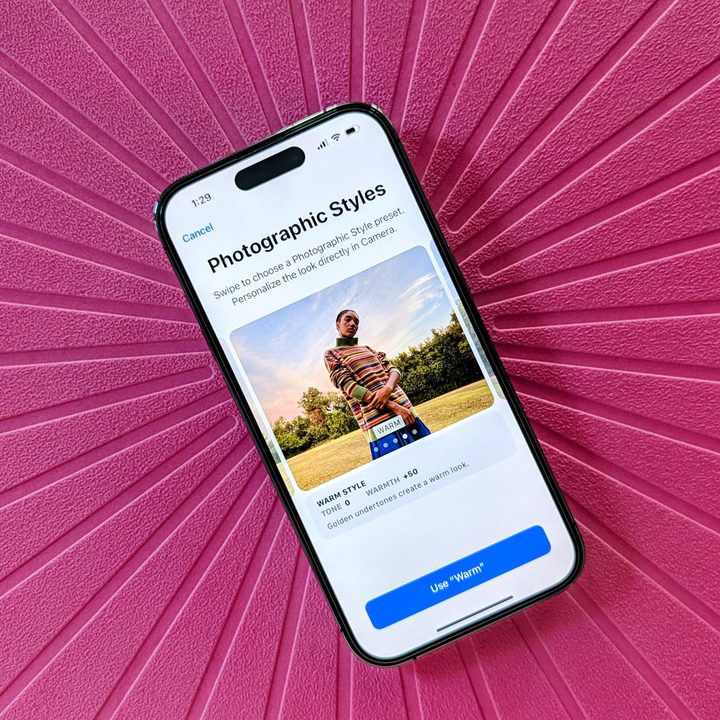
When Apple first launched Photographic Styles, I was intrigued because it seemed like a great idea. Make your iPhone photos stand out by applying a “style” to them, either the regular presets or fine-tuning them to your own creation. That way, every photo you take now has a unique aesthetic.
Photographic Styles launched with five options: Standard, Rich Contrast, Vibrant, Warm, and Cool. Each style is set according to its tone and warmth level. If you prefer, you can adjust the levels on each to make that style truly “yours.”
The Standard style is the default setting, though you can change it to a different one whenever you’d like — either in the Camera app or the Settings app. I personally loved the Rich Contrast and Vibrant styles the most, as they add that extra bit of “oomph” to your image.

But again, the ongoing problem with Photographic Styles is that they have only worked on new images, and the style can’t be changed after the fact. Once you take a photo with a style applied, it’s stuck like that — no changing your mind.
Since I take a lot of different kinds of photos — random objects, my daughter and husband, selfies, Disneyland, cats, etc. — I don’t think a one-size-fits-all style works for me. I had it on Rich Contrast for a bit but eventually went back to Standard. Plus, I like to play around with my photos when I edit them, so I think the Standard style works best if I’m just going to edit them later anyway. The idea behind Photographic Styles has always been good, but the limitations it ties you down with have long been an unavoidable problem.
Things are finally getting better
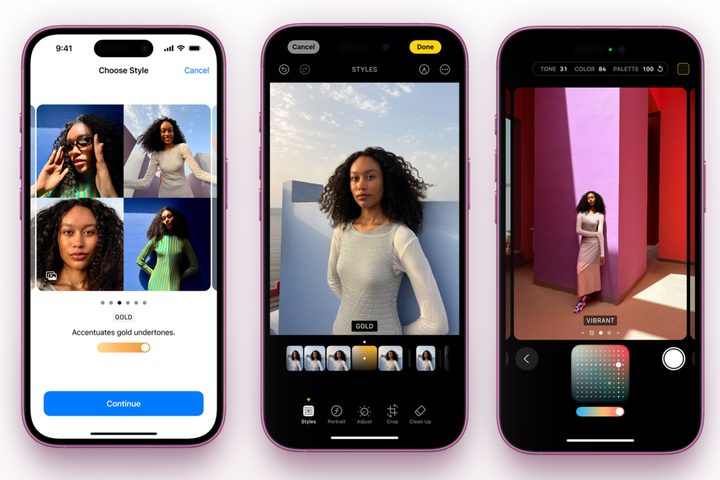
Though Apple debuted Photographic Styles three years ago, it hasn’t done anything to improve the feature until now. With the iPhone 16 family, Apple is also launching the “latest-generation” Photographic Styles.
What’s so great about the latest generation of Photographic Styles? There are now even more styles to choose from, giving you many more styles to choose from than ever before.
Apple has also changed the way styles are applied. You can now preview them live before making any changes. If you tweak the tone and color, it has a new control pad. Photographic Styles now also allow users to adjust the intensity of specific colors and the overall tone so that the style doesn’t affect the entire color scheme of an image.
The best update is that you can finally change the Photographic Style after capturing an image. This was impossible before and was one of the main reasons I’ve stayed away from the feature. Now that it can be changed after the fact, I think I’ll be playing around with Photographic Styles a lot more.
An exciting year for iPhone photographers

Apple’s updated Photographic Styles isn’t just the only big change for photographers who get the new iPhone 16 or iPhone 16 Pro. I am also very eager to try out the new Camera Control, which is something I’ve wanted for years.
I placed my order for the iPhone 16 Pro the moment preorders went live, so I’m also eager to try out the new 48-megapixel ultrawide lens. Since I missed out on the 5x optical zoom last year with the iPhone 15 Pro, that’s another feature I’m excited to play around with.
Some may see these as incremental changes, but since I depend on my iPhone as my primary camera, all of these new camera features are quite exciting for me. A new button, upgraded ultrawide and telephoto cameras, and a Photographic Styles revamp I’ve waited ages for? If you ask me, it’s all pretty darn exciting.