
“The Devour offers a better keyboard than Motorola’s other Android devices, but lags behind them in many other features.”
- Motoblur social networking interface
- 4-line QWERTY keyboard with dedicated number line
- Sleek and tough extruded aluminum casing
- Side-mounted battery and SD card
- Included 8 GB memory card
- Heavy and clunky
- Inferior 3.1 MP camera
- Flush on/off, camera access/shutter buttons
- Mysterious syncing problems
“Why you can trust Digital Trends – We have a 20-year history of testing, reviewing, and rating products, services and apps to help you make a sound buying decision. Find out more about how we test and score products.“
Introduction
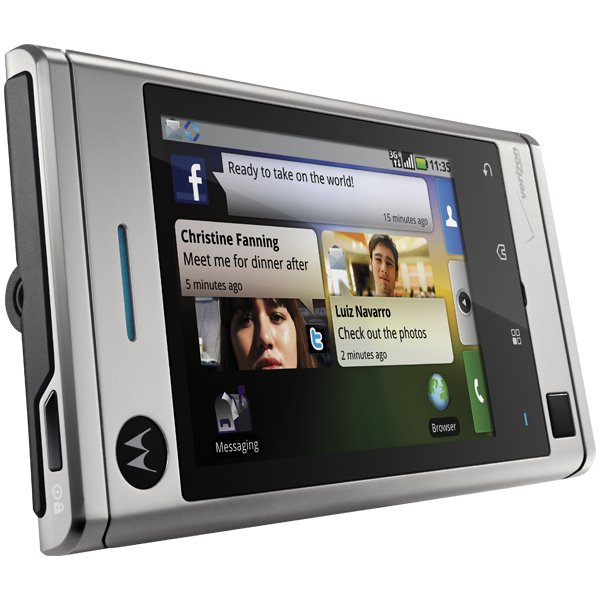
For social networking addicts, there’s no better cellphone interface than Motoblur. Motorola’s innovative Android overlay aggregates all your social media accounts, and delivers the latest messages and information updates via what looks like comic book quote balloons conveniently splayed across the phone’s home screen. Previously available only on the Motorola Cliq from T-Mobile, Motoblur now comes to Verizon on the Motorola Devour, a sleek-if-bulky new Android phone encased in luxurious extruded aluminum. Motoblur, matched with a capacious four-line slide-out QWERTY keyboard, makes Devour arguably the easiest way to stay in touch without talking, and offers an overall attractive package of features and functions. But how does Devour match up with Verizon’s other Android phones, the similar Droid and the HTC Eris?
 Features and Design
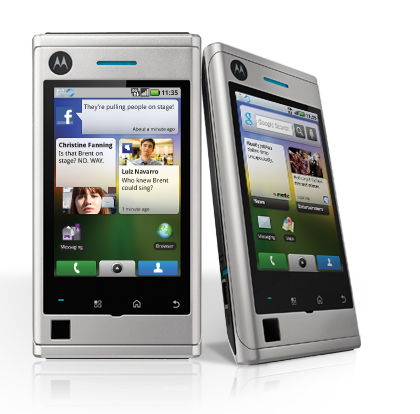
Priced $50 less than the Droid and $80 more than the Eris, Devour suffers when compared to both. Like its Android cousins, Devour accesses Verizon’s 3G EV-DO network, includes Wi-Fi connectivity, and is equipped with the always welcome visual voicemail. The Droid’s value evens out thanks to its included pre-installed 16GB SD card, compared to the Devour’s (and Eris’) pre-installed 8 GB card.
But while the Droid and Eris each offer an excellent 5-megapixel camera, the Devour is equipped with just a 3-megapixel imager that takes inferior bland, pixelated and fuzzy photos. Plus, the Droid includes a flash. The Devour incorporates Bluetooth 2.0 instead of the 2.1 spec on the Droid, and presents a 3.1-inch LCD compared to Droid’s superior 3.7-inch display, and the Eris’ brighter 3.2-inch screen.
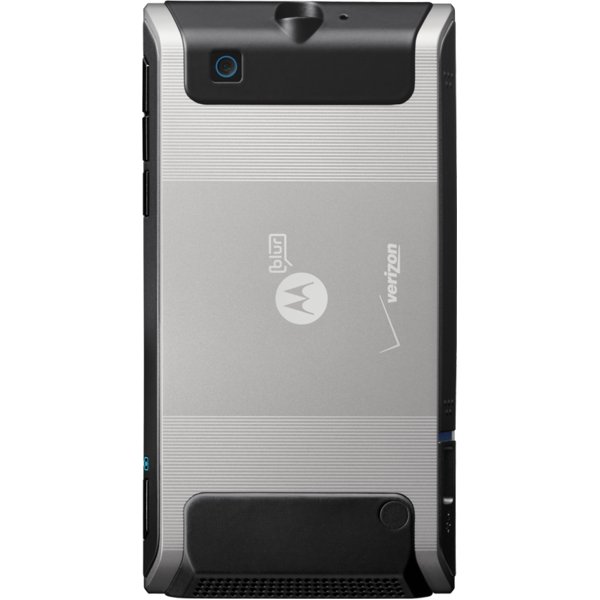
The Devour’s bulk and weight are immediately noticeable, making it bigger and as heavy as the Droid. Its silver aluminum design with rubberized black highlights is Klingon-like, and decidedly masculine.
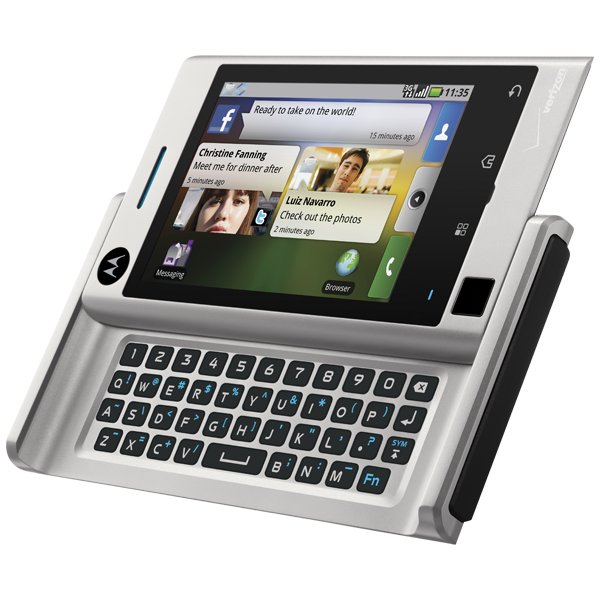
Devour’s one nearly superior faculty is the top dedicated row of numbers on its four-line QWERTY keyboard. Its keys also are slightly more raised and reactive than on the Droid’s, fostering faster typing. But Motorola giveth and Motorola taketh away. Devour’s lone shift and function (symbol) keys are on the right instead of the left, an arrangement only left-handed typers benefit from, slowing down typing for the righty rest of us. The Devour’s @ key, a dedicated key on the Droid, is a Function key inconveniently placed on the W, instead of the 2, as on standard QWERTYs. The Eris, of course, lacks a physical QWERTY.
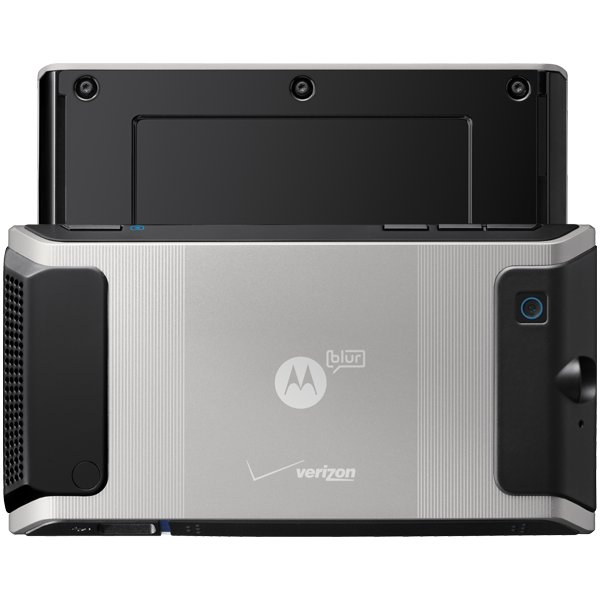 Instead of the usual slide-off rear door for accessing the battery and SD card cover, a rubberized cover easily slips off the side, more like a digital camera.
The Devour’s top-mounted power switch and camera shutter button are also nearly flush with the phone’s surface, making both difficult to quickly locate by feel.
Can a phone serve as a workable PMP?
While its display is not as sharp or bright as the Droid (but then, to be fair, few cellphone screens are) or the Eris, Devour’s LCD is nonetheless colorful, if a bit dim. YouTube videos played in high quality, and most filled the screen. But both Droid and Eris offer a brighter and crisper personal media player experience.
Syncing our test sample with Windows Media Player or via Motorola’s Media Link was hit-or-miss. Frustratingly, mostly miss. And when Devour showed up in WMP, it mysteriously stopped syncing after a dozen or so tracks. This could have been a problem with our test model, but caveat emptor.
Sound Quality
Even without Motorola’s ClearTalk technology, Devour, like most Motorola phones, offers superior sound quality. Its rear speaker pumps out a surprising amount of volume for music, video audio and speakerphone conversation.
Phone Functionality
With a green phone icon ever-present on the bottom of its five home screens, the Devour’s dialer is slightly faster to get to than the Droid’s, which is merely another Android app icon.
Of course, the biggest distinction between Devour and Droid is Motoblur. Yes, you get all your messages and social network updates and news updates without drilling even as far as Android’s pull-up menu. But Motoblur’s update bubbles clutter your screens like papers covering a desktop calendar blotter, forcing you to pull-up the app menu to access nearly all your other oft-used functions.
Web
While above-average snappy, Devour’s page load time of 4-5 seconds consistently lagged behind both Droid and Eris by one or two seconds. That’s fast enough when not compared side-by-side, but part of a pattern of comparative inferiority.
And while Droid and Eris regularly conjured up the more appropriate mobile HTML versions of sites such as The New York Times and Wikipedia, the Devour accessed less convenient full HTML versions.
Battery Life
Motorola rates Devour at 389 hours of talk and 443 hours (18.45 days) of standby, both more than either the Droid or the Eris, with nearly twice the standby time as the Droid.
In practice, our test model’s battery mysteriously died after only a day of not charging. And even though the battery meter showed nearly 50 percent of power remaining, our Devour shut down less than an hour later.
Conclusion
If you are constantly Facebooking, Twittering, instant messaging and e-mailing, the pretty (and pretty heavy) Devour offers a superior social networking experience. But, along with the fancy aluminum frame, you are paying mostly for Motoblur and the dedicated QWERTY number line. Motoblur’s value also vanishes when you consider how many more non-Motoblur features and functions you get with the Droid for just $50 more, and if you don’t mind touchscreen typing, the equally feature-superior Eris is half Devour’s price. Both previous Android phones swallow the Devour in overall value.
Highs:
- Motoblur social networking interface
- 4-line QWERTY keyboard with dedicated number line
- Sleek and tough extruded aluminum casing
- Side-mounted battery and SD card
- Included 8 GB memory card
Lows:
- Heavy and clunky
- Inferior 3.1 MP camera
- Flush on/off, camera access/shutter buttons
- Mysterious syncing problems


