You might want to avoid that QR code plastered on a parking meter the next time you visit a place in Texas (or any other state, just to be on the safe side). Also known as Quick Response codes, they are a fairly common medium for scammers to get rich quickly by tricking people into paying them or implanting malware. Now, they are pasting it on parking meters to earn some dough by conning unsuspecting drivers.
As per a Fox News report, 29 parking pay stations in Austin have been found plastered with fraudulent QR codes. For the unaware, parking stations in Austin only accept payments via the official ParkATX app, coins, and banking cards — both credit and debit. The Austin Police Department has already issued a warning about the ongoing scam on social media platforms, but it appears that the scam has spread to more cities in Texas.
🚨Scam Alert🚨
APD Financial Crimes detectives are investigating after fraudulent QR code stickers were discovered on City of Austin public parking meters. People attempting to pay for parking using those QR codes may have been directed to a fraudulent website and made a payment. pic.twitter.com/Gb8gytCYn7— Austin Police Department (@Austin_Police) January 3, 2022
The San Antonio Police Department has also released a similar warning and is currently investigating the parking meter QR scam. The Massachusetts State Police has sent out a cautionary message as well, asking residents and visitors to avoid QR codes they come across in parking stations. Michigan’s St. Joseph Department of Public Safety says it has received reports of fraudulent parking tickets, too.
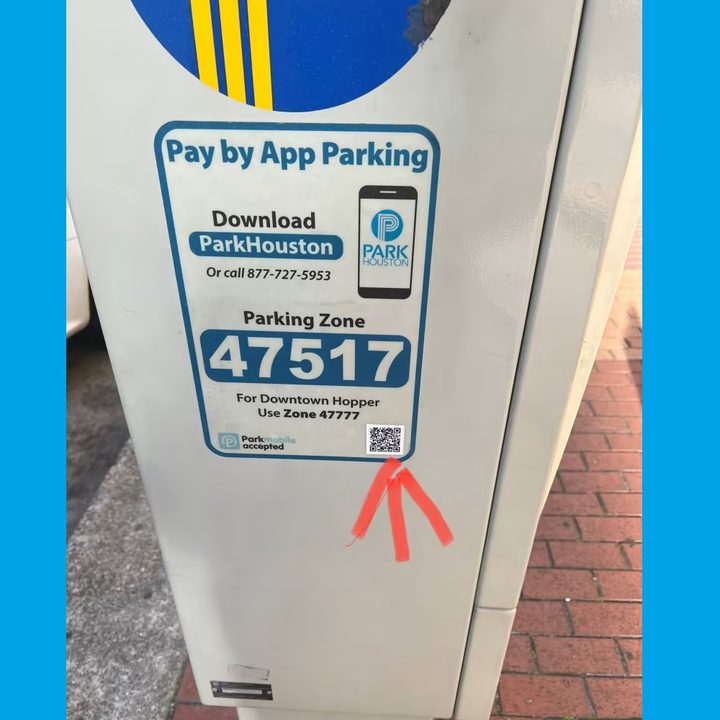
In an official press release, the city of Houston warned citizens that street-parking pay stations do not accept QR code payments, which means you should stay away from them if you come across any. The ParkHouston team has launched an inspection drive to check over 900 pay stations for such malicious QR codes, although no victims have been reported so far. If you’re in Houston, you can pay your parking bill in coin via the ParkHouston app, or banking cards. As per ABC News, officials had spotted five locations where scammy QR codes were affixed. Residents have been asked to report such scams at the parking@houstontx.gov email address.
What if you’ve already been duped?
The QR code scam can hurt users in many ways. The most obvious one is when a scammer gets the parking ticket cost deposited in his account. In such a scenario, only a few dollars are gone from your wallet. However, scanning a suspicious QR code might also redirect users to a web page where they may be tricked into submitting sensitive financial details such as credit card numbers and bank account information, among others.
When that happens, the scammer can either sell this data to bad actors or even wipe your account by initiating a transaction after extracting the PIN. The chances of harm are vast. Law enforcement officials have advised folks to stay vigilant, and if they suspect that a fraud has happened, the victim should immediately file a report.
You can do so by reporting to the Federal Bureau Of Investigation’s Internet Crime Complaint Center (IC3) by visiting www.IC3.gov on your phone or computer. It is also advised that the victim immediately report the incident to their local police department, either via a phone call or in-person (if the existing COVID-19 protocols allow it).
If you’ve fallen victim to a parking meter QR scam in Austin, call the 3-1-1 helpline or visit www.ireportaustin.com to file a report of a credit card breach. Plus, you should try to reach your banking institution and ask them to block any transaction in your name or linked to your bank wallet. Once it’s done, users should follow it up by changing passwords for their online banking account and credit card PIN.
How to avoid QR code scams?
Scanning a QR code might seem harmless, but it is nothing short of a massive leap of faith. We do not know what’s hidden behind those dots and lines nor what kind of websites they will lead users to once scanned. But ever since the pandemic hit, QR codes have skyrocketed in popularity. Take, for example, a restaurant where you no longer have to touch a physical menu. Just scan a QR code and the menu opens on your phone. The same goes for making payments after the meal or any other in-store purchase.
In the resurgence of QR codes, scammers also saw an opportunity. In October last year, Better Business Bureau in Minnesota and North Dakota warned about QR code scams. A month later, the FBI also issued a warning about shady QR codes at cryptocurrency ATMs that could be used to deposit funds in a malicious party’s wallet. Here are a few precautions you can take to avoid falling victim to QR code scams in general — and not just at a parking station:
- Do not scan QR codes given to you by strangers, plastered on your vehicle, or at any random place like an airport or bus stop. Always check if an alternative method of payment like cash or banking cards can be accepted.
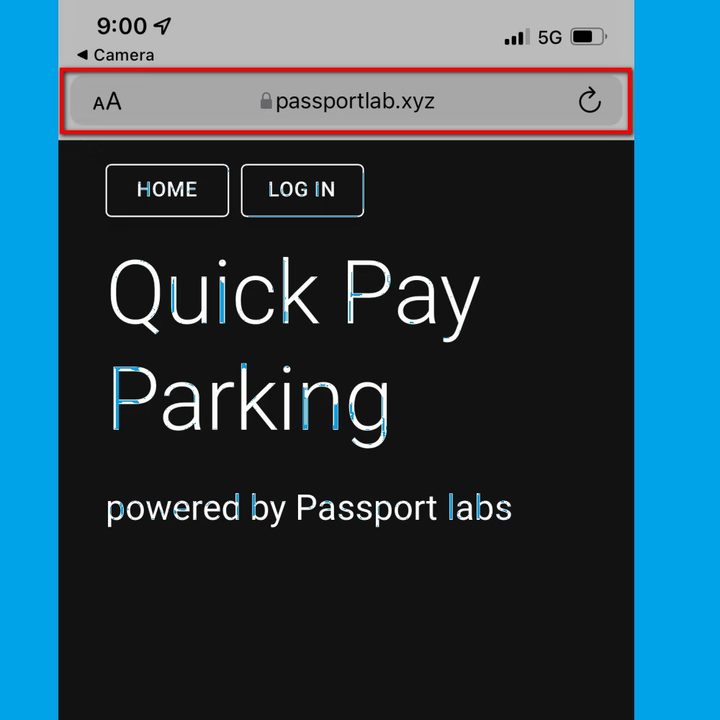
- If scanning a QR code leads to a website, check the URL to see if there’s anything odd with the name, such as spelling errors or random numbers. If the URL spells a name, do a quick Google search to check if the core URL matches with the one opened after scanning a QR code. Other telltale signs are weird ads and pop-ups on a web page. Payment gateways are usually secure and do not show a ton of ads, if at all. Another tip is to look for HTTPS in the URL, as the ‘S’ stands for secure. Authentic government agencies or verified institutions usually have an HTTPS URL, instead of following the older HTTP protocol.
- If someone sends you a QR code via social media or an instant messaging app, ask if they’ve personally scanned it and if it works as intended.
- If a message or email with a QR code has been sent by an institution like your bank or insurance service provider, always call them to confirm before you proceed with scanning it.
- If a QR code has any sign of tampering such as slapdash, avoid scanning it at all costs.
- If you receive a QR code from someone claiming that you’ll get paid after scanning it, that’s most likely a fraud. Avoid it.
- In case a QR code is associated with cryptocurrency or Bitcoin-related schemes, steer clear of it as much as possible.
- Install mobile security software or apps that can detect when you open a malicious QR code link and raises an alarm in case of any potential risk. Kaspersky, Avira, Bitdefender, AVG, and Avast offer solutions that can keep you safe from scams and malware.