  1. Home
  2. Phones
  3. Mobile
  4. News

If you have an iPhone, you need to download iOS 18 ahead of Hurricane Milton

Add as a preferred source on Google
Satellite messaging features on an iPhone with iOS 18.
Apple

Florida is preparing for Hurricane Milton’s arrival on Wednesday. As the storm approaches, here’s a valuable tip for iPhone users in its path.

Before the storm’s arrival, it’s crucial to download iOS 18 on your iPhone. With this version of iOS 18 installed, you immediately gain access to Apple’s new Messages via satellite feature. The new feature lets you send and receive text messages without cellular and Wi-Fi coverage. This means you can stay connected with friends, family, and emergency services even in areas where power might be lost.

Recommended Videos

To access Messages via satellite, you’ll need an iPhone 14 or later running iOS 18. Due to satellite communication’s limitations, sending and receiving messages via satellite could take longer than traditional texting. The feature is free for two years after activating your supported handset.

How to get the latest weather
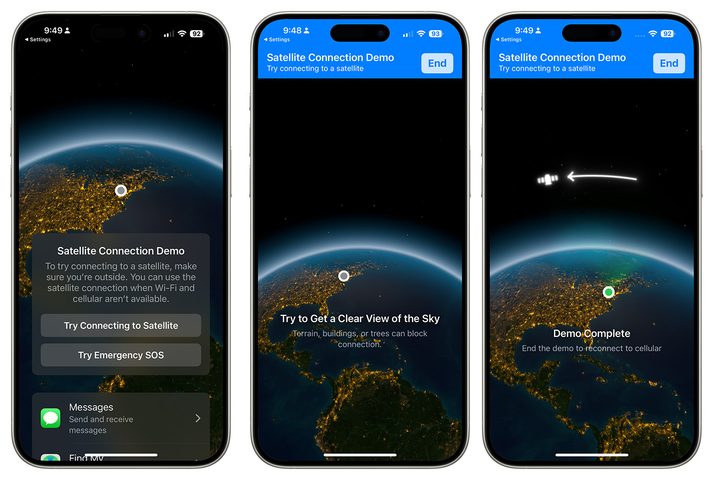
Screenshot showing how to test the satellite feature on iPhone.
Bryan M. Wolfe / Digital Trends

After installing iOS 18, you should test the iOS satellite feature to familiarize yourself with it. To get started, open the Settings app on your iPhone. Scroll down to Apps and select Messages. Then, tap Satellite Connection Demo to see how the feature works. The demo works best outdoors with your phone pointed toward the sky. The system will guide you on how to move your iPhone to connect to Apple’s satellite.

Messages via satellite is a valuable tool for staying connected during emergencies and when venturing off the grid. This technology provides peace of mind and a vital communication lifeline when traditional cellular networks are unavailable — something that’s all but guaranteed to happen during severe weather situations like Hurricane Milton.

In addition to satellite messaging, iOS also provides Emergency SOS, Find My, and Roadside Assistance via satellite. For up-to-date weather information, check out our list of the best weather apps for iPhone.

Bryan M. Wolfe
Former Mobile and A/V Freelancer
Bryan M. Wolfe has over a decade of experience as a technology writer. He writes about mobile.
Android 17 makes it harder for bad actors to guess and crack the PIN on your phone
Thieves only get 20 shots before the door slams shut
Electronics, Mobile Phone, Phone

Google is planning on making Android 17 even more secure. The company had previously confirmed that Android 17 will now reduce the number of times someone can guess your PIN or password and add longer wait times between failed attempts.

Now, thanks to a deeper breakdown from Mishaal Rahman, we have a better idea of how aggressive that change really is.

Read more
Acti just turned your smartphone keyboard into an AI assistant
One keyboard that types your words and does your errands. This might be the upgrade your thumbs have been waiting for.
Acti keyboard open on iPhone

Your smartphone’s keyboard is the thing you interact with the most, and yet, it has largely remained the same since it was introduced two decades ago. Yes, it has become better at understanding our typing habits and predicting text, but its function has largely remained unchanged. 

A Singapore startup called Acti looked at the keyboard and the large space it occupies on your smartphone and asked a fair question. Why not make it actually do things? After seeing its keyboard in action, I think the idea has legs.

Read more
Finding photos is so much easier with Siri AI in iOS 27 that I no longer scroll
Natural language photo search in iOS 27 is the kind of feature that quietly becomes essential.
Electronics, Phone, Mobile Phone

My camera roll has crossed 8,000 photos, and it got there by capturing random moments (only to forget them later). The problem, however, starts when someone asks me to share something specific. It could be their portrait from last weekend or the food pictures they snapped using my phone.

Finding those pictures usually means scrolling through my seemingly endless camera roll. If the photo is a month or two old, I end up scrolling past hundreds of other images to find it, and that gets old fast.

Read more