


“The Toshiba Thrive didn't impress us with its looks, but it has won us over with its software, flexibility, and PC-like approach to the Android tablet.”
- Removable battery
- SD card reader
- Full-size USB and HDMI ports
- Fast charging AC adapter
- Good suite of software
- Respectable specs
- Rubber grip is easy to hold
- Heavy and thick
- Screen picks up fingerprints
- Cameras are oddly placed
- Battery cover difficult to remove
“Why you can trust Digital Trends – We have a 20-year history of testing, reviewing, and rating products, services and apps to help you make a sound buying decision. Find out more about how we test and score products.“
The iPad is the gold standard for tablets today. Hordes of PC and phone makers are vigorously trying to manufacture tablets that look and feel like Apple’s success story. In the case of Samsung, it’s Galaxy Tab 10.1 is so similar to an iPad that a common consumer probably couldn’t tell the difference. Thankfully, this is not Toshiba’s strategy. Instead of introducing yet another iPad clone into the market, the PC maker has taken a step back and decided to create a tablet that is designed more for its usability than its sense of style. For that, the Toshiba Thrive has us interested.
Hardware design
Looking at the Toshiba Thrive, the first thing you notice is that, like the Acer Iconia Tab, this is not a tablet that intends to combat Apple on style. Thick and covered with black rubberized plastic, it is more like an lightweight truck than a sports car (to lift an analogy from Steve Jobs). It is bulkier and heavier, but not to the point of strain, and like a truck, it comes with an array of ports and hardware features that should please those who desire a connected device.
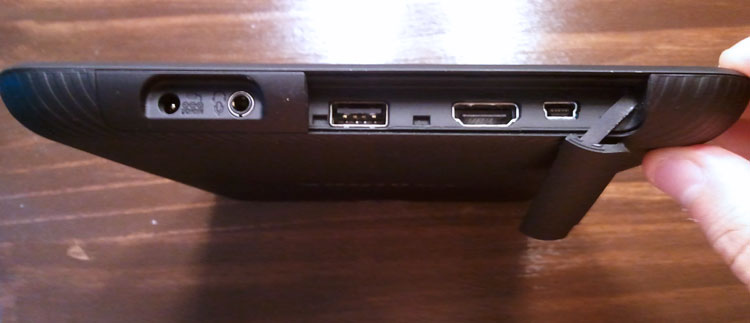
Under a hatch on its right side, the 10.1-inch Thrive has a full-sized USB port, a full-sized HDMI port, a full-sized SD card reader, and a Mini USB port. This means you don’t need clumsy adapters to plug the tablet into a camera, TV, MP3 player, phone, or other device. You can just use the USB cords that come with those devices and it will just work. That’s the theory, at least. In testing, we were unable to get the Thrive to recognize a Zune MP3 device or an Android phone in USB mode, but the tablet had no trouble picking up a thumb drive and SD card. It also had no problems recognizing a USB mouse. Our first lengthy mousing experience with Android was quite pleasant. Hooking up a keyboard practically made the tablet into a netbook.
The Iconia Tab also came with a full-sized USB port, but we find Toshiba’s tablet to be somewhat easier to hold and manipulate due to its rounded edges and rubber back plate (shell).
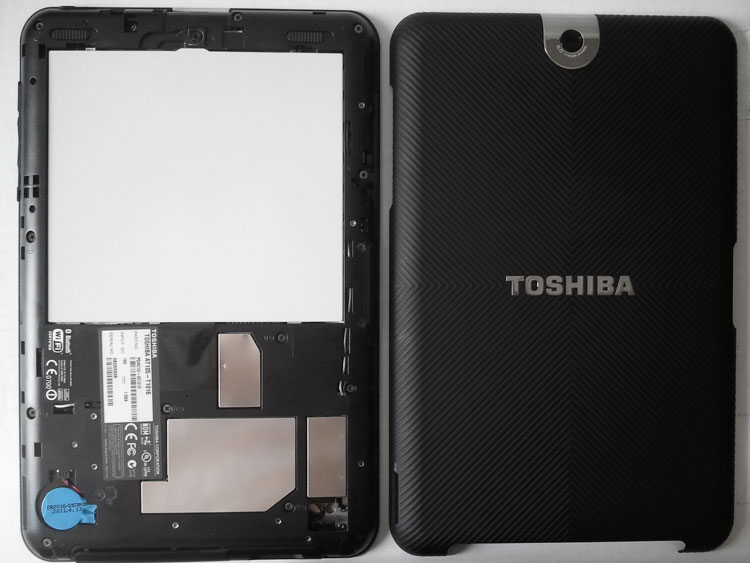
Speaking of the rubberized shell, that brings us to the next unique feature of the Thrive: it’s removable battery. The 2030mAh battery can be taken out and replaced, as can the entire back shell. For $20, you can buy a new shell in six different designer colors and for $80, you can own a second battery for the unit, which isn’t a bad deal when you consider that the 8GB model is $430, or $70 cheaper than the cheapest iPad 2.
The charging port of the Thrive is pretty much a PC-like AC adapter, which is a bit disappointing when compared to the universal MicroUSB chargers on phones, but seems to be a growing trend among tablets, which can’t seem to shake their growing evolution toward the PC. The good news is that this charger is among the fastest we’ve seen, fully charging the tablet at record pace.
The Thrive has the usual power and volume keys, an audio jack, a screen-orientation lock switch, and a hidden docking port on the bottom. Two speakers line the bottom of the Thrive and produce louder sound than other units, though the underpowered speakers still sound rather tinny overall.
And finally, Toshiba has included three indicator lights on the upper left side of the screen (when held horizontally). It has a power light, a battery charging light, and a Wi-Fi/Data connection light. We’ve read a few complaints about these indicator lights, but they did not bother us.
<object classid=”clsid:D27CDB6E-AE6D-11cf-96B8-444553540000″ id=”ooyalaPlayer_6xqgg_gq9kwf32″ width=”625″ height=”351″ codebase=”http://fpdownload.macromedia.com/get/flashplayer/current/swflash.cab”><param name=”movie” value=”http://player.ooyala.com/player.swf?embedCode=91a21uMjrPqGBNVjRpPN2QC-79-ySYRI&version=2″ /><param name=”bgcolor” value=”#000000″ /><param name=”allowScriptAccess” value=”always” /><param name=”allowFullScreen” value=”true” /><param name=”flashvars” value=”embedType=noscriptObjectTag&embedCode=91a21uMjrPqGBNVjRpPN2QC-79-ySYRI” /><embed src=”http://player.ooyala.com/player.swf?embedCode=91a21uMjrPqGBNVjRpPN2QC-79-ySYRI&version=2″ bgcolor=”#000000″ width=”625″ height=”351″ name=”ooyalaPlayer_6xqgg_gq9kwf32″ align=”middle” play=”true” loop=”false” allowscriptaccess=”always” allowfullscreen=”true” type=”application/x-shockwave-flash” flashvars=”&embedCode=91a21uMjrPqGBNVjRpPN2QC-79-ySYRI” pluginspage=”http://www.adobe.com/go/getflashplayer”></embed></object>
Specs
The Thrive has predictable, but respectable innards. The unit comes with 1GB of RAM and runs on a 1GHz dual-core Nvidia Tegra 2 processor. For storage, you can choose between 8GB ($430), 16GB ($480), or 32GB ($580) models. In addition, since the tablet comes with a full File Manager built in, you can easily expand your storage to include USB hard/flash drives or SD cards. It isn’t too expensive to pick up an 8GB or higher SD card these days. For a hardcore user, the Thrive offers the most flexibility and storage potential of any tablet on the market. The LED backlit screen (which picks up fingerprints more than we’d like) has a 1280×800 resolution, which is also identical to most every 10.1-inch tablet on the market.
Naturally, the Thrive comes with a gyroscope, accelerometer, ambient light sensor, GPS, and digital compass. These are common features on almost every smartphone.
 Android Honeycomb, Apps, and Web
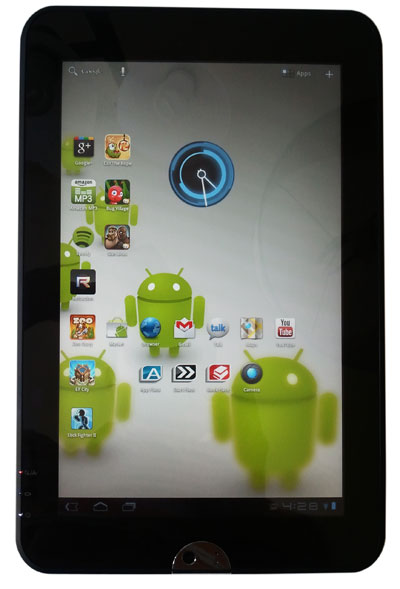
The Thrive runs on Android 3.1 (Honeycomb). We’ve gone over the issue with Android 3.0 in the past (see the Iconia Tab review) and we like the progress Google is making with 3.1, but the overall experience is nowhere near as fluid and fun as an iPad or webOS. The Thrive is currently running version 3.1, but Toshiba promises a move to 3.2 soon, which should fix some of the lingering bugs and speed up the OS with some hardware acceleration. Then, later this fall, we should see the next full version of Android, Ice Cream Sandwich, which should have some very cool new features.
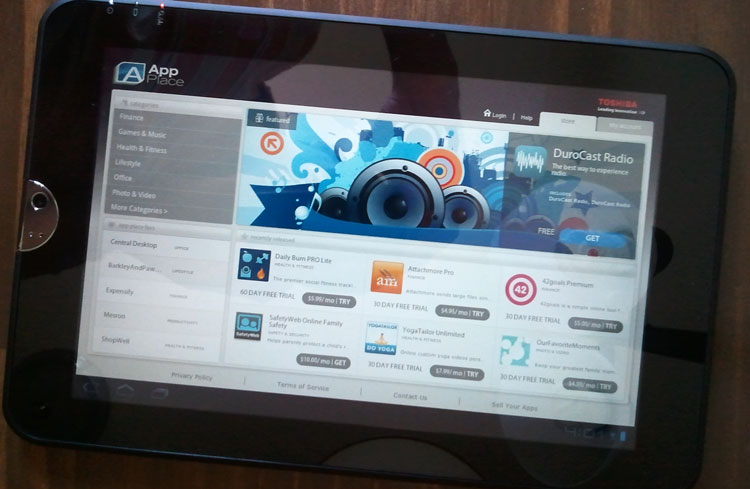
Toshiba has mostly stayed out of the OS, which is nice. The Thrive has no custom widgets or a fancy modified UI design, but it does come with some useful pre-installed software. Toshiba has included a great File Manager app, a Printer Share app, as well as its own App Store, which mostly has productivity (PC-like) apps in it, which is a nice departure from the Android Market, which doesn’t do a great job of promoting business software. The Toshiba BookPlace and Media Player are a bit unneeded, but don’t hurt anything.
All of the standard Google apps are accounted for, including Navigation, Maps, Latitude, Places, Movie Maker (movie editing), the new Google Music, Talk, eBooks, Calendar, and Gmail. The Android Market is full of more than 200,000 different apps to download, though few of them are customized for larger screens. Curiously, even Google’s new Google+ app doesn’t appear to take advantage of tablet screens. Instead, we just get a giant stretched app.
Finally, a few games and fun apps have been included as well including versions of Backgammon, Euchre, Solitaire, Hearts, Spades, Need for Speed, and MOG Music. Like most Android manufacturers, Toshiba has locked down all pre-installed apps so that none of them can be deleted. So even if you hate MOG Music or Euchre (Who can hate Euchre?), you will have to look at them in your menu from now until the end of time…or when you buy another tablet.
As for the Web, it’s accessible via Google’s Android Browser. As we’ve said before, this isn’t the best browser, but it does the job better than competing mobile browsers on iOS and Windows Phone. We look forward to the day when Google’s Chrome browser is finally ported to Android.
Camera
The Thrive has a 5MP rear camera and a 2MP front-facing “HD webcam with microphone.” These units do the job, but are curiously placed way on the left side of the tablet, when held horizontally, which is a bit awkward as that’s often where your hand naturally wishes to hold the tablet. Toshiba has opted to keep Google’s default camera software, which, again, gets the job done but does not have any of the frills one might hope for. There is no touch to focus and pictures look somewhat washed out with video being rather blurry. This isn’t the device to record your family vacation. In a pinch, this tablet has cameras, but they aren’t anything special. Having said that, we make the same complaint about almost every tablet. Toshiba’s cameras are as good as the iPad, Galaxy Tab, Xoom, and the rest of the gang.
Battery Life
Battery life is solid so far, though we hoped for more with how large the internal battery is. We estimate that we’re getting around 7-9 hours right now, though we have not had time to perform any extensive tests. Toshiba claims that its 6-cell battery can run up to 11 hours. However, for those willing to cough up $80, Toshiba sells extra batteries for the Thrive, which technically makes it a more mobile and flexible tablet than any on the market.
Conclusion
The Toshiba Thrive didn’t impress us with its looks, but it has won us over with its software, flexibility, and PC-like approach to the Android tablet. This is the first mainstream tablet with a removable battery, and the first we’ve seen with full-size USB, SD card, HDMI, and MiniUSB support built in. It’s quite refreshing to be able to just plug in your flash drive or HDMI cable without having to search for adapters. Toshiba’s focus on productivity software is also nice, as its an area where Android traditionally fails in. For the $429.99 price tag, you cannot find a better all-around Android tablet. It’s nice to have sports cars, but sometimes a truck is just more versatile.
Highs:
- Removable battery
- SD card reader
- Full-size USB and HDMI ports
- Fast charging AC adapted
- Good suite of software
- Respectable specs
- Rubber grip is easy to hold
Lows:
- Heavy and thick
- Screen picks up fingerprints
- Cameras are oddly placed
- Battery cover difficult to remove


