
  1. Home
  2. Computing
  3. Web
  4. Legacy Archives

How the Heartbleed bug works, as explained by a Web comic

Add as a preferred source on Google

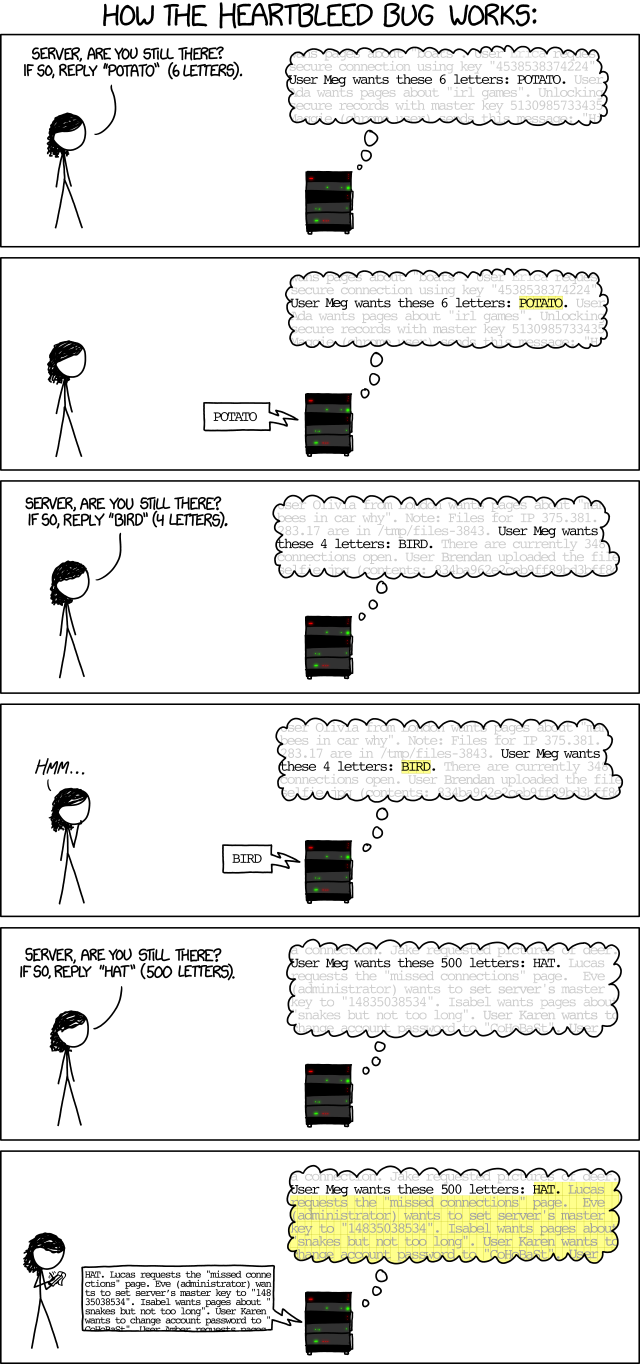
Sometimes, the easiest way to explain a concept to someone is with the use of illustrations, or cartoons. Xkcd.com attempts to do just that with this simple comic, where it tells a short story of a hacker talking to a server, who uses the Heartbleed exploit to trick the server into leaking more information it’s supposed to, until it begins to divulges sensitive data.

First, check the comic out below.
heartbleed_explanation
Image used with permission by copyright holder

First the girl asks the server to indicate whether it’s still online by telling it to say “Potato,” and indicates the length of the word. The server responds with “Potato,” while withholding all of the information surrounding “Potato,” written out in a lighter hue in the server’s speech bubbles. The hacker then asks the server to repeat the same task, but instead replaces “Potato” with “Bird,” and indicates the length of the word. The server complies.

Recommended Videos

Then, the hacker asks the server to say “Hat,” but instead of noting that it’s a three-character word, she states that it’s 500 letters long. The server responds not only by saying “Hat,” but also by leaking out the information around the word. By doing so, it reveals sensitive server information, including a “master key,” which the hacker begins to jot down.

This is a basic explanation of how the Heartbleed bug works. The Heartbleed bug is a flaw in the OpenSSL method of data encryption used by many of the world’s websites, which was actually put into the code accidentally by a programmer roughly two years ago.

OpenSSL contains a function known as a heartbeat option. With it, while a person is visiting a website that encrypts data using OpenSSL, his computer periodically sends and receives messages to check whether both his PC and the server on the other end are both still connected. The Heartbleed bug allows hackers to send trick heartbeat messages, like the one pictured in the comic above, which can fool a site’s server into relaying data that’s stored in its RAM — including sensitive information such as usernames, passwords, credit card numbers, emails, and more. This is the part of the flaw that the Xkcd comic illustrates.

What do you think? Sound off in the comments below.

Konrad Krawczyk
Former Computing Editor
Konrad covers desktops, laptops, tablets, sports tech and subjects in between for Digital Trends. Prior to joining DT, he…
Anthropic confirms Claude acts differently depending on your language and which model you pick
A new study shows Claude's isn't nearly as consistent as you might assume.
Claude app on iPhone

If you've ever felt like Claude gave you a completely different vibe on one day than another, you weren't imagining it. Anthropic just published research confirming that its chatbot's personality shifts depending on which model you pick and which language you type in, and the pattern is consistent enough that it's worth knowing before you ask your next question.

The model you pick decides how Claude responds

Read more
This website is a goldmine if you love Mac menu bar apps
Discover hundreds of menu bar apps, from tiny utilities to powerful productivity tools, all in one place.
MacMenuBar website open on Mac

The menu bar is the most underrated part of macOS. It sits quietly at the top of your screen, and most people never do anything with it other than checking the time and battery percentage. But if you find the right apps, that thin strip becomes the fastest way to get things done on your Mac.

The problem is finding those apps. The Mac App Store is not great at surfacing them, and hunting through random blog lists is a chore. And while I have shared my favorite Mac utilities that include menu bar apps like Supercharge and CleanShot X, there’s an even better place to find the best apps for your Mac’s menu bar.

Read more
How to install macOS 27 Golden Gate public beta on your Mac?
From a smarter Siri to a more reliable Spotlight, here's your full walkthrough for installing macOS 27 Golden Gate's public beta today.
macOS 27 Golden Gate

Along with iOS 27’s public beta, Apple has also released macOS 27 Golden Gate’s public beta build, so that early adopters can get their hands on the new features, including Siri AI, and provide timely feedback to help ensure a stable iOS launch in September. 

If you’re sold on all the new features but don’t want to put your faithful MacBook through developer beta duty, a public beta offers a much more refined experience. To install macOS 27’s public beta, follow the steps given below. 

Read more