1. Home
  2. Phones
  3. Apple
  4. Mobile
  5. Photography
  6. News

VisualRuler uses your iPhone’s camera to measure objects in the real world

Add as a preferred source on Google

Unless you work in construction, there’s a good chance you don’t always carry a tape measure with you. So what do you do when you stumble upon something, and you really need to know exactly how big it is? Will that discarded futon fit in your hatchback? And how big is that 48-inch TV, really? Well, if you’re an iOS user — and assuming you do carry your phone around with you– just snap a picture of the object with the VisualRuler app and it will measure it for you.

Of course, it’s not quite that simple. As detailed by Lifehacker, VisualRuler works by comparing the size of an unknown object to the size of something it knows: a credit card. So before you take a photo, you need to place your card somewhere in the frame. The photo isn’t sent anywhere, but if you’d rather not have pictures of your credit cards lying around, you can use a gift card, store membership card, or anything else of the same dimensions. The app will automatically detect the card and place a box around it, then manually put a second box around the object to be measured. Because the app knows how big the credit card is, it can now determine how big the other object is, regardless of how far away the camera was.
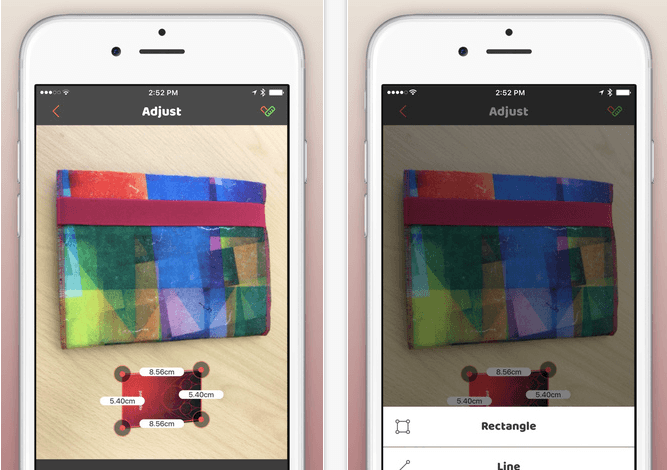
VisualRuler
Image used with permission by copyright holder

It’s far from an automated process, at least at this stage of development, and the app’s accuracy is not perfect. The card must be on the same plane as the object to be measured, and the app can’t account for perspective distortion. Presumably, it would also be difficult to measure very large objects — such as a building — since the credit card would be so relatively small in the frame.

Recommended Videos

Still, the $3 VisualRuler provides a much better guesstimate than simply eyeballing things – although, in a sense, that’s exactly what it does.

While VisualRuler is not available for Android, a somewhat similar app is. It’s called Viewlers Free Digital Ruler, and it can either use a database of known objects — such as a coin — to determine the size of other objects, or turn your phone into an actual ruler based on the screen’s DPI. It looks a little janky, but that may have had something to do with the poorly lit demonstration video showing it running on an old HTC phone with a cracked screen.


Daven Mathies
Daven is a contributing writer to the photography section. He has been with Digital Trends since 2016 and has been writing…
Apple’s next big iPhone display experiment could be its biggest yet
The company may be testing a 6.96-inch panel for a future flagship, although one leaker’s post is currently the only source for the exact measurement
iPhone 17 Pro Max

Apple may be testing a 6.96-inch display for a future iPhone, bringing its largest handset within a whisker of the 7-inch mark.

Leaker Digital Chat Station claims the experimental panel retains the same aspect ratio as Apple’s current Pro Max display. The post mentions the iPhone 20 Pro Max as a possible destination, but doesn’t connect the screen to a finished device. Apple could be exploring the size without putting it anywhere near a production line.

Read more
Vibecoded apps are flooding Apple’s App Store, and users are getting sick of them
App Store submissions have doubled this year as AI tools make it easier than ever to build an app, but downloads haven't kept pace, and for good reason.
Apple App Store homepage on an iPhone

Apple's App Store is in the middle of its steepest submission surge in years. Developers submitted nearly 600,000 new apps last year, marking a 30 percent jump over the previous year. That number has already doubled to roughly 560,000 new apps in just the first six months of this year, according to estimates from analytics firm Sensor Tower cited by the New York Times. The reason behind the spike is vibecoding, which allows people with no prior development experience to create new apps using AI tools.

A familiar boom, with a twist

Read more
Google Photos adds a quick toggle between AI and classic search
Classic search is finally easier to reach for people who enabled Ask Photos
Google's Ask Photos debut.

Google Photos is giving users an easier way to leave its Gemini-powered search when a simple keyword would do. A new toggle now sits at the top of the results page, letting users switch between Ask Photos and classic search without digging through settings.

The change appears to address feedback from people who opted into Ask Photos but wanted a quicker way to return to classic search when Gemini was slower or less useful for a straightforward query.

Read more