  1. Home
  2. Phones
  3. Android
  4. Apple
  5. Mobile
  6. Smart Home
  7. News

The new Logitech Pop buttons work with Apple’s HomeKit

Add as a preferred source on Google

Last year’s Logitech Pop button were an inventive solution to a common smart home problem: A lack of switches to go along with devices. You could wire up Logitech’s spring-mounted Pop buttons instead of having to fish out your smartphone for basic tasks like adjusting an internet-connected lightbulb or thermostat. And now, if you use Apple’s HomeKit, you can do the same with this year’s Pop.

The new Pop has the distinction of being the first internet-connected button inside Apple’s growing smart home ecosystem, Logitech said, and it works as you’d expect: You can control any compatible HomeKit-device you’ve set up within the iOS app.

Recommended Videos

Otherwise, it doesn’t do much to switch up last year’s formula. The new Pop still ships with an adhesive rear cover, and connects to a smartphone or tablet via Bluetooth. It’s programmable — each button press can be tied to a different action, like dimming the lights and flipping on the television or opening the blinds. And it works with Logitech’s existing Pop companion app, which lets you create IFTTT-like “recipes” with custom delays, timing, and activation orders.
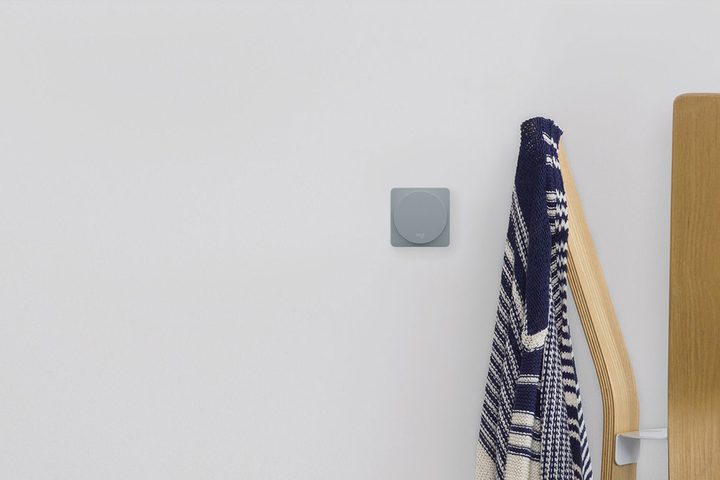
Image used with permission by copyright holder

It’s a plug-and-play affair with just about every product that Logitech’s Harmony remote platform supports. The Pop can toggle wirelessly connected Sonos speakers on and off, flip Philips Hue overheads to a certain color, and open and close Lutron window drapes. And better still, it works in tandem with Logitech’s internet-connected Harmony remotes, if you happen to have one or two of those lying around — you can program a Pop to switch off your television with a tap, for example, or tune in to a favorited cable channel with a double press.

That’s just the tip of the iceberg — hardware on open platforms like WeMo, SmartThings, and Insteon platforms are also compatible. And existing Logitech Pop owners are getting a software update — users will be able to control Osram Lighting, Hunter Douglas Shades, and Lutron.

“You still want it to be simple, you still want it to be capable,” Logitech’s senior director of Home Control Neil Raggio said. “And so we landed on […] gestures, as something from a mental model that would be easy enough that a user would know [how to use it].”

The Logitech Pop Smart Button Kit starts at $50, and ships with the bridge necessary to connect it to your Wi-Fi network. Each additional button costs $40, and the product comes in white, alloy, coral, and teal.

Kyle Wiggers
Kyle Wiggers is a writer, Web designer, and podcaster with an acute interest in all things tech. When not reviewing gadgets…
The dream of uber cheap phones for kids and grandparents is effectively dead, thanks to AI
AI's demand for memory chips has made budget smartphones unprofitable to build.
Electronics, Mobile Phone, Phone

That $100 phone you were going to grab for your kid's first device, or hand down to grandma, could become a dream in a while. AI's hunger for memory chips just made the entire budget phone category borderline impossible to build.

So how bad are we actually talking?

Read more
Apple’s new Upgrade program launches on Tuesday with major changes
Apple's new leasing program might drop AppleCare coverage from the bundle.
iPhone 17 Pro Max

Buying your next Apple device could soon look like leasing a car. Apple is launching its new Apple Upgrade program on Tuesday, July 28, replacing new enrollments in the long-running iPhone Upgrade Program with a lease-based option that covers iPhones, iPads, Macs, and Apple Watches.

Backed by Klarna, the program is designed to lower the upfront cost of Apple's premium devices, but it is also raising questions about whether you'll actually own what you're paying for.

Read more
Setting up your dorm desk? These are the phone stands I’d actually spend my money on
From a $2 folding stand to a three-in-one Apple charging dock, these are the phone stands worth setting up this semester.
Analog Clock, Clock, Electronics

A phone stand is one of the smallest purchases on any back-to-school list, but it's also one of the easiest to get wrong, especially since there are dozens of options available on Amazon. A good phone stand is one that does its job well and, more importantly, doesn't put much of a dent in your budget.

This is one of those product categories where you don’t need to spend big, unless a MagSafe dock or a multi-device charging stand is genuinely useful for your desk or dorm setup. That is why this list begins with the most affordable options and works its way up to the more expensive ones. From a two-pack that costs about as much as a coffee to a three-in-one Apple charging station, I picked eight of Amazon's best-reviewed phone stands worth considering this back-to-school season.

Read more
