

When Sprint invited us to a quiet meeting room in the backwaters of CES 2010 to view the upcoming Skiff Reader, we couldn’t help but be reminded of last year’s somewhat lackluster demo with the Palm Pre. That time, orders were “take all the photos you want, but don’t touch.” This time, our lucky little hands got to take the Skiff for a spin, but cameras were strictly verboten.
You can’t win ‘em all. But it was well worth the trip.
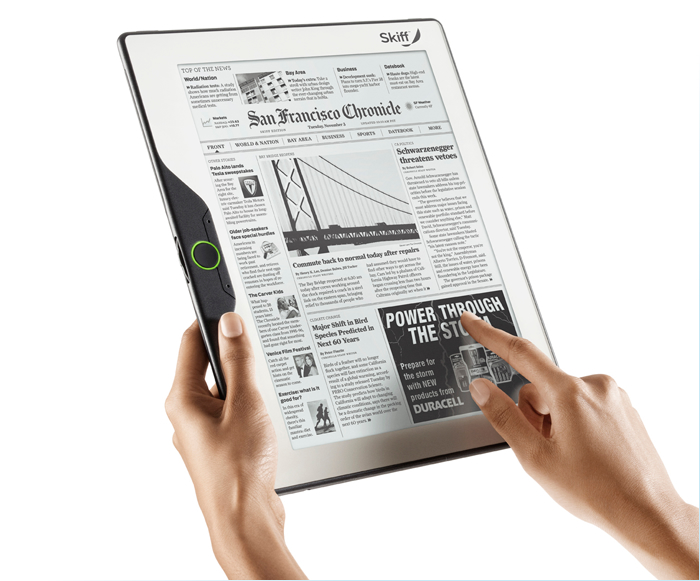 The Skiff Reader on display, which will be distributed by Sprint but has been developed by the Palo Alto outfit Skiff, easily makes the short list of the most promising e-readers of 2010. It’s the biggest (11.5 inches) the thinnest (just a quarter of an inch) and even packs the most pixels into its e-Ink display (1200 x 1600).
The Skiff Reader also joins the rarified ranks of touch screen e-readers, allowing you to make your selections directly on the screen. Like the Plastic Logic Que proReader, we found the touch capability convenient, but still less than responsive compared to typical LCD displays. It took a significant prod to get our touch to register on the preproduction unit, and swiping to scroll side-to-side while zoomed in still feels like a complete shot in the dark. Good thing the giant, high-resolution display eliminates the need for most material.
Not all functions have to be performed with the screen. Unlike the single-button Que, the Skiff uses a more traditional, but still sparse, assortment of hard buttons. The side has a green-ringed home button flanked by up and down buttons, and a scroll wheel on the side. Despite taking the form of the wheel, it’s spring loaded and only twists a little up or down to initiate scrolling – you don’t actually spin it like a mouse wheel. Given the clunky touch on both the Que and Skiff readers, the extra buttons might actually give this model a leg up, even if it isn’t quite as pretty as the Que.
 Very much like the competing Plastic Logic Que proReader, which substitutes plastic for glass as a more durable e-Ink substrate, the Skiff Reader uses foil. The technology, developed by LG, should make the reader less susceptible to the catastrophic cracking that earlier readers suffered when they took a tumble. Despite our best intentions, Sprint reps were not eager to let us chuck the prototype into the wall for informal testing. We can say the Skiff feels light but solid, and gets an extra air of confidence from a thin veneer of metal (the same material you see around the edges and creeping up around the left-hand controls).
Although the preproduction unit came preloaded with a handful of publications for testing, the size of final library remains very much up in the air. Skiff has partnered with Hearst, so a good swath of major magazines and papers have been confirmed, but beyond that, the all doors lead to question marks. Perhaps one of the most intriguing doors we spotted: an “apps” menu. On the preproduction unit, we were able to open up a game of Sudoku, but it potentially leaves room for more creative endeavors, too.
Sprint hasn’t yet named a price for the Skiff, but with its closest competitor, the Que, slated to sell for $799 with lifetime data access, we wouldn’t expect this even bigger model to show up as a bargain. Even so, its unmatched size will make it quite the device to reckon with it when it launches sometime this year.


