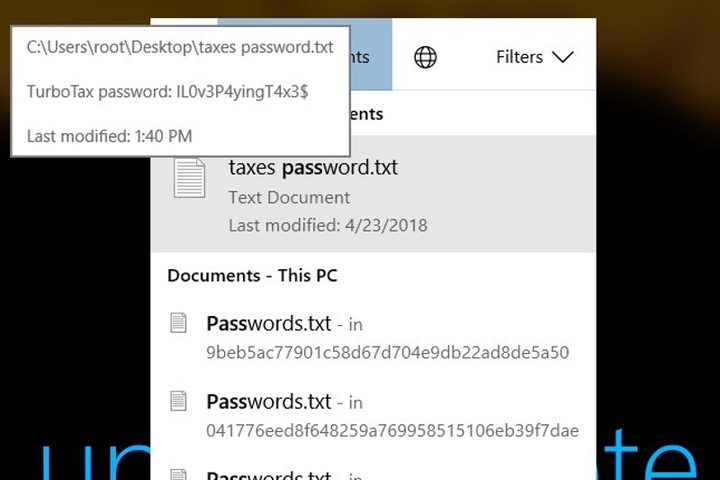
McAfee Labs reports that Microsoft fixed a problem with Cortana that allowed anyone to read sensitive information on the Windows 10 lock screen and bypass the screen altogether. At the core of the issue was the file indexing process used by Windows 10 and Cortana’s contextual menu for manually asking the virtual assistant questions.
If enabled, Cortana can be present on the Windows 10 lock screen so that anyone can ask her questions, not just the owner of the locked device. Prior to the fix, if you activated Cortana verbally but instead began typing your query manually, a contextual menu appeared. The problem was that all displayed results stemmed from indexed files and applications.
Windows 10 keeps an index of all files and installed applications used on your PC so you can easily search for those items. This system also includes a method to peek inside your files and index their content. You can see the list of indexed file types by heading to “Indexing Options” on the Control Panel and navigating to the File Types tab after clicking “Advanced.” You’ll see that many file types are marked as “Index Properties and File Contents.”
That said, you could initiate Cortana and manually begin searching for documents. Thus, if you kept a list of passwords in a text file named “passwords,” Cortana would display that file and its current location on the locked Windows 10 PC.
“If the match is driven by file name matching, then you will be presented with the full path of the file,” McAfee’s report states. “If the match is driven by the file content matching, then you may be presented with the content of the file itself. Keep in mind that the entire user folder structure is indexed, which includes the default location for most documents but also for mappings like OneDrive.”
But the problem didn’t just revolve around hunting down stored passwords. If the search located any document, script, or text file, it would be loaded by the associated editor and presented once the device owner logged onto Windows 10. The same could be said when loading Calculator, Notepad, and other programs from the contextual menu. That means you could essentially run malware on the PC without unlocking it.
The deal with running malware using Cortana is that you need to be personally associated with the target PC, such as accessing your boss’ laptop or a company workstation storing secrets. One method of attack required dropping an executable file or PowerShell script on the target PC through file sharing or a disguised email attachment. Thus, the boss could open the file, unknowingly drop malware onto his PC, and then you sneak into the office and launch the executable or script from the lock screen.
But the problems didn’t stop there. Using a string of inputs and an inserted USB stick, the team managed to reset a locked PC’s password using a PowerShell script from Cortana’s contextual menu, thus gaining access to the entire PC.
Microsoft fixed the Cortana exploit on Tuesday, June 13.