When Quibi was first unveiled, everyone had high expectations for the video platform. The goal was to launch content with episodes that were only several minutes long for easy consumption, starring familiar faces like LeBron James and Sophie Turner. The library would include everything from documentaries to fictional shows to comedy skits, and in the age of TikTok and commuting, it seemed like a plausible idea.
As it turns out, Quibi hasn’t been particularly successful at holding long-term interest. Current estimates put the app at getting 2 million paying customers by the end of 2020, which is around 30% of its first-year target. Quibi founder Jeffrey Katzenberg even went so far as to blame coronavirus, though the other shortcomings — notably lackluster programming and poor marketing — have likely been a factor.
So, if you’re one of those who prefer to drop Quibi — or at least wait until it shows up on your TV — you may be wondering how to officially end your subscription. Thankfully, we’ve got you covered.
How to cancel Quibi from within the app
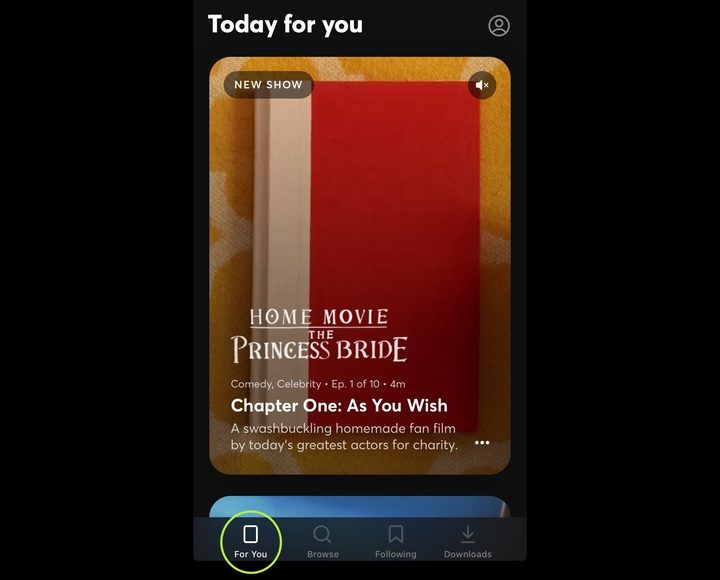
The easiest way to end your Quibi subscription is from directly within the app itself.
Step 1: Launch the app and tap the For You tab at the bottom. Then, select the human icon in the upper-right corner, which will allow you to access the Settings menu.
Step 2: In Settings, select the My Account option at the top.
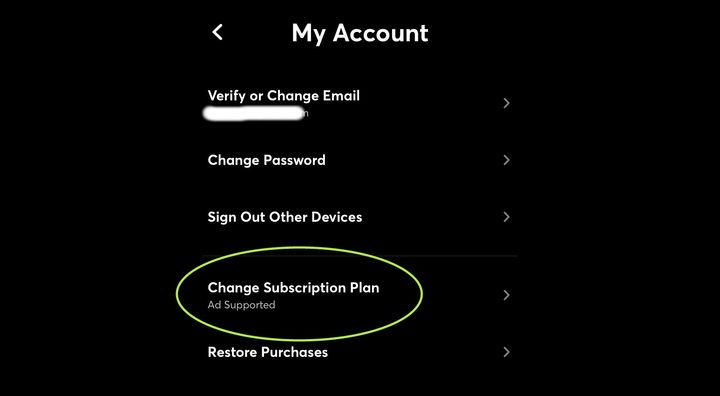
Step 3: Now, tap the Change Subscription Plan option toward the bottom of the page.
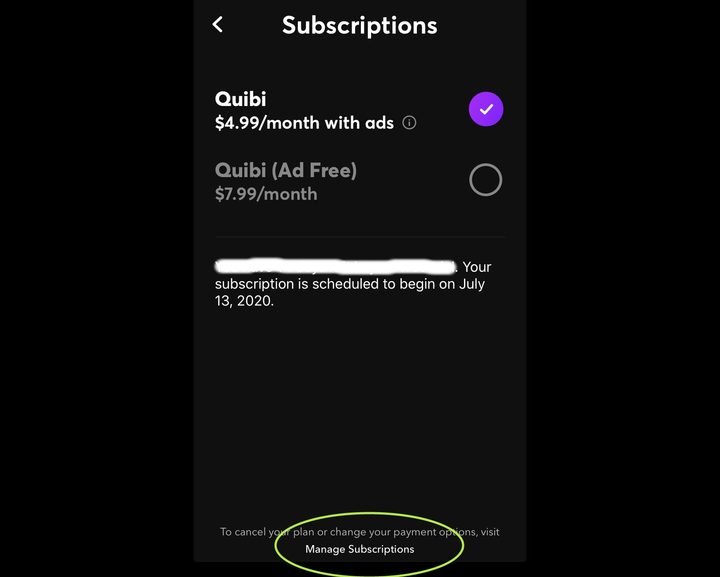
Step 4: The resulting screen will show you your current subscription plan. At the bottom, you will see a small section that says Manage Subscriptions. Tap here to continue.
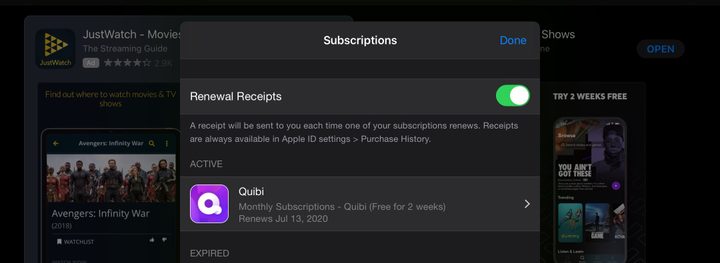
Step 5: You’ll now be taken to the subscription section of your app management software, which looks a bit different depending on your operating system. Regardless, look for an option to select the Quibi app from your list.
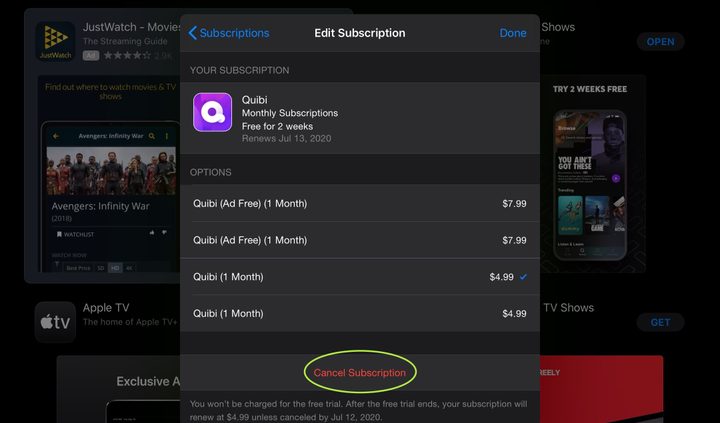
Step 6: Finally, select Cancel Subscription at the bottom and confirm your cancellation.
How to cancel Quibi via iOS
If you prefer to cancel Quibi without launching the app, you have other options. If you’re on an iPhone, just head to the Settings menu and tap your name at the top of the resulting page.
Next, select the Subscriptions option and peruse your current subscriptions through Apple. If you don’t see Subscriptions, then you aren’t signed in, so select iTunes and Apple Store instead, and sign in using your Apple ID information. Afterward, select Quibi, followed by Cancel Subscription. Confirm the cancellation, enter your Apple ID password once more if necessary, and you’re done.
How to cancel Quibi via the Google Play Store
If you’re on Android, you can also cancel Quibi through the Google Play Store. First, make sure you are signed in to the correct Google Account (i.e., whichever account you use for your phone and Quibi).
Next, open up the Google Play Store, tap the icon with the three lines, and go to Subscriptions. Select the Quibi app, tap Cancel subscription, and verify your decision to remove your subscription.