  1. Home
  2. Phones
  3. Computing
  4. Mobile
  5. Web
  6. News

See how Google Maps is using color to add even more detail

Add as a preferred source on Google
 

Google Maps is getting even better with the greater use of color to depict additional geographical details in natural features.

Recommended Videos

Google Maps product manager Sujoy Banerjee said the visual improvement will bring “even more detail and granularity to the map, making it easier to understand what an area looks like whether you’re exploring virtually or planning a visit.”

Banerjee explained that the enhanced level of detail has been made possible by applying a new color-mapping algorithmic technique to its current data to create “an even more comprehensive, vibrant map of an area at global scale.”

It means that from this week, when looking at a location on Google Maps, you’ll get a clearer understanding of its natural features, “so you can easily distinguish tan, arid beaches, and deserts from blue lakes, rivers, oceans, and ravines,” Banerjee said, adding, “You can know at a glance how lush and green a place is with vegetation, and even see if there are snow caps on the peaks of mountaintops.”

Google used computer vision to locate natural features in its huge database of satellite imagery before applying the new coloring. It means that a densely covered forest, for example, will appear as dark green on the map, while an area of patchy shrubs will show up as a lighter shade of green.

To offer a better idea of how much more detail you’ll see on Google Maps, Banerjee posted several before/after images of various places, including Iceland (below), a country famous for its stunning natural landscapes.
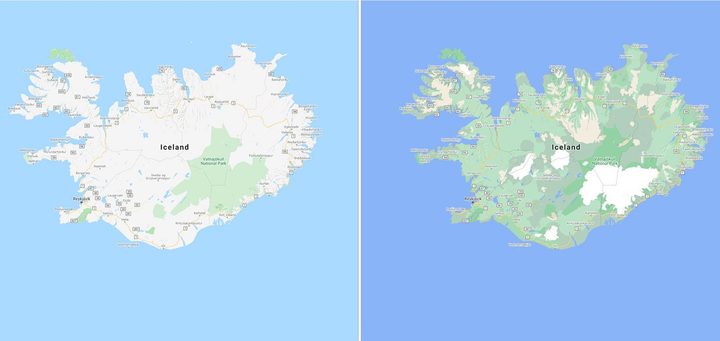
Google Maps

“Iceland’s rich landscape is now much easier to visualize,” the product manager said. “You can see the varying densities of greenery throughout the country and more easily spot Vatnajökull, the largest ice cap in Iceland, which is now depicted in white.”

While these improvements are geared toward natural landscapes, Google is also planning to add highly detailed information for urban areas, too. It means you’ll soon be able to see the shape and width of a road to scale, as well as the precise location of sidewalks, crosswalks, and pedestrian islands — important for those with accessibility needs.

These more detailed city maps will land in the coming months for New York, San Francisco, and London, with more cities added over time.

For more information on how to get the most out of Google Maps, check out Digital Trends’ handy guide.

Trevor Mogg
Contributing Editor
Not so many moons ago, Trevor moved from one tea-loving island nation that drives on the left (Britain) to another (Japan)…
I picked four wireless chargers so you can stop making your iPhone, AirPods, and Apple Watch fight over one dorm outlet
The best back-to-school wireless chargers for dorm desks, study spaces, and travel
Computer, Electronics, Laptop

A dorm-room desk can disappear surprisingly quickly beneath a laptop charger, phone cable, Apple Watch puck, and the growing collection of adapters required to power them all. Add textbooks and other academic materials, and finding enough room to study becomes the first assignment of the semester.

A wireless charging stand can consolidate several of those cables into one station. It also gives your phone a dedicated place to sit, which helps when you are checking the time or watching a lecture. Every charger here still needs one connection to the wall. So finding a peripheral that works with all of your gadgets isn't just convenient, it's smart. I picked four models ranging from an inexpensive two-device stand to a fast 25W wireless charger capable of powering an entire Apple setup.

Read more
Your backpack needs one of these power banks before classes start
I picked 4 power banks that can survive your longest day on campus
Anker Nano 3-in-1 10,000mAh portable power bank for iPhone.

Finding an empty outlet on campus can require more patience than registering for a popular class. Common spaces like libraries or lecture halls rarely have sockets in the right places. So a good power bank gives you far more freedom. It gives you the option to choose the quiet corner of the library, work outside between classes, or even finish an assignment without worrying about your laptop's battery.

The right model depends on what you carry, since a phone needs far less power than a MacBook or gaming laptop. I picked four Anker power banks that cover everything from everyday phone charging to running several demanding devices at once.

Read more
The Minimal Phone 2 looks dramatically better than the original, and I’m genuinely here for it
Plastic is out, metal is in, and Minimal Phone 2's renders suggest the digital detox phone concept finally has the hardware to match its ambition.
Electronics, Mobile Phone, Phone

I've been following the Minimal Phone since its initial crowdfunding days. The first iteration had the right idea trapped inside the wrong body, I’d say. Plastic build, no 5G, an underwhelming camera, and e-paper ghosting that frustrated early adopters; all these issues kept the phone from reaching a wider audience. 

Now, founder Armen Youssefian has posted what appears to be a 360-degree render of the Minimal Phone 2 on X, and from what I can see, the team has done its homework.

Read more
