
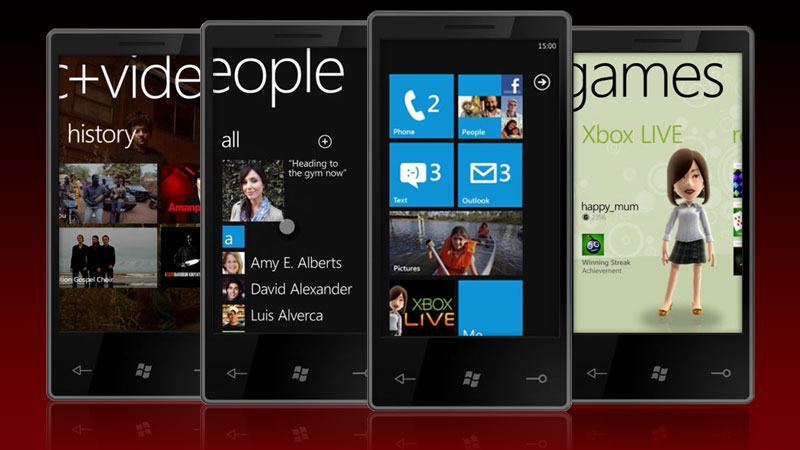
The new Phone Series 7 platform from Microsoft is getting a lot of praise at the moment, with only two things being identified as problems: the name of the platform, which will likely be overshadowed by the names of the phones anyway, and the fact that existing phone users can’t upgrade to the new operating system. The latter problem is a recurring one, but the reality is that to really move this platform forward, Microsoft had to step away from the past. It is kind of ironic that a lot of folks, over the last several decades, have felt that Microsoft should actually clean slate Windows as well, which would be vastly more difficult to do this with. Let’s talk about the problems with backwards compatibility and why Windows Phone Series 7 (WPS 7) needed a full reset.
Graphics Performance Requires Graphics Power
One of the things that sets the iPhone apart from other smartphone products is Apple’s focus on detail and their tight control over the product (evidently there is a control war going on over the iPad).
Each of the components is designed to work together, yet even so, they have had problems with each new iPhone release. For Microsoft, Google, Symbian, and other hardware-independent products, the problems have seemed more pronounced when they bring out new products, and each has to build for the lowest common denominator.
The end result is phones that are similar, but don’t take real advantage of the unique advances in certain hardware platforms like the Qualcomm Snapdragon, Nvidia Tegra, or Marvell Armada lines. So Microsoft made a hard choice, setting a hard specification for hardware so they could build a platform that pushed that hardware’s limits. In effect, the phone user will get much like what they get with Apple: the full capability available in the phone, and not lose as much due to the differences between the various platforms.
By doing this, Microsoft had to step away from the existing lines because they weren’t built under this specification, and wouldn’t have the performance the new OS required. As a result, backwards compatibility with hardware was compromised.
Upgrades Remain a Rarity
Cell phone manufacturers want to sell new phones, and carriers use the phone subsidy to lock in customers so they can’t move. If you update the OS, the cell phone manufacturer doesn’t make money, and you are at more risk of leaving your current carrier for a competitor. So while you often could update an old Windows Mobile phone with a new OS, few did, and few handset manufactures put in the work that allowed an upgrade.
The fact of the matter is we buy the vast majority of phones like any appliance: The device and related operating system is a single unit, and to upgrade you need to buy a new phone. However, with smartphones becoming more like PCs, the ability to upgrade these devices could increase. The question is, should it?
Let’s argue both sides.
Yes, We Should Upgrade Smartphones
There are two strong arguments for this. The first is that this would reduce electronic waste and potentially prevent a lot of cell phones going into landfills. In addition, owned phones (with their subsidies paid off) should allow for lower cost monthly services and more freedom when it comes to carriers, because users should be outside of penalty periods. Greener and more freedom, it doesn’t get better than that, but what about the other side?
 No, We Shouldn’t Upgrade Smartphones

Advancements are slowed down by the need to support older hardware with new versions of the OS. This means big advancements come slower, performance on new phones is often not fully utilized to prevent problems with the older phones that are being upgraded, and support problems, resulting from the upgrade process, increase. In fact, overall reliability would be lower, and we tend to be relatively intolerant of unreliable phones.
Which is Better?
It probably depends on how much change you like and how mad you are with your carrier. If you don’t like change, and hate your carrier, then upgrading is the path you’ll likely prefer. If you want the most from new technology, want a new phone every one or two years, like your carrier and don’t want to mess with upgrading, a new OS with every new phone is the path you’ll likely prefer. I’m personally in the second group and can’t imagine keeping a phone for over two years (I kind of beat the snot out of them).
A Clean Start on the Desktop?
If the start-from-scratch path is better for WPS 7, why not use it for Windows 8, or the long delayed major upgrade to the Mac OS? The Mac OS hasn’t had a significant upgrade since OS X came out nearly a decade ago, and OS 11 apparently isn’t on the horizon. Looking at the iPad OS and WPS 7 besides OS X and Windows 7, both desktop platforms are starting to look a little old.
At one time, operating systems needed backwards compatibility because PCs initially cost thousands of dollars, and were kept in service for a decade. But with the average selling price for desktops dropping under $500, and for laptops well under $800, I wonder if this need is still the case. Folks kept Windows XP running for seven years, and I’ll bet there are plenty who will still be running it three years from now on the same hardware. Apple, which has historically been less backwards-compatible than Microsoft, makes the highest margins of any hardware vendor, and has the highest customer satisfaction.
The only big problem with missing backwards compatibility is that the respective markets will likely stall when features of the new OSs are released. Potentially, they could just go back one year (which is kind of what Apple does anyway), or move the bar much farther with every cycle than they do now.
Software used to be what would keep both vendors from doing this, but with emulators and virtual machines, this software problem isn’t what is once was. Add to this the increasing number of SAAS (software as a service) applications, and what Google is doing with Chrome, and I think you can see a future where software backwards compatibility is not really that relevant anymore.
Change is In the Wind
Setting aside the seeming hypocrisy of screaming at Microsoft to make a clean start, then screaming at them when they do, the reality is all this backward compatibility issues has really turned the PC into a support mess. I hope that the smartphone doesn’t go down this path, and instead we get more clean breaks like WPS 7, so platforms can advance and do the cool stuff we want to get done. I have no problem with Microsoft, Apple, or Google making clean breaks to take advantage of new hardware and more rapidly improve my phone experience. After a year or two, I’m ready for a change, what about you?


