(This article comes courtesy of N-Sider, a site for well-adjusted Nintendo fans. N-Sider has served the Nintendo community for more than a decade.)
There’s actually not much that’s new going on at the numerous demo stations Nintendo has set up for The Legend of Zelda: Skyward Sword—in fact, last year’s demo did a much better job of introducing players to the game’s mechanics and many options—so if you know nothing about the game, click that link first.
What Nintendo did have to show off was a handful of gameplay scenarios: an early-game sequence of bird-riding in the clouds as part of a ceremony, a chance to run around through the Sky Temple, and a boss fight against that white-haired guy from the trailers—a magical man named Ghirahim who calls himself lord of the surface.
Taking flight
The bird-flying sequence has been compared a bit to Super Mario Galaxy‘s Fluzzard races. I agree on a few levels—not only does it control similarly, but a lot of people are just really, really bad at it. It’s actually a piece of cake if you use a steady hand and watch what’s going on.
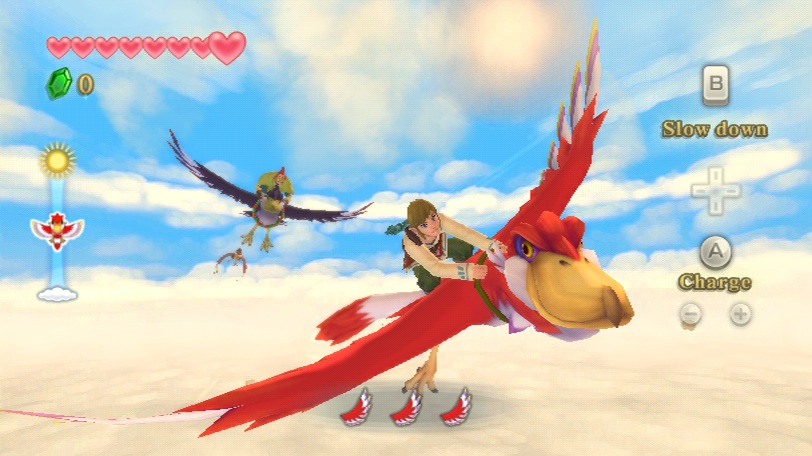
Tilting the MotionPlus-equipped Wii Remote around controls the roll and pitch of your bird, pressing A will give you a burst of speed (you get up to three of these in succession, and you’ll have to wait for them to recharge before using them again), B slows you down, and shaking the Remote lets you gain height by flapping. (They do a great job of filtering the small motions for flapping from the tilting required to change your bird’s orientation. I never felt the two conflicted at all.)
Like I said, it’s really a piece of cake. It took me roughly 30 seconds to catch the target the first time around. If you can handle tilting a Wii Remote competently, you have nothing to fear from this section.
Temple in the sky
It says it’s the Sky Temple, and there’s way too much of it to cover in the 10 minutes the demo lasts for—not to mention that most of its mechanics we’ve seen before, from the flying beetle that can pick up items (which it won’t do until you get it an upgrade) to enemies that must be fought by watching their positions and striking them in the appropriate direction. But there are a few elements I spotted for the first time that I thought were worth mentioning.
Enemies that are apparently Skulltulas dangle from the ceiling and will drop down on Link as he passes by. Using his bow (and a somewhat forgiving aiming reticule), he can shoot them down and combat them on the ground. Here, they’re invulnerable unless they either rear up or you knock them back with an uppercut, at which point you can thrust the Wii Remote forward to stab them. I saw some players knock them completely over, too, at which point you can take them out with a finishing move—slamming the Nunchuk and Remote simultaneously within a short window of time when prompted to.
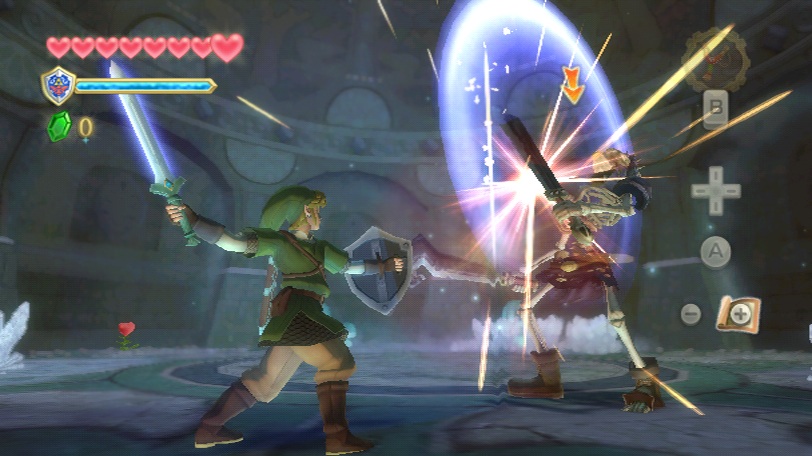
There’s also a curious shield meter that some have observed in the demo; honestly, I never really saw it in use save one time when I saw someone’s was depleted a little. The Hylian shield doesn’t seem to take damage (so why does it have a bar? Beats me, and the booth attendants as well), but other available shields do, and if they take too many hits, they’ll break.
As for the dungeon itself, maybe it was the nature of the show, maybe it was the time limit, but it felt like there was an almost bewildering number of things to do in the large room the demo placed you in, as opposed to the obvious “this is what you do next” M.O. past Zelda games have embraced. It’ll be interesting to see if the final game stumps us, gets us lost. Keeping the roundtable commentary about Skyward Sword requiring players to be really familiar with getting around, maybe it will.
Lord Ghirahim
He’s probably also located in the Sky Temple, but he’s a separate demo option on the show floor today, and he’s a decent amount of work to defeat. When you first meet him and after he monologues a bit, the fight will start.
At first, he’ll simply move about in front of you, and grab your sword with his hand, smirking. Shake the Remote a bit to free it, and you’ll be able to get a few hits off. After doing this a few times, he’ll step back, lick his lips in an abso-freaking-lutely creepy-as-heck fashion and summon his own sword with which to engage you.
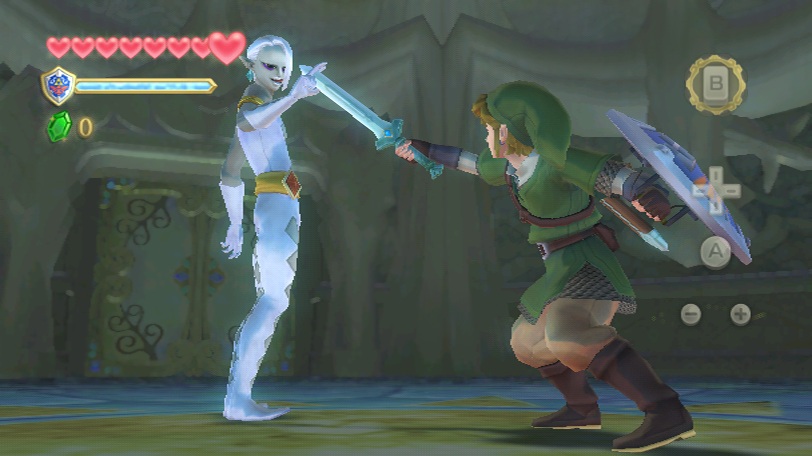
He does a few things, like spawning a line of red bat-like projectiles that you can either deflect with your sword or strike back with a shield bash (if your shield is up via a Nunchuk shake, you can thrust it forward to execute this move). His key attack is posing for a moment and then moving quickly across the room to strike. You can dodge this with the A button if you want, but if you can shield-bash him instead, you’ll disable him and be able to strike.
I discovered one really interesting thing during this fight: if you go nuts with your Wii Remote (and thus your sword), you’ll deplete your stamina meter. The stamina meter, you may recall, is the green pie that appears next to Link and is drained if you use the A button to dash, climb vines, etc. Although I can’t say I was in danger of running out of stamina at any point during the demos available today, it makes me wonder if there may be scenarios in other parts of the game where it may prove to be a challenging restriction—particularly if you get in the habit of dashing up to things and wailing on them. (If you do run out of stamina, Link will have to catch his breath and will move very slowly for a bit—so don’t do that.)
Skyward Sword seems like it’s just about ready to release, probably going through its absolutely final polish as we write this. It’s slated for this holiday, and I think it’s fair to say that between the motion-centric gameplay and the little hints of changes in structure, as well as the challenge level, it’s going to be one of the most interesting console Zeldas in a long time.