
 I recently had the opportunity to drive the 2011 Chevy Volt through Alaska. Our group began the trip in Anchorage, making our way to Girdwood, Hope, and Seward before heading back again. And while Digital Trends has already fully reviewed the vehicle and offered several thorough insights about the car, the mini road-trip through Alaska meant some extended and intimate one-on-one time behind the wheel.
Now I’m not a car expert, but the Volt’s almost video-game like interface and tech-fiend friendly controls were enough to pique my interest. These were the things I loved and hated about my time with the Volt.
Love
Touch interface
The touchscreen interface was easily one of my favorite things about the Volt. It was responsive (as it must be for this purpose), and after the getting-used-to-it phase, the capacitive controls felt completely natural.
I initially worried that I would spend more time with my eyes on the center panel, trying to find my respective touch controls, but I’m happy to say it was just the opposite: I was able to keep my eyes on the road and navigate the car’s icons just fine.
Efficiency icon
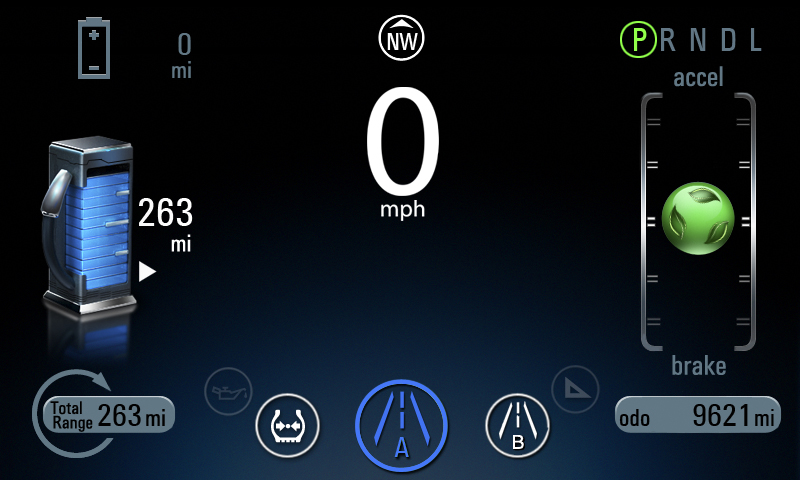
I like driving, but a lot of people don’t. Take into account the fact that I walk to work and don’t have to suffer through workweek traffic and my reasoning becomes clearer. But everyone is at some point a slave to driver fatigue or frustration about the time you’re spending inside your car. Now I’m not saying the Volt is a cure-all, but its eco-efficiency reader certainly helps. A rotating green globe bounces up and down a scale, and you want to drive so you balance it in the middle, getting the most efficient use out of the car.
Navigation system
This feature would find itself only under things I hated if it hadn’t been so useful once I’d figured it out. Chevy preloaded most of the destinations for us, and when using those it was more than simple to get on the road. But entering an exact address, not so easy (I’ll get to the later). However, after I gave in and decided to use crossroads, it was quite helpful. And for longer drives, I would get a reminder every 15-20 minutes that I was still on the right road, a feature I found comforting but that can also be easily disabled.
Feel
Simply put, the Volt is really fun to drive. It’s a comfortable car (I drove a model with the optional leather seats), and having the battery down the middle means it takes curves really nicely without slinging you around the car – maybe that’s not a problem for everyone, but fellow 5-foot-2 girls know what I’m talking about. But for short and long rides, it performed nicely.
Hate
Accelerator sensitivity
While I overall enjoyed my days driving the Volt, there are bound to be a few things to take exception with. For me, that including the car’s sensitivity. There’s always that adjustment period of getting used to a vehicle’s acceleration – and I don’t think I ever got there. After driving for awhile, I would get used to how much pressure I wanted to use on the accelerator, but those first few moments were always a little iffy.
The hiss
This might be silly and so unimportant to most drivers, but it definitely started to get to me. The Volt has a constant background hiss that is likely made all the more obvious by its comparative silence. Road noise didn’t really bother me, and surprisingly neither did the lack of radio or XM (didn’t work so well in most of the small towns we drove through) – but the hiss did. Apparently Chevy didn’t invest as much in noise dampening since the motor is so quiet, but the constant whir bordered on obnoxious.
Navigation system
Making an appearance in both categories is the Volt’s navigation system. Entering exact addresses was, to put it mildly, extremely annoying. It would try to auto-select my destination, which was wrong in each circumstance. It was also difficult to use backspace, and I found I was better off just entering the town name or maybe a cross street to find where I was going.
It’s probably important to note that Chevy did shelter us from one very important aspect of the Volt: the company always took care of charging the cars and filling the gas tanks, and I never had to stop to fill up.
Here’s a video with Chevy’s Michelle Bunker offering a little information on how the Volt charges.


