At its Worldwide Developers Conference (WWDC) in early June 2022, Apple showcased its upcoming iPadOS 16 update, which is currently in Developer Beta. While the stable update for the iPad’s next operating system is slated to be released sometime in October, we already know all the features coming to your Apple tablet. iPadOS 16 isn’t a significant overhaul in terms of looks, but it brings some handy features. Here’s everything you need to know about the next generation of iPadOS.
Which iPad models will get iPadOS 16
All iPads powered by an A9 chip and above will receive iPadOS 16. This means the fourth-generation iPad, iPad Air 2, and iPad mini 4 won’t get the update. On the other hand, the new iPadOS is supported by all iPad Pro tablets, including the original 10.5-inch and 9.7-inch iPad Pro. Here are all the iPads that will run iPadOS 16:
- iPad Pro 12.9-inch: First, second, third, fourth, and fifth generations.
- iPad Pro 11-inch: First, second, and third generations.
- iPad Pro: 10.5-inch and 9.7-inch.
- iPad: Fifth, sixth, seventh, eighth, and ninth generations.
- iPad mini: Fifth and sixth generations.
- iPad Air: Third, fourth, and fifth generations.
Stage Manager

iPadOS 16 will come with a bunch of new features that include better window management, new collaboration tools, and more. Here are all the iPadOS 16 features that you need to know about.
One of the most prominent features on iPadOS 16 is Stage Manager — allowing users to run up to eight apps at once. It lets you resize windows and see multiple overlapping windows simultaneously. Stage Manager holds recently used apps on the left side of the screen for easy access. It also lets you drag and drop files and windows from your iPad Pro to an external display, and vice versa.
However, the feature is limited to M1 iPads, so your two-year-old iPad Air 4 or 2020 iPad Pro won’t be getting Stage Manager with the iPadOS 16 update.
New collaboration tools
From Photos to Safari, the iPadOS 16 update brings new collaboration features to numerous apps. For instance, you can now share media seamlessly with up to five other people through the iCloud shared photo library. It will also form family memories that can be accessed by anyone in the group. If someone edits a photo in the shared library, the edits are saved and viewable for everyone.
SharePlay is being expanded to Messages, so you can watch the latest episode or listen to your favorite song while chatting about it with your friend in Messages. You also get shared playback controls to keep the media synced.
The Freeform app
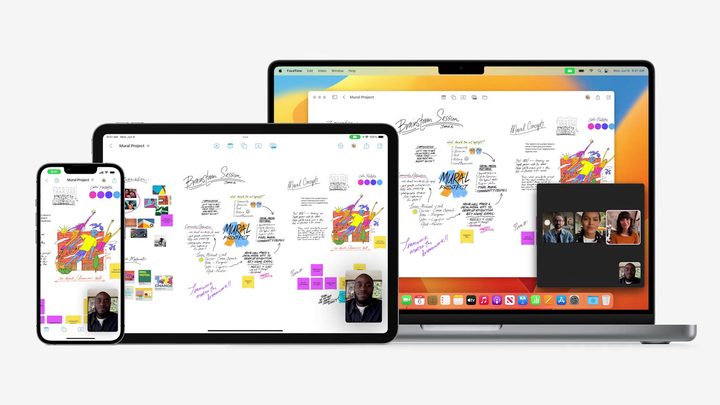
Apple will also be introducing a new Freeform app in iPadOS 16, which is a project-based organizational app. It will allow you to work with your colleagues or friends on a digitally shared whiteboard. SharePlay is also supported by apps like Pages and Keynotes. All of these collaborative features will work across the Apple ecosystem, so if you are on the iPad while your friend is using a Mac, you two can still collaborate.
Desktop-class apps
Most of the iPad apps have their origin in iOS, which causes many not to make the most of an iPad’s processing power. To change that, iPadOS 16 is bringing multiple Mac features of first-party apps to the iPad. These include the availability view in Calendar, card merging in Contacts, editing of file extensions, and more.
The find-and-replace feature is making its way to multiple system apps, including Mail, Messages, Reminders, and Swift Playgrounds. You get a new context menu, which shows common actions such as close, save, and duplicate.
Features shared with iOS 16
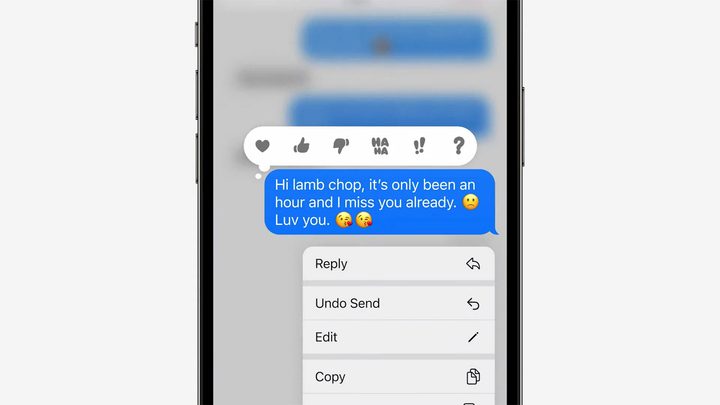
Plenty of apps work across iOS and iPadOS, and a new operating system upgrade means updates to those apps across the platforms. These include Mail, Messages, Safari, and more. You can now undo a sent email for up to 15 seconds or schedule to send one like on Gmail.
Undo send is also available on Messages. Plus, you can now edit messages or mark them as unread. Safari brings shared tab groups, which can be shared amongst friends, and anyone can add their own tabs. With iOS 16 and iPadOS 16, if you have specific settings for a particular website, like page zoom or automatic Reader view, these settings will sync across devices.
Other features in iPadOS 16
Handoff now works with FaceTime, so you can start a call on your iPhone and transfer it easily to the iPad. Hover text, which easily reads input fields, menu items, button labels, and other text is making its way to iPads. Live captions will be introduced soon, so you can get transcriptions of audio on the go.
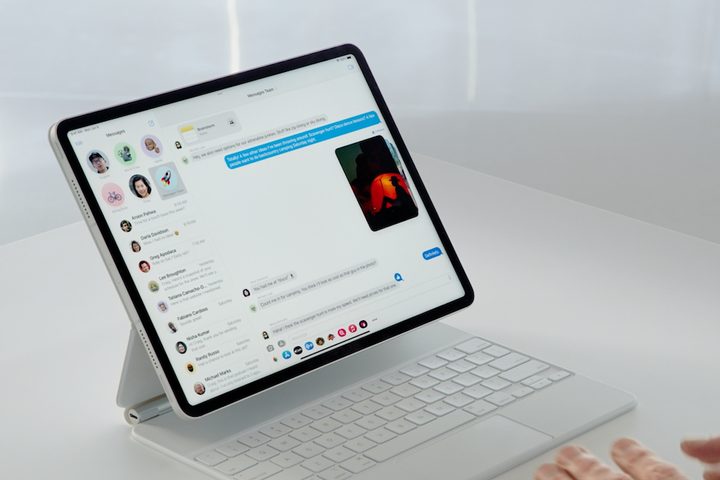
With iPadOS 16’s collaboration features in Files, Keynote, Numbers, Pages, Notes, and more, you will get the option to FaceTime the collaborators with a tap. Maps, Memoji, and News are getting some upgrades too. You will now be able to insert simple shapes like boxes and arrows into the drawing area of the Notes app. Reminders is getting pinned lists to let you pin your favorite lists and get to them quickly.
iPadOS 16 release date
The latest iPadOS is currently available in Developer Beta. We should get a Public Beta of the OS in the coming months, with the stable release slated at the time of the iPhone 14 launch alongside iOS 16. As such, iPadOS 16 should be available for everyone sometime in September or October.