1. Home
  2. Computing
  3. Gaming
  4. News

Thanks, I hate it: Someone installed macOS on a Steam Deck

Add as a preferred source on Google

Yesterday we got the news that Apple might bring macOS to the iPad Pro. Today, someone has managed to get macOS to run on a Steam Deck. And tomorrow? I’m betting we’ll see macOS installed on a toaster. You heard it here first.

Back to the Steam Deck. The feat was achieved by enterprising Reddit user Lampa183, who apparently was able to get macOS Catalina running inside a VirtualBox virtual machine on their device. In other words, this is several layers of operating systems and emulation. But the result is worth it … right?
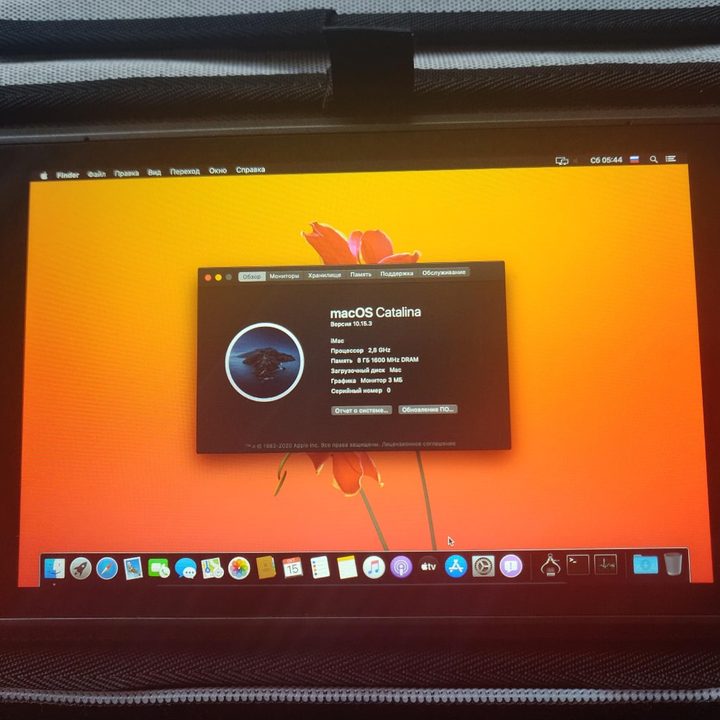
MacOS Catalina running on a Steam Deck.
Image used with permission by copyright holder

Well, according to Lampa183, performance on the Steam Deck is “normal” with macOS Catalina installed. However, they added that “some animations are [laggy] and turning on takes 2 to 4 minutes.” So, this is probably not the most monstrous Steam Deck out there in terms of raw power.

Recommended Videos

When asked what was working and what was not, Lampa183 responded that the device could access the internet and that the touchscreen was “partially” working. On the other hand, “Sound, GPU and (for some reason) security settings” were out of order.

I suppose we shouldn’t be too picky at this stage, since getting a full desktop operating system to work on a Steam Deck — something both the software and the hardware were entirely unprepared for — is an impressive feat in itself.

It’s not the first time macOS has found itself on an unfamiliar device. We’ve seen Apple’s old-school System 7 installed on a graphical calculator. There’s an entire cottage industry of people running macOS on custom PC hardware, crafting machines called “Hackintoshes.” And if you combine Apple’s Sidecar and Universal Control features, you can even get macOS to run almost natively on an iPad.

Still, I think running macOS on a Steam Deck takes the biscuit for now. Even if it is buggy and half-baked, it’s more daring than anything I’d ever try.


Alex Blake
Alex Blake has been working with Digital Trends since 2019, where he spends most of his time writing about Mac computers…
Claude redefined my bond with Macs. I am building my own apps and it’s a bliss.
I talk to Claude. It builds me apps. It's as simple as that!
Claude AI on Mac.

A few days ago, one of my colleagues asked me a favor. They wanted a few iOS and macOS screenshots turned into a mockup image where the UI is rendered on an iPhone and a MacBook. The problem? It was 3 am PST, which meant asking one of my design team colleagues was out of the question. 

Now, there are plenty of online tools that will do it, but you either have to pay for a subscription (as in Canva), or sign up to buy usage credits after a few free trials. Moreover, these editors limit you to a handful of design presets. I turned to Anthropic’s Claude, and within half an hour, I had a screenshot-to-mockup editor built for the entire team to use. Take a look:

Read more
ASUS Zenbook Duo UX8407AA review: Two screens finally earned their place in my bag
Two machines are definitely better than one, but on the same laptop? Asus nailed it, but you must be willing to pay for the convenience.
ASUS Zenbook Duo has two displays

See at Amazon

Two displays on a laptop once sounded like an elaborate solution waiting for the right problem. ASUS has spent the past few generations steadily proving otherwise. After using the latest Zenbook Duo (2026) UX8407AA for over two weeks, I started arranging my daily routine around that second display. 

Read more
How Claude helped my 65-year-old dad finally ditch his handwritten ledgers
AI has a lot to answer for, but this one small win is hard to argue with, at least for me.
Claude app on iPhone

My dad has owned a small business for as long as I can remember, and for just as long, he's kept his books the old-fashioned way. Every sale gets written down by hand so he can file his taxes later. The problem is that his accountant needs this data in Excel, and my dad, who didn’t grow up around computers, has never learned how to use it.

For years, his workaround was paying someone to manually type his handwritten entries into a spreadsheet. It worked, but it was adding additional cost to his business, which he wanted to avoid, but couldn't.

Read more