Alienware is debuting a monster gaming laptop at CES 2023 — the 18-inch m18. I had a chance to try out the machine for a bit after Alienware teased it, and although it’s impressive, I’ve struggled to think of a good use case for a laptop that’s so large.
The term “desktop replacement” doesn’t scratch the surface, which was previously used by massive machines like the MSI GT77 Titan. The hulking Alienware m18 weighs 9.3 pounds, making it even heavier than the older Alienware Area-51m. It’s a super heavy machine, and will likely come with an equally heavy power brick in tow.
While it’s heavier than a standard 17-inch workstation, its footprint isn’t much larger. Alienware went with a 16:10 screen, so you get 18 inches of screen real estate, while the machine itself is close to the size of a 17-inch laptop. You have two screen options — 1660p at 165Hz or 1200p at 480Hz — but neither looks great. Dell says they cover 100% of the DCI-P3 color gamut, which would make them great for color work. But in my brief time with the screens apart from my SpyderX, the low 300-nit peak brightness is what stood out.
That sounds like a lot of negatives, but there’s a method to Alienware’s madness here. You can pack in up to an Intel Core i9-13980HX processor, which is a 24-core behemoth that can turbo up to 5.6GHz. Dell also lists “next-gen AMD Ryzen processors” on the spec sheet, lending some credibility we might hear about AMD’s new chips at its keynote on Wednesday.
| Alienware m18 specs | |
| CPU |
|
| GPU |
|
| RAM | Up to dual-channel 64GB DDR5-4800, user replaceable |
| Storage | 4x NVMe SSD slots, up to 9TB total |
| Screen |
|
| Additional screen details |
|
| Battery | 97 watt-hour battery |
| Webcam | 720p webcam |
| Wireless | Wi-Fi 6W and Bluetooth 5.2 |
| Ports | 1x Ethernet, 1x headset, 3x USB 3.2 Type A, 2X USB 3.2 Type C, 1x Thunderbolt 4, 1x HDMI 2.1, 1x Mini DisplayPort, 1x SD Card |
| Operating system | Windows 11 |
| Dimensions (LxWxH) | 12.59 x 16.15 x 1.05 inches |
For graphics, it’s hard to say. Alienware lists “next-gen Nvidia” and “next-gen AMD” as options. That’s not surprising — we expect mobile GPUs from Nvidia and AMD at some point — but the graphics options may explain the massive size. If next-gen mobile GPUs are anything like Nvidia’s desktop RTX 4090, they’ll be insanely powerful (and require a lot of power).
You’ll have a beefy CPU and GPU in your Alienware m18. No surprise there. The storage is what stands out. You can pack in up to 9TB of NVMe storage (read that again: 9TB). You also get up to 64GB of DDR5 memory that you can replace yourself.
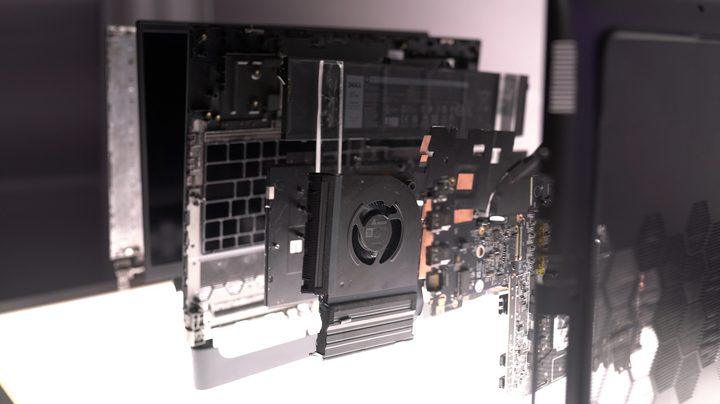
Under the hood, Alienware says it redesigned the internals for better thermals. The Element 31 thermal compound is present, but it’s applied to the GPU and CPU this time around. It lives under a vapor chamber that covers both, which is aided by four fans that Alienware says can improve airflow by 25% compared to the previous generation.
I wasn’t able to test the machine to see the performance in action, but it’s probably safe to assume the Alienware m18 will get loud when it’s pushed. We already know Intel’s processor reaches 55 watts, and I imagine the GPU options will climb high as well.

Alienware focused on aspects outside of performance. The keyboard from the Alienware x17 R2 returns — a low-profile mechanical board that Alienware co-developed with Cherry. I didn’t like the feel of it before and I don’t now, but Alienware is offering an AlienFX membrane keyboard option as well.
I also heard a lot about Alienware Command Center 6.0. This is the software that power Alienware’s laptops, and the company says it has been redesigned so it doesn’t consume as many system resources in the background. I like the per-game settings that Command Center has now. You can tie performance profiles and lighting effects to games, and Command Center automatically scans your PC to see what you have installed.
Alienware even tracks your frame rate each time you play and displays the most recent session, allowing you to see your performance and how you can optimize it. And I checked: Command Center deletes the data later, so it isn’t a suck on your disc space.
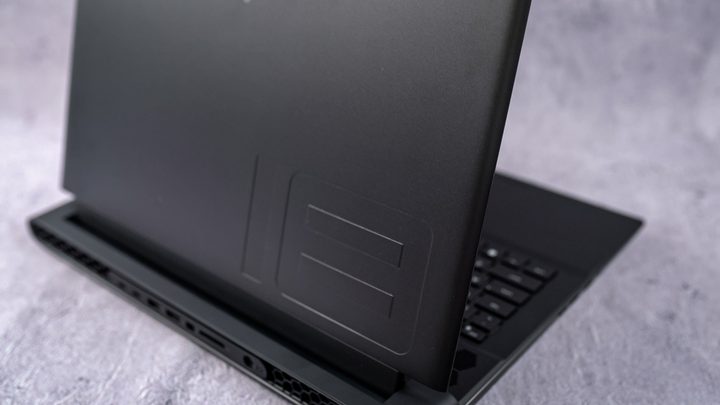
The Alienware m18 isn’t a travel companion, but laptops in this class never are. The more pressing question is if the power will offset the lack of portability. And perhaps even more important, how much Alienware plans to charge.
Alienware hasn’t shared a price yet, but I imagine the m18 will run above $3,000 for most configurations once the laptop is available for sale.