Pikmin 4 is the fourth game in Nintendo’s long-running strategy series, but it may as well be the first. That’s because the Switch sequel reinvents the franchise’s 22-year-old formula, turning it into a more laid-back exploration adventure with more of a puzzle emphasis. That makes it the perfect starting point for those who never grew up with the series on GameCube (though all three of Pikmin 4’s predecessors are now available on Nintendo Switch).
If you’re entirely new to Pikmin, though, you’ll still need to learn the basics of the oddball strategy game. And if you’re a seasoned veteran, you’ll need to get used to some of the new features that alter how it’s played. Before you set off on your space-faring adventure, here are seven tips you’ll want to keep in your back pocket.
It’s okay to multitask
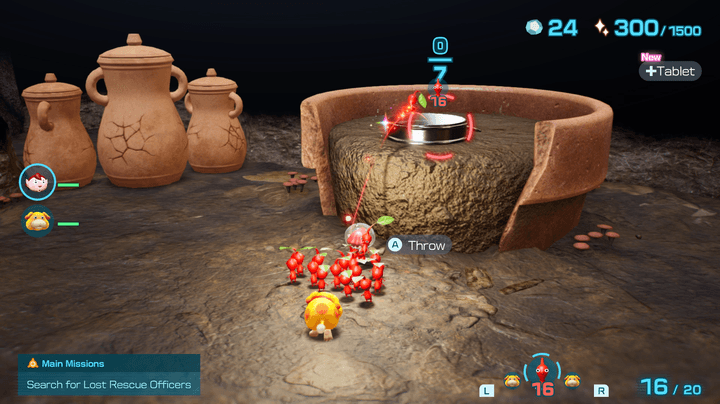
When you first start playing, your instinct might be to focus your Pikmin army on one task before moving to the next. While you certainly can do that, Pikmin 4 is meant to test your multitasking skills — and you’ll need to sharpen them to clear some of its toughest challenges. Don’t be afraid to split your Pikmin up and juggle multiple tasks at once. You can have a few carrying treasure, another batch breaking down a wall, and another taking down enemies. You’ll only start with a small squad so practice splitting them up efficiently and slowly expand the number of tasks you can do at once as you raise the number of Pikmin that can follow you to 100.
Pik the right ‘min for the job
Pikmin 4 has more creature types than ever, with each one having its own unique strength. Red Pikmin can safely withstand fire, while purple ones can carry 10 times their weight. A big part of the core loop comes from learning what every creature’s function is and picking the right squad for the job. You don’t have to guess, though. Whenever you land in an area or a dungeon, the game will suggest a team. You should initially listen to that, as that recommendation clues you in to what kind of obstacles are in the area. Naturally, you can choose to ignore that if you want and there’s some good reason to. Purple Pikmin can help you move more treasures at once, winged pink Pikmin can speed up resource gathering, and ice Pikmin can freeze enemies to make combat easier. Feel free to experiment once you’ve explored a new area and have an idea of what tools you could use to speed up some tasks.
Nectar is life
Every once and a while, you’ll find a nectar blob sitting around. These orange liquids are incredibly important, as they can power up your Pikmin. If you move Pikmin on top of one, they’ll automatically slurp the puddle down until it’s gone. That’ll turn the leaf onto their head into a flower, which isn’t just a cute aesthetic change. That will power your Pikmin up and make them more durable in battles. Rather than dying when they get hit, they’ll revert back to leaf form. It’s essentially a 1-up for each squad mate. Whenever you find one, make sure to power up as many Pikmin as you can to save you some deaths in the long run.
Learn to disband your squad
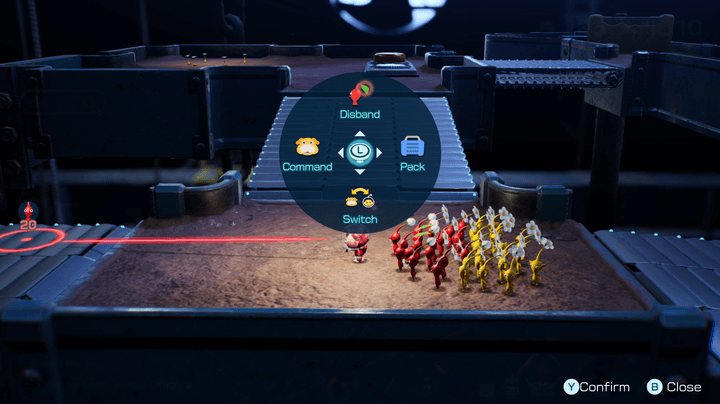
Once you’re running around with 100 tiny creatures, it’s easy to get overwhelmed. Pikmin 4 tries to declutter the experience as much as possible by only allowing players to have three Pikmin types out at once, but it can still be tricky to direct traffic effectively. If you want to make your life much easier, you’ll need to get used to two key functions. Disband All will set every Pikmin that’s following you into an idle state, splitting them into types. That makes it easy to only grab blue Pikmin if you need to cross water safely. More useful, though, is the Disband function, which idles every Pikmin except for the type that’s currently highlighted in the Pikmin selection UI on the bottom right of your screen. Both will make it much easier to pick the right Pikmin for any given job and avoid accidental deaths.
Set shortcuts
Speaking of functions, there are a ton of them in Pikmin 4. You’ll gain a whole bunch of tools and abilities that you usually have to select from a menu. It’s a little clunky, but there’s an easy way to gain quick access to your favorites. Press the minus button on the left Joy-con and select Shortcut Settings. Here, you’ll be able to set quick actions for three D-pad buttons and one that’s activated by pressing the left joystick in. You can pick anything you want, but we recommend setting at least one of those Disband functions, as well as the Switch action which lets you control Oatchi independently. Other helpful functions worthy of a shortcut include the Survey Drone, Oatchi’s Gather Pikmin command, and the Go to Base tool.
Don’t be afraid to rewind
Does the idea of accidentally killing a whole bunch of Pikmin keep you up at night? Don’t stress out too much. Pikmin 4 makes it much easier than ever to reverse accidents without losing much progress. Press the minus button and you’ll see a Rewind option that’ll turn back time. This is especially useful in dungeons, as using it will only kick you back to the start of the floor you’re on rather than the beginning. If you get to a hard boss fight underground and wind up losing too many Pikmin, don’t be afraid to try again so you can minimize your casualties once you’ve deduced a winning strategy.
Oatchi is your multitool
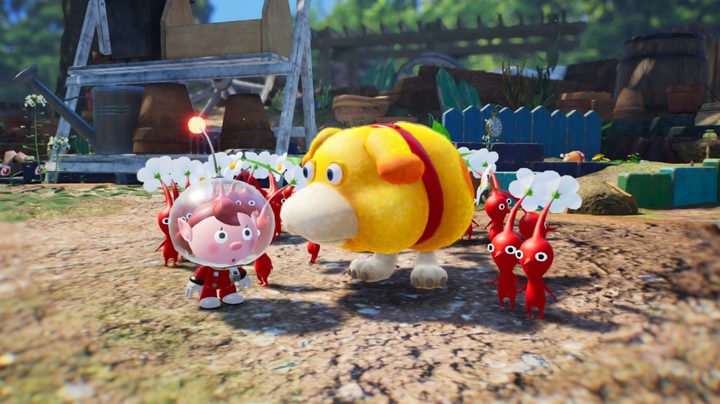
Oatchi isn’t just a cute dog companion; he’s a useful multitool that can do anything a Pikmin can. He can dig quickly, attack enemies, carry heavy objects all on his own, and much more. When it comes to multitasking, he can basically handle one entire job on his own, leaving you free to use your Pikmin elsewhere. There’s one specific trick you’ll want to use often, though. When you ride Oatchi, all of your Pikmin will climb onto his butt, keeping them all in one place. If you charge at an enemy while that’s happening, they’ll all leap onto that foe at once. That’ll burn down big bosses in no time, making it an indispensable strategy. And don’t forget to upgrade his skills to make him stronger and more effective at everything he’s able to do.
Pikmin 4 is out now on Nintendo Switch.