  1. Home
  2. Audio / Video
  3. News

Hulu content is now available inside Disney+ as a ‘beta’

Add as a preferred source on Google
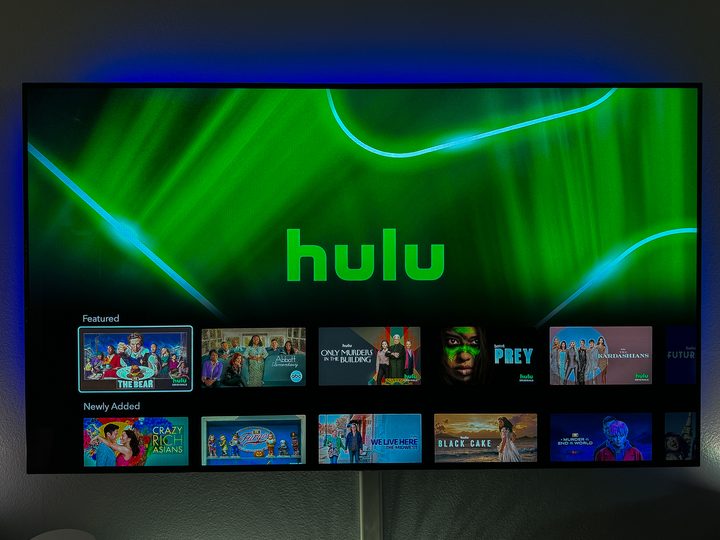
The Hulu section within Disney+.
Phil Nickinson / Digital Trends

If you’ve been waiting on pins and needles for the merger of Hulu with Disney+ (especially now that Disney effectively owns all of Hulu), well, that wait is over because you can now get Hulu shows and movies inside the Disney+ app.

And … that’s pretty much all there is to it. It’s part of the previously announced “beta” test to bring everything under one roof. (The full, official rollout is said to be coming in March.) And we say “beta” in quotes there because, unlike a traditional beta test that actually requires you to opt into the beta test, this one sort of just happened. The reason for the beta moniker, CEO Bob Iger said in November, is that it’s “giving parents time to set up profiles and parental controls that work best for their families.”

Recommended Videos

It’s all simple enough: If you also have a subscription to Hulu, you’ll now see a Hulu logo inside the Disney+ app, both on mobile and on a streaming platform. (I used an iPhone and Apple TV, for what that’s worth.) Click through, and you’ll be presented with the world of content that’s currently available on Hulu.

Hulu content is also returned as a search result from the top level of the app, which is exactly how you’d expect it to work.

One thing that didn’t convert over is any sort of “resume” playlist. If you were in the middle of a show or series on Hulu proper, it looks like you’re going to have to go to it directly in the Disney+ app to jump back into where you left off. That’s hardly a deal-breaker, though it’s worth noting.

Otherwise? Things look to work exactly as you’d expect. You’ll need to have both a Disney+ account and a Hulu account to take advantage. And if you don’t? Disney+ will happy upgrade you for a small fee.


Phil Nickinson
Former Section Editor, Audio/Video
Phil spent the 2000s making newspapers with the Pensacola (Fla.) News Journal, the 2010s with Android Central and then the…
The LG C6 OLED is great out of the box. These settings make it even better.
From Filmmaker Mode to shadow detail and AI Sound Pro, these are the settings that made the biggest difference after a month of testing the LG C6 OLED.
Electronics, Remote Control, Computer Hardware

The LG C6 OLED is one of the best mid-range OLED TVs you can buy right now. After spending the past month testing and using it every day, one thing became clear: straight out of the box, you're leaving picture quality on the table.

The good news is that getting more out of the TV doesn't require professional calibration or hours spent digging through menus. A handful of small adjustments can make movies look more cinematic, improve shadow detail, smooth out motion and even make the built-in speakers sound noticeably better. Here are the exact settings I've been using after living with the LG C6.

Read more
Samsung’s Freestyle+ AI Smart Projector turns any wall into your next movie screen
This $1,200 Samsung projector uses AI to fix your picture automatically.
samsung-Freestyle-AI-Smart-Projector

Movie night no longer needs a blank white wall or a complicated projector setup. Samsung has launched the Freestyle+ AI Smart Projector for $1,200 in the US, and its biggest trick is making almost any surface work as your screen.

Whether you're projecting onto patterned wallpaper, a colored wall, or even a space with shelves and picture frames, the projector uses AI to automatically adjust the image so you can start watching with minimal effort. The portable projector can create a Full HD picture up to 100 inches, making it an easy companion for everything from backyard movies to bedroom binge sessions.

Read more
Apple Music just got pricier
The subscription fee has climbed for student, family, and individual plans in the US, UK, and the rest of Europe.
Apple Music App

Apple just raised the subscription fee for its eponymous music streaming service. For individual plans, the price has climbed by a dollar, and so has the affordable student tier. The fee for the family plan has gone up by $3, and it now costs $19.99 in the US. The benefits associated with each plan remain unchanged.

How much do I pay now?

Read more
