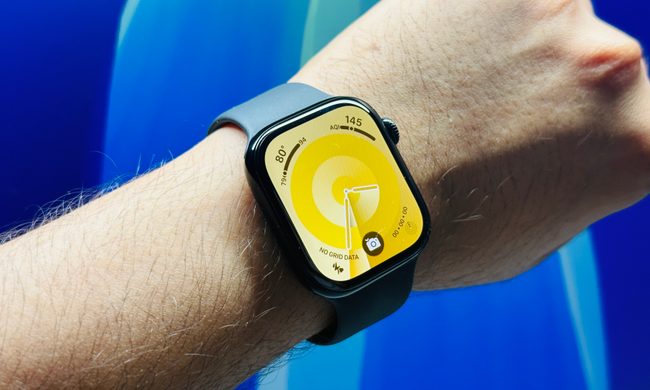
I’m just going to come out and say it: I love the Apple Watch Series 9. A couple of weeks ago, I returned to wearing it every day after an extended period of not doing so. And you know what? I was surprised by how much I’d missed it.
But one thing has bothered me this time around: There’s a feature I haven’t been using. Not because it’s bad, but because I tend to forget it’s there.
Effortless to own and wear

Everything about the Apple Watch Series 9 is so simple that it’s an absolute pleasure to own and use. My needs are fairly basic — primarily notifications, media controls, health and workout tracking, and emails. As such, the battery lasts two days if I don’t track sleep, and will just about get to the end of the second day even with an hourlong workout tracked. When I went to put the Apple Watch back on again, there was a software update to apply, which happened in the background and was entirely effortless, with no need for me to even touch the smartwatch at all.
This uncomplicated nature extends to workout tracking, too. It takes a few taps to start a workout session and a swipe and tap to end one, with all the correct information shown on the screen while I exercise. I don’t need to agree to this or that, long-press different buttons, pause before ending the workout, or learn needlessly complex procedures. It’s the same for understanding my progress toward daily goals, and the animations when I close a ring are special enough that I pay attention.


While my familiarity with watchOS — I’ve used it since the very beginning — helps the Apple Watch Series 9 feel so welcoming and easy to use, I still firmly believe it’s the simplest for newcomers to learn for one reason: It doesn’t bother you, or require tailoring to work as you’d hope. I last used the Xiaomi Watch S3, and it (like so many others) was set up out of the box for maximum battery life with various features disabled. Even when I used a Xiaomi phone, various notification and power settings had to be changed and activated by digging through menus with little guidance.
This just isn’t a thing on the Apple Watch. All its functions work as expected, without much need to immeduately customize the settings at all. Oddly, though, following the watchOS 10.4 update, the automatic handwashing timer was disabled despite my not doing so. This is a sign of the times, rather than an efficiency decision, I assume. But thanks to the logical layout of the Settings menu, it only took a moment to activate it again.
My new favorite Apple Watch band

Due to the superb software, the Apple Watch Series 9 is very easy to live with, and the same principle applies to the different bands that are available for it. Until now, I’ve been wearing a silicone Solo Loop band, which is a fantastic 24-hour-a-day band. But now I have a new favorite, and it came as a bit of a surprise.
I’ve recently written about using a case on my iPhone 15 Pro Max, a decision that was helped by Casetify’s collaboration with the K-pop group Le Sserafim. I was already familiar with the brand’s cases, but had never spent much time with its Apple Watch straps before. As part of the Le Sserafim collection, it released a special version of the Impact Band, and I’ve been wearing it for the last few weeks. I’m very happy to say it’s excellent.

The name Impact Band did put me off a bit, as it suggested it was a rough-and-tumble band, but it is not like that at all. It’s certainly hardwearing, but it’s immensely comfortable at the same time. The end of the strap tucks into the buckle like Apple’s Sport Band, keeping it neat and out of the way, and the metal pin holding it in place is solid and trustworthy. This is all great, but the material is the winner here as it has just the right amount of pliability; it doesn’t get hot and sweaty, is easily cleaned if it gets mucky, and wraps perfectly around my wrist for a great look.
If the Le Sserafim version isn’t for you, there are dozens of different designs and colors, and at about $50, it’s good value, too. I am very picky when it comes to bands for the Apple Watch, as they need to be comfortable for all-day, everyday wear, and there are quite a few out there that fail to meet this relatively basic criteria. I’m extremely pleased I can proudly wear the Casetify x Le Sserafim Apple Watch band, as it easily surpassed my expectations.
What don’t I use enough?

After all this positivity, are there any negatives about the Apple Watch Series 9? There is one, and it’s quite surprising as the feature operates really well; I just don’t use it at all. I’m talking about Double Tap, the gesture where you tap your thumb and forefinger together to activate certain functions on the Apple Watch.
Double Tap itself is a superb example of how gesture control should work. It’s simple to learn and use, metronomically reliable, and the software responds almost instantaneously to your input. The trouble is, it just doesn’t really do much. At least, it doesn’t dramatically impact my daily use anyway. That means I forget about it and occasionally remember it only after I’ve interacted with the watch using the screen or Digital Crown.

It’s a common problem with gesture controls, as we’re so used to prodding, twisting, and swiping on the screen that we forget other options that may be available. Plus, Apple hasn’t found a way to prompt us to use Double Tap, something that may help jog my memory when there’s the opportunity to use it.
However, when the only real negative I can find about the Apple Watch Series 9 is that I don’t use a well-engineered feature enough, then that should tell you all you need to know about whether the smartwatch is worth buying or not — and just how much I like it.