
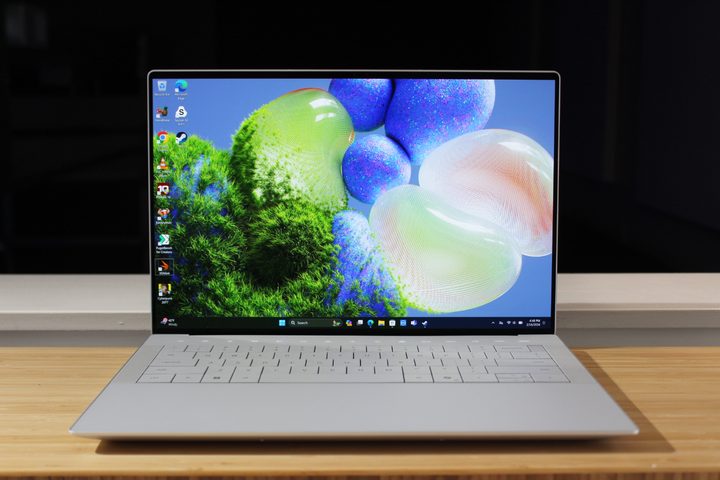
The Dell XPS 14 is an excellent 14-inch laptop with a thoroughly modern design and aesthetic, as well as some fast components. You can even configure it with an Nvidia RTX 4050.
But there’s no question that it’s been controversial. Between the invisible trackpad to the LED touch keys, there are plenty of reasons to consider a different option. Here are the five alternatives you should consider before pulling the trigger on the XPS 14.
Apple MacBook Pro 14

The MacBook Pro 14 is the XPS 14’s main competitor. Many people looking for a faster 14-inch laptop will look at these two as natural alternatives to one anotehr, and for good reason. Both laptops are incredibly well-built, both have fast components, and both offer excellent displays.
However, they’re not identical by any stretch of the imagination. The MacBook Pro 14 is much more conservatively designed, but it has a blockier, even more cohesive aesthetic that exudes solidity and elegance. On the inside, the MacBook has a more traditional keyboard and haptic touchpad, but they’re both arguably more precise and less fatiguing than the XPS 14’s. The MacBook Pro’s display is brighter and has better HDR performance, but the XPS 14’s OLED panel has wider and more accurate colors.
In terms of performance, the MacBook Pro 14 starts with the base M3 that’s slightly slower than the Core Ultra 7 155H that’s currently available in the XPS 14. And the XPS 14’s RTX 4050 is faster than the base M3’s integrated GPU. But here’s the thing: The MacBook Pro 14 can scale up to the incredibly fast M3 Max chipset with 16 CPU cores and 40 GPU cores. That iteration is significantly faster in highly demanding productivity and creative workflows. The MacBook doesn’t support as many games, but those that run natively are faster.
Finally, the MacBook Pro 14’s battery lasts much longer than the XPS 14’s — up to three times as long. Of course, all that power and efficiency come at a price. The MacBook Pro 14 costs hundreds more than the equivalent XPS 14, and thousands more at the high end.
Apple MacBook Air 15
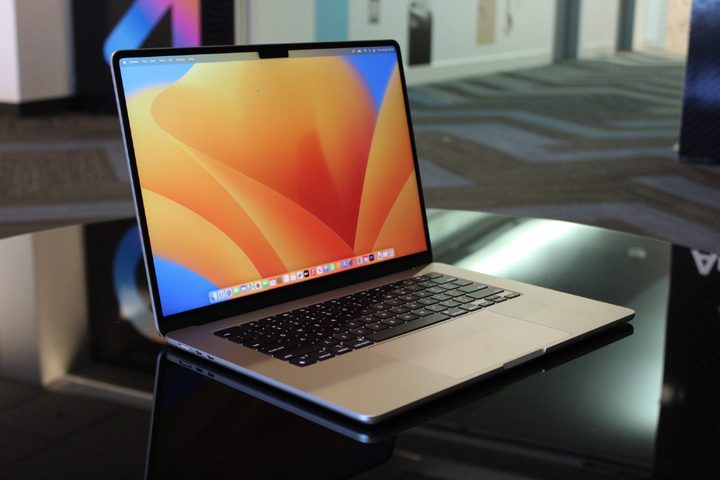
The XPS 14 is reasonably small for a 14-inch laptop, but it’s still thicker and heavier than the Apple MacBook Air 15 in spite of the latter’s larger 15.3-inch display. If you want a slightly larger display, then the MacBook Air 15 is the most portable machine around. It’s one of the thinnest laptops available today, and it’s also considerably lighter. The display isn’t quite as colorful as the XPS 14’s OLED panel, but it’s good enough for all but the most demanding creators.
Even though it’s completely fanless, the MacBook Air 15 is competitive with the XPS 14 for anyone who primarily runs productivity apps and performs less demanding video and photo editing. It runs the base M3 that’s slightly slower in CPU-intensive tasks and games, but it’s competitive in apps that take advantage of the chipset’s encoding and decoding optimizations.
As with the MacBook Pro 14, the build quality is also excellent and it has a more minimalist and elegant design. The keyboard and haptic touchpad are also a bit better than the XPS 14’s, and the audio quality is a cut above.
Unlike with the MacBook Pro 14, the MacBook Air 15 is also slightly less expensive than the XPS 14. It can’t be configured with as much RAM or storage, but for most users, the highest-end model is more than sufficient.
Lenovo Yoga 9i Gen 9
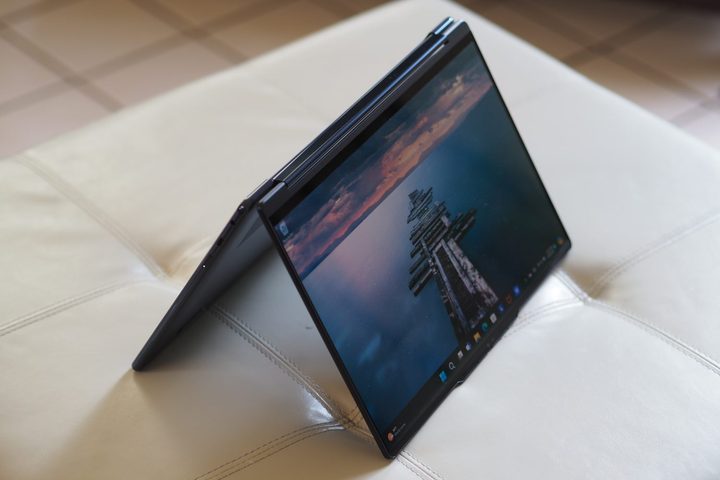
A convertible 2-in-1 offers a lot of flexibility with its clamshell, tent, media, and tablet modes, while touch displays and active pens add another dimension to interacting with a laptop. Among the best modern examples is the Lenovo Yoga 9i Gen 9, which is one of the best to cross our doors in 2024.
The Yoga 9i Gen 9 is, unsurprisingly given its place on this list, a very well-built laptop that’s equally as rigid as the XPS 14 while being a lot thinner and lighter. That’s in spite of using a 2-in-1 hinge that houses Lenovo’s Soundbar with two tweeters that combine with two side-firing woofers for excellent audio quality. The Yoga’s chassis edges are rounded for extra comfort and a modern look, and the 2-in-1s aesthetics are drop-dead gorgeous.
The Yoga utilizes the same Core Ultra 7 CPU as the XPS 14, but is limited to Intel Arc graphics. That means that it’s not as fast in games and creative apps, but it’s equally fast for productivity uses. The excellent OLED display, Dolby Vision HDR, and sound quality, combined with the media mode, make for an awesome media consumption experience.
To top it all off, the Yoga 9i Gen 9 is considerably less expensive than the XPS 14. It’s a great choice for anyone who feels limited by a clamshell-only form factor.
HP Spectre x360 14

The Yoga isn’t the only excellent convertible 2-in-1 to pit against the XPS 14. The HP Spectre x360 14 is another — in fact, the Spectre is one of the best 14-inch laptops, period. It all starts with the 2-in-1 format, which HP has honed over several generations. It’s not quite as thin or light as the Yoga, but it’s more so than the XPS 14, and the Spectre’s rounded chassis edges and notched corners housing a USB-C and audio jack are comfortable and functional.
The Spectre x360 14’s build quality is exceptional, as is its aesthetic, which is both elegant and modern. As a 2-in-1, it handles four modes extremely well, and HP’s active pen provides for smooth and accurate digital writing and drawing.
While the Spectre also doesn’t offer a discrete GPU, it’s very fast for productivity use and offers better battery life. The OLED display delivers superior colors and its HDR performance is excellent.
HP often puts the Spectre on sale for close to $1,000, and at that price, it’s a steal. Even when fully configured, it’s considerably less costly than the XPS 14.
Asus Zenbook 14 Q425

There are many good reasons for the Asus Zenbook 14 Q425 to be on this list. To begin with, it’s as well-built as any laptop here, with a solid all-aluminum chassis and lid that resists bending, flexing, and twisting. That’s an Asus trademark and it holds true with this laptop.
It also uses an OLED display, which Asus has been instrumental in pushing down into midrange and near-budget machines. This version is a lower FHD+ resolution, but it has the usual bright colors and inky blacks and helps the Zenbook 14 Q425 reach the best battery life on this list outside of the two MacBooks.
And the Zenbook is plenty fast with its Core Ultra 7 155H. It’s excellent for productivity use and media consumption while not being the best for creators due to a lack of a discrete GPU option.
However, where the Zenbook 14 Q425 stands out is in its price. It lists for $1,050 in its most powerful configuration with 16GB of RAM and a 1TB SSD, but it can be found for $800 and less. That makes it by far the most affordable option here.



